MediaPortal SVN-Snapshot:-11-06-2009 19-18h - Revision:24047.rar (1 Viewer)

Status
Not open for further replies.

romuz

Retired Team Member
  • Premium Supporter
  • July 26, 2008
    1,045
    250
    Moskau
    Home Country
    Russian Federation Russian Federation
    Hi guys,

    dont know if this bug is new to this SVN but if i do a skip for x seconds in an mpeg2 og ts movie the info shown on the OSD is the channel name from previously viewed tv channel. If i hit the info button on the mce remote it correctly shows what im watching.

    regards

    Jacob

    Hi,

    What skin are you using? The OSD is part of the skin, so this information is essential.

    Mark

    i can confim it too using b3w skin
    if i play video file after viewing tv and do a skip for some seconds last viewed channel name in osd shows

    PS bug: time skipping not shows in osd is related to http://mantis.team-mediaportal.com/view.php?id=1792 or its something new?
     

    mironicus

    Portal Pro
    March 9, 2008
    688
    44
    Yes I can confirm. In the Video OSD the last channel name is displayed if you just skip through the video.

    It only happens with B3Wide-Skin.
     

    zeebee

    MP Donator
  • Premium Supporter
  • August 10, 2007
    433
    16
    I just tried the MP Beta with latest SVN today. Is it normal that you have to keep the TV Group "Digital Cable"? It cannot be deleted or removed from MP like "All Channels". I dont want this group visible in MP, also it makes the EPG-funtion for "All grouped channels" useless since all my channels are in "All Channels" and "Digital Cable" and so all channels are marked for epg grabbing.

    Otherwise it runs fine, no problems so far.
     

    christix

    MP Donator
  • Premium Supporter
  • February 27, 2008
    94
    12
    67
    Skepplanda
    Home Country
    Sweden Sweden
    powerscheduler

    Hi! I have noticed that saving the powerscheduler plugin, from MP 1.1 beta, and put them in a safe place and then replace
    the PS Plugin from svn, with the saved ones are solving the powerscheduleproblem dont no why, but it works :D:D
     

    skeal

    Portal Pro
    October 21, 2007
    140
    5
    Near Munich
    Home Country
    Germany Germany
    I just tried the MP Beta with latest SVN today. Is it normal that you have to keep the TV Group "Digital Cable"? It cannot be deleted or removed from MP like "All Channels". I dont want this group visible in MP, also it makes the EPG-funtion for "All grouped channels" useless since all my channels are in "All Channels" and "Digital Cable" and so all channels are marked for epg grabbing.

    Otherwise it runs fine, no problems so far.

    same with satellite group
    go to main channel tab and click on remove group. there you can remove it

    i also can't delete it with right-click on the group tab
     

    Lowietje

    MP Donator
  • Premium Supporter
  • April 21, 2008
    48
    6
    Aalsmeer
    Home Country
    Netherlands Netherlands
    problems with first time tuning on pay channel

    Hi Devs,

    Every now and then i get a message: you are not entitled to watch this channel.
    If it happens its always the first time i tune to a pay channel after the server is woken up from a sleep state.

    I'm currently not sure but it looks like the sleep period has to be over 2 hours to get this message. Perhaps some condensators on the firewire card are loosing their current after this time.

    I have logging of the server and of the client attached.
    The logging is not completely clean, as it is hard to predict when this is going to happen, but the error occured on 7 november around 16:36

    I guess a reinit of the card and the cam are necessary to avoid this problem. Or a initial tune to a paychannel after returning from a sleep state (but that would just be a ugly way to do it :D:D)

    hope anyone can look into this problem

    :D:D

    Louis
     

    VASkO

    Portal Member
    September 18, 2008
    48
    2
    Home Country
    Slovenia Slovenia
    on the computer, I administer for my parents, the MCE remote doesn't control MP anymore on this SVN. mappings remained the same, logs show events for the remote being captured, but nothing happens in MP frontend. On my setup with ATI remote wonder (X10) remote control works OK.
     

    Juppe

    Portal Pro
    November 17, 2006
    315
    45
    Home Country
    Sweden Sweden
    Cant change tv-channel on client.

    I have done one test with this SVN and my problem is still there.
    The problem is that I cant change channel on a client. If I look at the stream with VLC I can see the channel change, but in mediaportal all I see is the last picture from the previus channel.

    What I can see there is no issues left in tv-server, does that mean that I'm the only one with this issue.
    If everything is working with this SVN for all others, then I got to have some other problem here, in that case can someone take a look at my logs and help me, I think I have tried everything. I've tried all SVN since beta-release and have the same problem with all.

    This last test is done on a complete fresh install on both server and client.
    I also have MP on the server and there it works to change channel. I'm starting to think that its something with my network, but cant figure out what, all I got between server and client is a switch and a router, and they are in the same ip-range.
    Anyone got any ideas what I can test more to get it to work?

    Hope I can get some response from someone.

    The attached logs are from the server and client when I try do change channel.

    Let me know if I can do some more test to help to solve this issue.

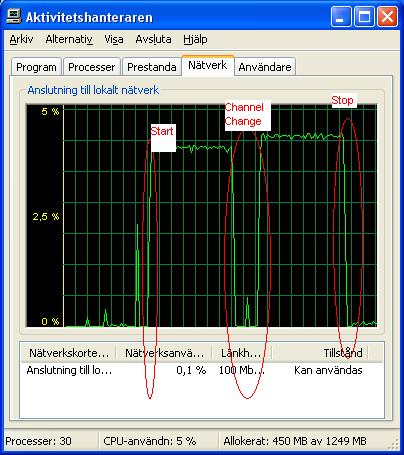
    EDIT. I've done some more tests and it looks like the stream is still coming to the client after the channel change, but mediaportal just dont show it. Thats what the picture is showing. The first mark on the picture is when I start tv and all is good, then there is the channel change and thats when the picture disappears from the client, but the stream continue to stream and the last is when I turn off the tv.

    /Juppe
     

    Attachments

    • network monitor.JPG
      network monitor.JPG
      48.2 KB
    • Server.zip
      30.6 KB
    • Klient.zip
      30.6 KB

    VASkO

    Portal Member
    September 18, 2008
    48
    2
    Home Country
    Slovenia Slovenia
    ooops. in my previous post I mentioned, the MCE remote doesn't work. It works, but the mapping is strange, the keys we were probing are up,down, left, right and ok (default movement when you start up MP) and those keys are not mapped. In the mapping XML file, they are commented out and it's mentioned, they are disabled this way, cause the OS is handling them. Well on Win7 this way you won't get any action with these keys in MP. I uncommented them and mapped them to proper actions in MP config. All working now.
     
    Status
    Not open for further replies.

    Users who are viewing this thread

    Top Bottom