
mkv files out of sync (1 Viewer)

insan3

Portal Member
May 25, 2009
47
1
TV-Server Version:
MediaPortal Version: 1.0.2.0
MediaPortal Skin: wideblue
Windows Version: Vista HP
CPU Type: AMD phenom X3 2.1Ghz
HDD: Spinpoint F1 1TB
Memory: 2GB ddr800 dual channel
Motherboard: MSI K9A2GM-FIH
Video Card: ATI 780G
Video Card Driver: Catalyst 9.5
Sound Card: ATI HDMI output
Sound Card AC3:
Sound Card Driver: ATI Catalyst 9.5
1. TV Card:
1. TV Card Type:
1. TV Card Driver:
2. TV Card:
2. TV Card Type:
2. TV Card Driver:
3. TV Card:
3. TV Card Type:
3. TV Card Driver:
4. TV Card:
4. TV Card Type:
4. TV Card Driver:
MPEG2 Video Codec: ffdshow
MPEG2 Audio Codec: ffdshow
h.264 Video Codec: coreAVC and ffdshow
Satelite/CableTV Provider:
HTPC Case:
Cooling: Enough
Power Supply: Corsair HX520
Remote: MCE remote
TV: Toshiba 40zf355
TV - HTPC Connection: HDMI

First i didn't had this problem but suddenly mkv video is out of sync in mediaportal, in windows media player its ok. I have tried a lot of things. (used ffdshow, coreAVC Powerdvd 7, and for the audio codec also ffdshow, ati audio codec, powerdvd)

sometimes it is sync but when you fast forward trough a movie it looses it sync, a few milliseconds but sometimes really more then a second.
I have updated all codec's, ati drivers, but it didn't help

I heard that is could be caused by the subtitle engine, is that possible?
 

JSorrentino

Portal Pro
September 30, 2008
90
4
Home Country
United States of America United States of America
I've had this problem now for about a month with no help or resolution.

For instance - watched Mall Cop (terribad movie btw) and the audio and video were fine at the start, then later got out of sync. No idea why, I've done full reinstalls of the system, removed and reinstalled SAF, etc. I never had this problem in the past (pre-MP1.02 - but cannt directly find a relation to 1.02 being the problem). I would assume there is a codec problem of some kind, I just cannot pinpoint it.

I used FFDSHOW before too in the past with no issues, and really would prefer the SAF method (cleaner).

Processor is not an issue (FX60, 4gb ram, 8800GTX nVidia card with 512MB).

I am hoping this is not an issue with encoding on the movies causing the sync issues, because that means something has changed recently to screw this up; as I said, never had the issues with certain movies before.

Oh yes, this is MKV files for me. ISO/Daemon Tools mounted work just fine.
 

opeters

Portal Member
July 29, 2008
34
1
Home Country
Netherlands Netherlands
Can you both try Reclock from slysoft (set it as preferred renderer). This solved my similar issues.
 

shackrock

Portal Pro
December 27, 2008
291
12
Raleigh, NC
Home Country
United States of America United States of America
I've also had this problem for months with no fix yet. The problem seems to come and go, and I THINK it only occurrs with DTS audio... although I could be wrong, I will check on this.
 

JSorrentino

Portal Pro
September 30, 2008
90
4
Home Country
United States of America United States of America
I just upgraded to the new SAF beta with the updated CLVsd.ax from the updated PDVD9 patch download. I am not at home, so when I get home I can do some testing and see if this fixes any of these issues.

But, in some cases (as mentioned) this problem can be intermittent.

Will post when I can do some testing.

JS
 

shackrock

Portal Pro
December 27, 2008
291
12
Raleigh, NC
Home Country
United States of America United States of America
Thanks JS.

I've not yet tried the latest SAF beta, I am using the latest posted version from a few weeks ago.

Now though, instead of DTS sync issues, it's the "quick sped up video segments" issue with DTS streams...
 

opeters

Portal Member
July 29, 2008
34
1
Home Country
Netherlands Netherlands
Well if you want to use SPDIF you need to mark the option that allows passtrough in Reclock. It is called: "accept SPDIF formats".
Don't forget to add "Mediaportal.exe" in advanced options and set it to "Load Always"

However I must say that in combination with SAF the DTS sound was not comming trough ok. The signal to the receiver was on/off/on/off. It should work however if you don't use SAF and use other Audio codecs. Currently I have set the MPC-HC codec to use 5.1 analogue, this works fine. Since I have Dolby Digital Life I still get SPDIF 5.1 channels output, or I use the Multichannel input of my reciever. Anyway the Video/Audio is smooth this way.

Hope this information helps.
 

kiwijunglist

Super Moderator
  • Team MediaPortal
  • June 10, 2008
    6,743
    1,754
    New Zealand
    Home Country
    New Zealand New Zealand
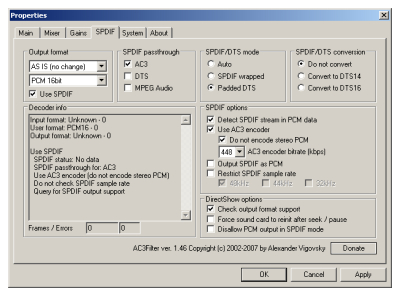
    try ac3filter

    there is an option called resynch or synch-something (i cant remember exactly)
    its off by default, to set it on it gives you a warning
    set ac3filter to prefer other codec in ac3filter configuration
    then use it as a post processing filter
    you have to log in and log out for the prefer other codec setting to work

    EDIT:

    ac3filter_install_config_05.jpg


    it's called "force sound card to reinit after seek/pause"
     

    JSorrentino

    Portal Pro
    September 30, 2008
    90
    4
    Home Country
    United States of America United States of America
    Styex and Tourettes are in a dev thread about issues they found with 24p videos. Just wondering if this applies to your issues.

    I put a new system board and processor in my mp pc and still have issues with video/audio sync. It's just random.

    I've tried reclock in the past to no avail.

    I'm waiting on the test DLL they will have out in the near future to see if this corrects the ongoing problems.
     

    Users who are viewing this thread

    Top Bottom