New Zealand
TV-Server Version: Latest Public SVN
MediaPortal Version: Latest Public SVN
MediaPortal Skin: Blue Two Wide
Windows Version: Vista Ultimate SP1
CPU Type: Core2Duo E8400 Ghz
HDD: Seagate SATA 320gb
Memory: 4GB DDR2-800
Motherboard: Intel DP35Dp
Video Card: NVDIA 8600GT
Video Card Driver: Newish From Nvidia
Sound Card: Intel Onboard IDT (Optical)
Sound Card AC3: Intel Onboard IDT (Optical)
Sound Card Driver: Latest From Intel
1. TV Card: Technisat SkyStar 2 Rev 2.6
1. TV Card Type: DVB-S
1. TV Card Driver: 4.4.1.0 BDA
2. TV Card: Technotrend Budget S1500 + CI Interface
2. TV Card Type: DVB-S (in PESUDO DVB-T Mode)
2. TV Card Driver: 4.4.10.12 BDA
3. TV Card: Hauppauge PVR-150
3. TV Card Type: Analog Hardware MPEG2
3. TV Card Driver: 6.0.6000.16408
4. TV Card: Hauppauge HVR-2200
4. TV Card Type: DVB-T/Analog
4. TV Card Driver: 7.2.9.26105
MPEG2 Video Codec: MPV
MPEG2 Audio Codec: MPA
h.264 Video Codec: Cyberlink PDVD8 Ultra
Satelite/CableTV Provider: FTA + Irdeto Provider
HTPC Case:
Cooling:
Power Supply:
Remote: MCE Remote + Keyboard
TV: 19" LCD
TV - HTPC Connection: DVI
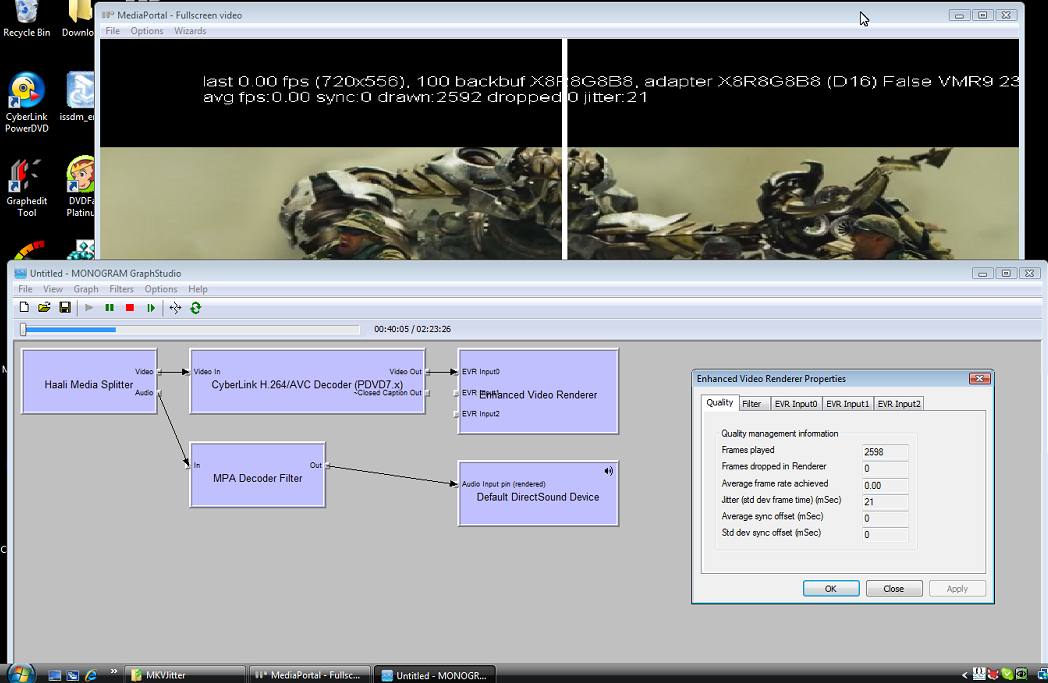
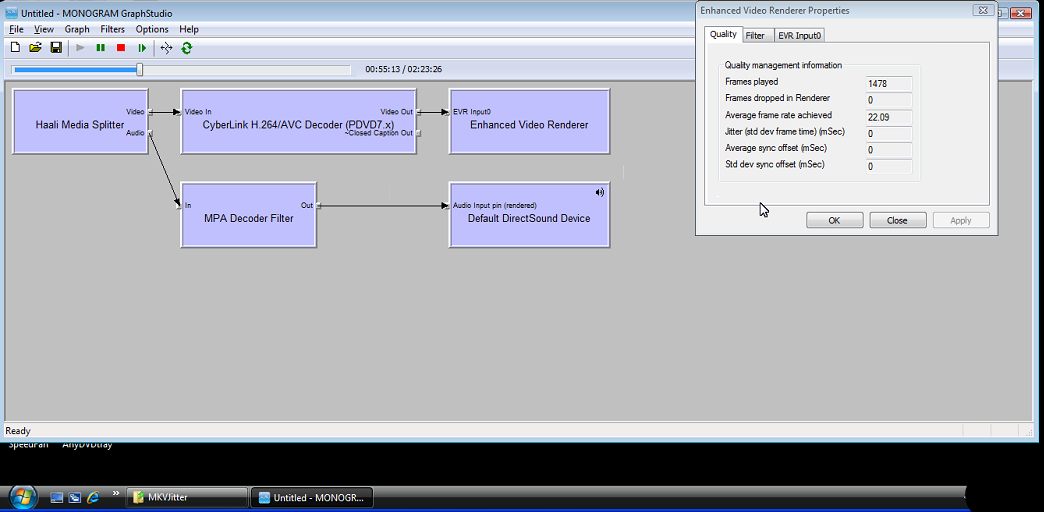
Jitter problem playing MKV h.264 files, Makes the picture look jumpy in slow pans. Only happens in MediaPortal.
See the attached screen shots.
1. MediaPortal with graphedit connected to remote graph. (Shows jitter)
2. Graphedit only; graph manually created. (No jitter)
Logs also attached (From play to stop)
Any help would be much appreciated
MediaPortal Version: Latest Public SVN
MediaPortal Skin: Blue Two Wide
Windows Version: Vista Ultimate SP1
CPU Type: Core2Duo E8400 Ghz
HDD: Seagate SATA 320gb
Memory: 4GB DDR2-800
Motherboard: Intel DP35Dp
Video Card: NVDIA 8600GT
Video Card Driver: Newish From Nvidia
Sound Card: Intel Onboard IDT (Optical)
Sound Card AC3: Intel Onboard IDT (Optical)
Sound Card Driver: Latest From Intel
1. TV Card: Technisat SkyStar 2 Rev 2.6
1. TV Card Type: DVB-S
1. TV Card Driver: 4.4.1.0 BDA
2. TV Card: Technotrend Budget S1500 + CI Interface
2. TV Card Type: DVB-S (in PESUDO DVB-T Mode)
2. TV Card Driver: 4.4.10.12 BDA
3. TV Card: Hauppauge PVR-150
3. TV Card Type: Analog Hardware MPEG2
3. TV Card Driver: 6.0.6000.16408
4. TV Card: Hauppauge HVR-2200
4. TV Card Type: DVB-T/Analog
4. TV Card Driver: 7.2.9.26105
MPEG2 Video Codec: MPV
MPEG2 Audio Codec: MPA
h.264 Video Codec: Cyberlink PDVD8 Ultra
Satelite/CableTV Provider: FTA + Irdeto Provider
HTPC Case:
Cooling:
Power Supply:
Remote: MCE Remote + Keyboard
TV: 19" LCD
TV - HTPC Connection: DVI
Jitter problem playing MKV h.264 files, Makes the picture look jumpy in slow pans. Only happens in MediaPortal.
See the attached screen shots.
1. MediaPortal with graphedit connected to remote graph. (Shows jitter)
2. Graphedit only; graph manually created. (No jitter)
Logs also attached (From play to stop)
Any help would be much appreciated