MP config error (1 Viewer)

akajammer

New Member
July 29, 2012
3
1
Home Country
United States of America United States of America
Hello to the forum.
I am going to apologize in advance for the length, but hope to err on the side of detail.

I switched to MP after doing some research on my AIW card & ATI's MediaMedia Center general poor software.
MP was highly recommended.

I do admit that while I did read the 'preparing your system' - I initially opted not to fully update my system via windows update. (just never found the need for my personal use habits)

Here is the timeline.
pre MP 1.2.3 install:
- AMD 2.4ghz w/ 1gb ram.
- winXP pro sp3.
- complete uninstallation of ATI programs and drivers.
- reinstalled most current video driver/programs from ATI/AMD.
- net frameworks up to 3.5sp1
- device manager had no problems,(however event viewer has a couple of err entries for .net runtime 2.0)
Restated.

MP123 installed with no issues - along with all the prompted secondary programs MP requires.
Restarted.

When MP was opened, it prompted to configure, I selected 'basic' mode - it erred at the 'adding filters section'.
Tried advanced mode - same error.

Googled the error and found a thread on this forum that used filmerit to scan filters.
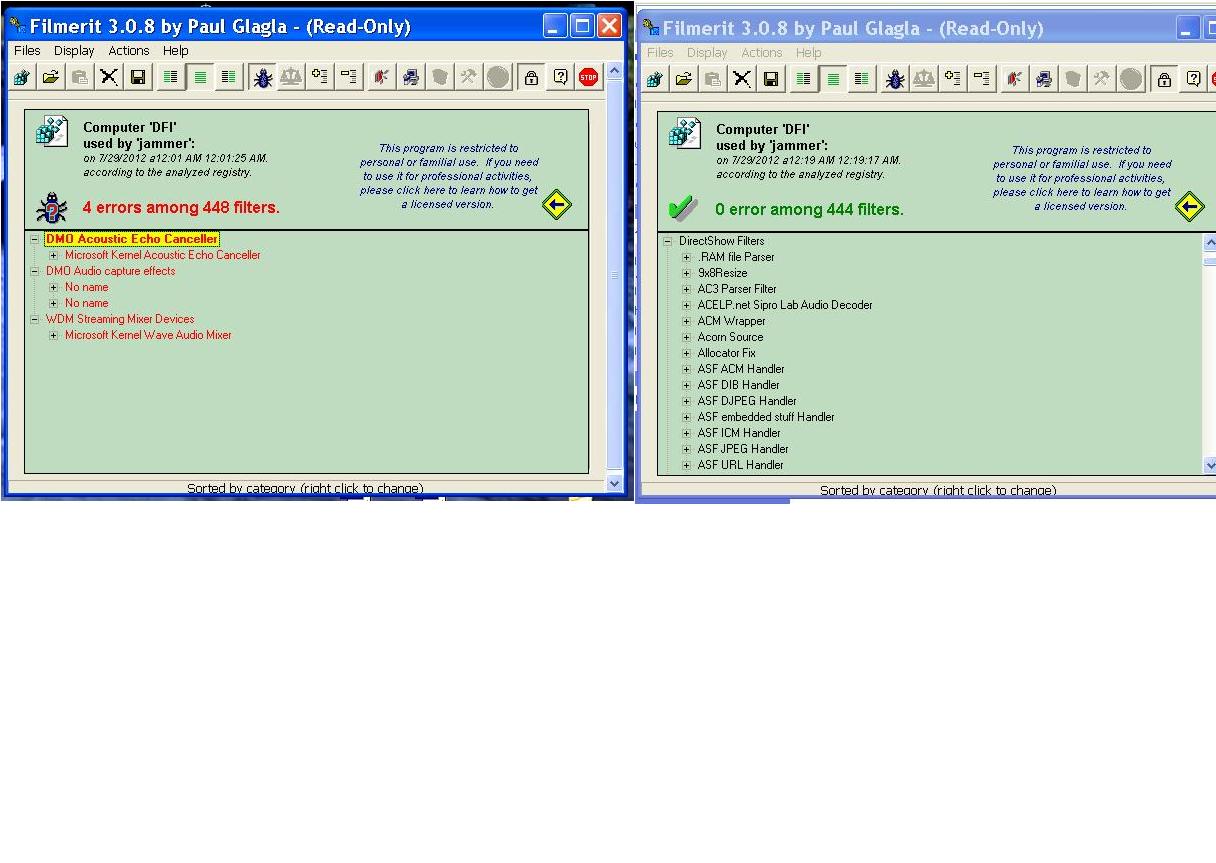
I repaired 4 filter errors.

Started MP - same error.

More google and redirected here. Tried to use debug mode and create logs using option 3 - no dice.
Watchdog err. SYSTEM.IO.FILENOTFOUND.EXCEPTION > MEDIAPORTAL.XML(paraphrasing here)

Applied updates via Windows Update with 21 .net framework related updates.
Restarted - same error at MP config.

Complete updated my system via Windows Update - 111updates.
I am not sure if the BDA/DVB hotfix was installed at this point or before MP install(as WinUpdate does not list it by name).

This is where I am at. No change in error's and no additional problems have surfaced.
Any advice?
Was it a fatal error by not updating XP prior?

jammer
 

mm1352000

Retired Team Member
  • Premium Supporter
  • September 1, 2008
    21,544
    8,236
    Home Country
    New Zealand New Zealand
    Hi and welcome jammer :)

    Well done for figuring out how to create the logs! (y)
    Usually the MediaPortal.xml file is created after you first successfully open and save MP configuration. In your case that seems to be impossible because of the codec issue.

    So from your log files I can see something is definitely not right on your system in regards to the registered codecs. Even dxdiag (which is a DirectX diagnostic program) is refusing to tell us which codecs you have installed. I'm guessing one or more codec references in your registry can't be resolved to files in the file system, but this theory is difficult to prove with the information available.

    Can you try running dxdiag manually and see if it has any useful information?
    To do that:
    1. Click start -> run.
    2. Type dxdiag and press enter (or click OK).

    Hopefully it will launch correctly. Assuming it does, have a nosy round on each tab and see if there is anything obvious that stands out as a problem.

    Do you remember the files/codecs involved in the problems found by filmerit?
    Have you restarted the PC since doing the filmerit scan (this would be recommended)?

    mm
    PS: regarding the BDA/DVB hotfix... that usually needs to be installed manually as I don't think it is installed by Windows update.
     

    akajammer

    New Member
    July 29, 2012
    3
    1
    Home Country
    United States of America United States of America
    After opening dxdiag, the green process bar gets to 80% and displays a pop-up:
    "DxDiag has detected that there may have been a problem accessing Directshow the last time this program was used. Would you like to bypass DirectShow this time? [yes] [no]"

    I select [no], the process continues for a minute more, then another pop-up:
    "Data Execution Prevention. To help protect your computer, Windows has closed this program. Name: MS Dx Diag Tool. [change settings] [close message]."

    I select [change settings].
    Two options present,
    The 2nd option: "Turn on DEP for all programs and services except those I select" is selected.
    Two items are unchecked.....MS DX Diag Tool & Windows Explorer.

    No changes were made, I selected [cancel], then a pop-up appears that MS DX Diag Tool encountered a problem, etc, etc.
    Three options present [debug] [send report] [do not send report].
    I select [debug], DX Diag closes. Not sure where the debug file went?

    I did run dxdiag again, but this time left the first pop-up and moved it to the side and was able to navigate around in the program.
    I can not find anything obvious, or anything regarding directshow.
    There was an option to [save all information], I selected this option but the 'collecting information' pop-up get to about 35%, stating its collecting directshow information and does not seem to process any further(pop-up periodically flickers like its trying to compile the information). I let it process for about an hour before I closed it out.

    filmerit screen shot attached.
    Yes, I always restart anytime a change is made.

    thank you for the super fast reply!

    jammer
     

    Attachments

    • filmerit error & after repair 2012.07.27.JPG
      filmerit error & after repair 2012.07.27.JPG
      124 KB

    mm1352000

    Retired Team Member
  • Premium Supporter
  • September 1, 2008
    21,544
    8,236
    Home Country
    New Zealand New Zealand
    Hello again

    After opening dxdiag, the green process bar gets to 80% and displays a pop-up:
    "DxDiag has detected that there may have been a problem accessing Directshow the last time this program was used. Would you like to bypass DirectShow this time? [yes] [no]"
    Doesn't sound good. The filter error in MP configuration is almost certainly related to this (DirectShow being the Microsoft codec/filter framework that MP uses). If DirectShow is not working properly then MP can't work properly.

    I select [debug], DX Diag closes. Not sure where the debug file went?
    Debugging requires a debugger to be installed. Don't worry about that - it is likely a waste of time.

    I did run dxdiag again, but this time left the first pop-up and moved it to the side and was able to navigate around in the program.
    I can not find anything obvious, or anything regarding directshow.
    There was an option to [save all information], I selected this option but the 'collecting information' pop-up get to about 35%, stating its collecting directshow information and does not seem to process any further(pop-up periodically flickers like its trying to compile the information). I let it process for about an hour before I closed it out.
    The logs that you posted previously included that information.

    filmerit screen shot attached.
    It is concerning that the Microsoft Kernel Wave Audio Mixer is mentioned there.
    Does sound work in any other application?

    Fixing this may require an OS reinstall. However in your position I would try at least two things before resorting to that:
    1. Check/install/upgrade/reinstall your audio device (onboard NVidia chipset audio???) drivers.
    2. Reinstall DirectX 9c (link).

    mm
     

    Users who are viewing this thread

    Top Bottom