
You are using an out of date browser. It may not display this or other websites correctly.
You should upgrade or use an alternative browser.
You should upgrade or use an alternative browser.
MP Crashes after Sleep (2 Viewers)
- Thread starter sherbs
- Start date
- September 1, 2008
- 21,544
- 8,236
- Home Country
-
 New Zealand
I don't want to say that you are wrong, but according to the logs your DVB-IP tuner is *definitely* trying to grab EPG. From this morning:
[COLLAPSE]2012-06-12 09:33:44.887479 [(17)]: card: Tune 1 to 8 - FOX Crime
2012-06-12 09:33:44.889479 [(17)]: card: user: epg:1:-1 tune DVBIP:tv: 8 - FOX Crime Freq:0 ONID:0 TSID:1 SID:1 PMT:0x21 FTA:True LCN:10000 Url:udp://10.230.154.24@232.4.2.19:5002
2012-06-12 09:33:44.921481 [(17)]: dvbip: Tune VBIP:tv: 8 - FOX Crime Freq:0 ONID:0 TSID:1 SID:1 PMT:0x21 FTA:True LCN:10000 Url:udp://10.230.154.24@232.4.2.19:5002
2012-06-12 09:33:44.926481 [(17)]: dvbip: tune: Assigning oldChannel
2012-06-12 09:33:44.933482 [(17)]: dvbip: tune: Current channel is null
2012-06-12 09:33:44.935482 [(17)]: dvbip: tune: Graph is running
2012-06-12 09:33:44.937482 [(17)]: dvbubmiting tunerequest Channel:8 - FOX Crime subChannel:-1
2012-06-12 09:33:44.939482 [(17)]: dvb:Getting new subchannel
2012-06-12 09:33:44.940482 [(17)]: dvb:GetNewSubChannel:0 #0
2012-06-12 09:33:44.949483 [(17)]: TvDvbChannel ctor new subchIndex:0
2012-06-12 09:33:44.952483 [(17)]: dvbubmit tunerequest size:1 new:0
2012-06-12 09:33:44.954483 [(17)]: subch:0 OnBeforeTune
2012-06-12 09:33:44.958483 [(17)]: dvbubmit tunerequest calling put_TuneRequest
2012-06-12 09:33:44.960483 [(17)]: subch:0 OnAfterTune
2012-06-12 09:33:44.962484 [(17)]: dvbip: tune: Running graph for channel TvLibrary.Implementations.DVB.TvDvbChannel
2012-06-12 09:33:44.965484 [(17)]: dvbip: tune: SubChannel 0
2012-06-12 09:33:44.968484 [(17)]: subch:0 OnGraphStart
2012-06-12 09:33:44.973484 [(17)]: dvbip:Add MediaPortal IPTV Source Filter
2012-06-12 09:33:44.979485 [(17)]: dvb: Render [source]->[inftee]
2012-06-12 09:33:45.009486 [(17)]: dvb: RunGraph
2012-06-12 09:33:45.016487 [(17)]: subch:0 OnGraphStarted
2012-06-12 09:33:45.017487 [(17)]: subch:0 SetupPmtGrabberid 21 sid:1
2012-06-12 09:33:45.025487 [(17)]: subch:0 set pmt grabber pmt:21 sid:1
2012-06-12 09:33:45.027487 [(17)]: WaitForPMT: Waiting for PMT 21
2012-06-12 09:33:45.117492 [(3)]: subch:0 OnPMTReceived() pmt:21 ran:True dynamic:False
2012-06-12 09:33:45.121493 [(17)]: WaitForPMT: Found PMT after 0,0930053 seconds.
2012-06-12 09:33:45.122493 [(17)]: subch:0 SendPmt:1 1 FFFFFFFF 1
2012-06-12 09:33:45.124493 [(17)]: Decode pmt
2012-06-12 09:33:45.127493 [(17)]: Set descriptor data with length 10
2012-06-12 09:33:45.129493 [(17)]: Set descriptor data with length 6
2012-06-12 09:33:45.130493 [(17)]: subch:0 SendPMT: Channel is FTA, nothing to do.
2012-06-12 09:33:45.132493 [(17)]: subch:0 SetMpegPidMapping
2012-06-12 09:33:45.134493 [(17)]: subch:0 pid:98 pcr
2012-06-12 09:33:45.135493 [(17)]: subch:0 pid:21 pmt
2012-06-12 09:33:45.137494 [(17)]: subch:0 pid:9B subtitle type:6
2012-06-12 09:33:45.138494 [(17)]: subch:0 map pid:9B subtitle type:6
2012-06-12 09:33:45.140494 [(17)]: subch:0 pid:99 audio lang:eng type:MPEG-2
2012-06-12 09:33:45.142494 [(17)]: subch:0 map pid:99 audio lang:eng type:MPEG-2
2012-06-12 09:33:45.145494 [(17)]: subch:0 pid:98 video type:H.264
2012-06-12 09:33:45.147494 [(17)]: subch:0 map pid:98 video type:H.264
2012-06-12 09:33:45.150494 [(17)]: subch:0 stop tif
2012-06-12 09:33:45.152494 [(17)]: WaitForPmt: PMT handling took 0,0300017 seconds.
2012-06-12 09:33:45.153494 [(17)]: dvbip: tune: Graph running. Returning TvLibrary.Implementations.DVB.TvDvbChannel
2012-06-12 09:33:45.155495 [(17)]: card: Tuner locked: False
2012-06-12 09:33:45.158495 [(17)]: **************************************************
2012-06-12 09:33:45.159495 [(17)]: ***** SIGNAL LEVEL: 100, SIGNAL QUALITY: 100 *****
2012-06-12 09:33:45.161495 [(17)]: **************************************************
2012-06-12 09:33:45.163495 [(17)]: card: tuned user: epg subchannel: 0
2012-06-12 09:33:45.165495 [(17)]: user:epg add
2012-06-12 09:33:45.168495 [DVB EPG timer(19)]: Controller: GrabEpg on card ID == 1
2012-06-12 09:33:45.175496 [DVB EPG timer(19)]: dvb:grab epg...[/COLLAPSE]
If you don't need it to do that then please double check that the idle EPG grabber is disabled in the DVB EPG section of TV Server configuration, and/or that EPG grabbing is disabled for the DVB-IP tuner(s) in the tuner list. That should solve the problem of not going to sleep at least, and I suggest that you check for a couple of days to see whether it also solves the problem with resuming from standby.
mm
[COLLAPSE]2012-06-12 09:33:44.887479 [(17)]: card: Tune 1 to 8 - FOX Crime
2012-06-12 09:33:44.889479 [(17)]: card: user: epg:1:-1 tune DVBIP:tv: 8 - FOX Crime Freq:0 ONID:0 TSID:1 SID:1 PMT:0x21 FTA:True LCN:10000 Url:udp://10.230.154.24@232.4.2.19:5002
2012-06-12 09:33:44.921481 [(17)]: dvbip: Tune
VBIP:tv: 8 - FOX Crime Freq:0 ONID:0 TSID:1 SID:1 PMT:0x21 FTA:True LCN:10000 Url:udp://10.230.154.24@232.4.2.19:5002 2012-06-12 09:33:44.926481 [(17)]: dvbip: tune: Assigning oldChannel
2012-06-12 09:33:44.933482 [(17)]: dvbip: tune: Current channel is null
2012-06-12 09:33:44.935482 [(17)]: dvbip: tune: Graph is running
2012-06-12 09:33:44.937482 [(17)]: dvb
ubmiting tunerequest Channel:8 - FOX Crime subChannel:-1 2012-06-12 09:33:44.939482 [(17)]: dvb:Getting new subchannel
2012-06-12 09:33:44.940482 [(17)]: dvb:GetNewSubChannel:0 #0
2012-06-12 09:33:44.949483 [(17)]: TvDvbChannel ctor new subchIndex:0
2012-06-12 09:33:44.952483 [(17)]: dvb
ubmit tunerequest size:1 new:0 2012-06-12 09:33:44.954483 [(17)]: subch:0 OnBeforeTune
2012-06-12 09:33:44.958483 [(17)]: dvb
ubmit tunerequest calling put_TuneRequest 2012-06-12 09:33:44.960483 [(17)]: subch:0 OnAfterTune
2012-06-12 09:33:44.962484 [(17)]: dvbip: tune: Running graph for channel TvLibrary.Implementations.DVB.TvDvbChannel
2012-06-12 09:33:44.965484 [(17)]: dvbip: tune: SubChannel 0
2012-06-12 09:33:44.968484 [(17)]: subch:0 OnGraphStart
2012-06-12 09:33:44.973484 [(17)]: dvbip:Add MediaPortal IPTV Source Filter
2012-06-12 09:33:44.979485 [(17)]: dvb: Render [source]->[inftee]
2012-06-12 09:33:45.009486 [(17)]: dvb: RunGraph
2012-06-12 09:33:45.016487 [(17)]: subch:0 OnGraphStarted
2012-06-12 09:33:45.017487 [(17)]: subch:0 SetupPmtGrabber
id 21 sid:1 2012-06-12 09:33:45.025487 [(17)]: subch:0 set pmt grabber pmt:21 sid:1
2012-06-12 09:33:45.027487 [(17)]: WaitForPMT: Waiting for PMT 21
2012-06-12 09:33:45.117492 [(3)]: subch:0 OnPMTReceived() pmt:21 ran:True dynamic:False
2012-06-12 09:33:45.121493 [(17)]: WaitForPMT: Found PMT after 0,0930053 seconds.
2012-06-12 09:33:45.122493 [(17)]: subch:0 SendPmt:1 1 FFFFFFFF 1
2012-06-12 09:33:45.124493 [(17)]: Decode pmt
2012-06-12 09:33:45.127493 [(17)]: Set descriptor data with length 10
2012-06-12 09:33:45.129493 [(17)]: Set descriptor data with length 6
2012-06-12 09:33:45.130493 [(17)]: subch:0 SendPMT: Channel is FTA, nothing to do.
2012-06-12 09:33:45.132493 [(17)]: subch:0 SetMpegPidMapping
2012-06-12 09:33:45.134493 [(17)]: subch:0 pid:98 pcr
2012-06-12 09:33:45.135493 [(17)]: subch:0 pid:21 pmt
2012-06-12 09:33:45.137494 [(17)]: subch:0 pid:9B subtitle type:6
2012-06-12 09:33:45.138494 [(17)]: subch:0 map pid:9B subtitle type:6
2012-06-12 09:33:45.140494 [(17)]: subch:0 pid:99 audio lang:eng type:MPEG-2
2012-06-12 09:33:45.142494 [(17)]: subch:0 map pid:99 audio lang:eng type:MPEG-2
2012-06-12 09:33:45.145494 [(17)]: subch:0 pid:98 video type:H.264
2012-06-12 09:33:45.147494 [(17)]: subch:0 map pid:98 video type:H.264
2012-06-12 09:33:45.150494 [(17)]: subch:0 stop tif
2012-06-12 09:33:45.152494 [(17)]: WaitForPmt: PMT handling took 0,0300017 seconds.
2012-06-12 09:33:45.153494 [(17)]: dvbip: tune: Graph running. Returning TvLibrary.Implementations.DVB.TvDvbChannel
2012-06-12 09:33:45.155495 [(17)]: card: Tuner locked: False
2012-06-12 09:33:45.158495 [(17)]: **************************************************
2012-06-12 09:33:45.159495 [(17)]: ***** SIGNAL LEVEL: 100, SIGNAL QUALITY: 100 *****
2012-06-12 09:33:45.161495 [(17)]: **************************************************
2012-06-12 09:33:45.163495 [(17)]: card: tuned user: epg subchannel: 0
2012-06-12 09:33:45.165495 [(17)]: user:epg add
2012-06-12 09:33:45.168495 [DVB EPG timer(19)]: Controller: GrabEpg on card ID == 1
2012-06-12 09:33:45.175496 [DVB EPG timer(19)]: dvb:grab epg...[/COLLAPSE]
If you don't need it to do that then please double check that the idle EPG grabber is disabled in the DVB EPG section of TV Server configuration, and/or that EPG grabbing is disabled for the DVB-IP tuner(s) in the tuner list. That should solve the problem of not going to sleep at least, and I suggest that you check for a couple of days to see whether it also solves the problem with resuming from standby.
mm
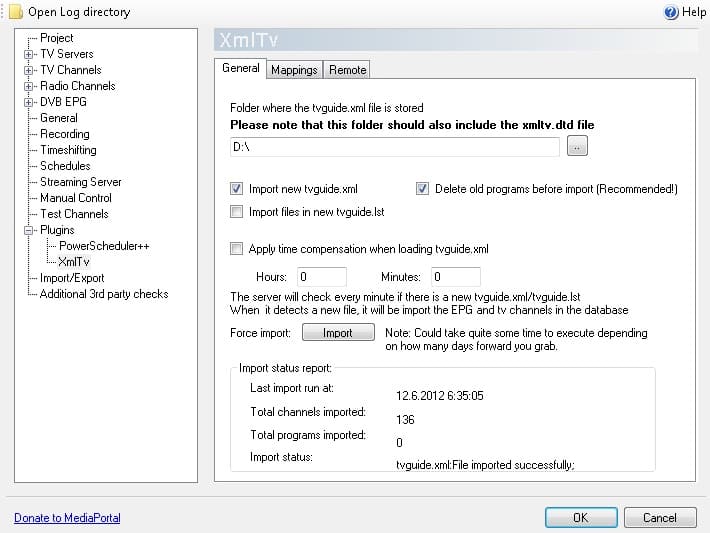
this is how the epg is setup. pc wakes up at this time for recording live tv to approx 7:30.
i think there is a problem in powerscheduler or powerscheduler++ because if i use normal powerscheduler pc goes to sleep even if the video is running and i dont have any possibility to change setup in mp configuration in plugins because the icon is missing (dll file is present in plugin folder). if i use powerscheduler++ sleep doesnt happen
i think there is a problem in powerscheduler or powerscheduler++ because if i use normal powerscheduler pc goes to sleep even if the video is running and i dont have any possibility to change setup in mp configuration in plugins because the icon is missing (dll file is present in plugin folder). if i use powerscheduler++ sleep doesnt happen
Attachments
- September 1, 2008
- 21,544
- 8,236
- Home Country
-
New Zealand
So when you tested with the default Powerscheduler, you had the option to prevent sleep when the EPG grabber is working enabled? If that is the case, then I would say there is a bug in the old Powerscheduler. When the option to prevent sleep for the EPG grabber is enabled then I'd expect your PC not to go to sleep.i think there is a problem in powerscheduler or powerscheduler++ because if i use normal powerscheduler pc goes to sleep even if the video is running and i dont have any possibility to change setup in mp configuration in plugins because the icon is missing (dll file is present in plugin folder). if i use powerscheduler++ sleep doesnt happen
Which folder is the DLL in?
mm
- September 1, 2008
- 21,544
- 8,236
- Home Country
-
New Zealand
Hi sherbs
MP seems to be hanging because communication between the client and TV Server is breaking down, and then Windows is closing MP. The cause of the hang seems to be TV server crashing, but I can't see why... unless it is TsWriter trying to return EPG grabbed and failing because the TV service is asleep. The last activity before sleep in the TV Server logs is the EPG grabber starting to grab. There is no sign of it stopping grab either before or after sleep (which would be a problem - the Powerscheduler should be detecting and preventing this), but equally there is no sign of TV Server hanging after resume because of the TsWriter deadlock that I've previously seen.
To me it seems like there is either an issue with the EPG Grabber, Powerscheduler, or system setup, but I honestly can't be sure which of those it is. I think the best approach to finding the problem (and hopefully the solution) would be to disable the Powerscheduler or EPG grabber temporarily to find out which is causing the problem by process of elimination. Note that I assume you're using a static IP address already. To test, you'll need the computer to go to sleep for at least as long as the DHCP lease on your router - maybe 3 hours.
mm
MP seems to be hanging because communication between the client and TV Server is breaking down, and then Windows is closing MP. The cause of the hang seems to be TV server crashing, but I can't see why... unless it is TsWriter trying to return EPG grabbed and failing because the TV service is asleep. The last activity before sleep in the TV Server logs is the EPG grabber starting to grab. There is no sign of it stopping grab either before or after sleep (which would be a problem - the Powerscheduler should be detecting and preventing this), but equally there is no sign of TV Server hanging after resume because of the TsWriter deadlock that I've previously seen.
To me it seems like there is either an issue with the EPG Grabber, Powerscheduler, or system setup, but I honestly can't be sure which of those it is. I think the best approach to finding the problem (and hopefully the solution) would be to disable the Powerscheduler or EPG grabber temporarily to find out which is causing the problem by process of elimination. Note that I assume you're using a static IP address already. To test, you'll need the computer to go to sleep for at least as long as the DHCP lease on your router - maybe 3 hours.
mm
Users who are viewing this thread
Online now: 3 (members: 0, guests: 3)