MP1 EVR Presenter/dshowhelper community development (4 Viewers)

Schicksal

Portal Pro
February 7, 2010
800
29
Home Country
Germany Germany
AW: MP1 EVR Presenter/dshowhelper community development

where do i get amd fusion 2.0?
if i look on the amd/ati hompage i find amd fusion in the download section but if i click on it i'm directed to the video driver.
is this correct?
 

mironicus

Portal Pro
March 9, 2008
688
44
AW: Re: AW: Re: AW: Re: MP1 EVR Presenter/dshowhelper community development

I've just added v0020 to the first post - this has some changes which might help in 1:2 video:display fps ratio situations.

Tony

Thank you, Tony. With this dll the following quoted problem...

I made further tests: I switched constantly between two videos with 29,97 fps running at 59,94 Hz. Starting and playing for some seconds, stopping - playing the next... and repeated those steps. There are no refresh rate changes.

In some cases the started videos are constantly stuttering - not everytime, but sometimes. (tested v13, v19)

... is fixed! I repeated the tests with those videos and indeed there is no more stutter! :)

However... videos still stutter (in most cases) after a refreshrate change 23,967 Hz (1:1) -> 59,94 Hz (1:2) and opposite. Mediaportal is somehow slowed down after a refreshrate change. Just stopping and restarting (skipping helps too) the video plays fine again.

What do you suspect? Maybe the GPU needs a little time to get synchronized after setting a new refresh rate?
So Mediaportal should wait for a few milliseconds before starting the playback after a refreshrate change? :confused:

This problem also happens within MPC Cinema and XBMC if you have configured it to change the refresh rate.

Update: There is no stutter between refreshrate changes if the video and the refreshrate matches 1:1. (23,967->29,976->23,967 etc)
 

edterbak

Portal Pro
March 4, 2008
2,114
1,176
Home Country
Netherlands Netherlands
I have been testing a number of files.
I think what the Fusion program from AMD does is disable aero. But with the help of Owlsroost's v19/20 dll I do (nearly never) see a judder or tearing. Even with 1080 i plus de-interlacing vector adaptive. :)

Based on my experience from half a year ago with Fusion, dont be too eager to install it. I had to do a fresh OS install then to get it out again. Hope amd fixed it up a little.

In the end with or without fusion running, I think the credits go to Owlsroost for the recent dll's :) Thanks
 

webs0r

Portal Member
December 17, 2008
20
2
Home Country
v20 DLL working great for me, thanks owlsroost.

I'm running WHS with reclock, 25 fps/50Hz and 30 fps/60 Hz combinations and it has eliminated the random judders that I occasionally had with the prior dlls (I think v12 was the best for me previously).
 

Jay_UK

Test Group
  • Team MediaPortal
  • October 6, 2009
    1,780
    283
    Derby
    Home Country
    United Kingdom United Kingdom
    Hi there,

    Mironicus, I have noticed the same effect as you - very occasionally, playing a movie after a refresh change (eg 24p) it has "micro stutters" and seems to be jerky/slow. If I stop and reply the movie again it seems to be fine.

    This is with v19 of the DLL.

    I will try and grab some logs later (at work at the mo).

    Many thanks,

    J.

    ps - Will test V20 later :D
     

    Owlsroost

    Retired Team Member
  • Premium Supporter
  • October 28, 2008
    5,539
    5,038
    Cambridge
    Home Country
    United Kingdom United Kingdom
    Re: AW: Re: AW: Re: AW: Re: MP1 EVR Presenter/dshowhelper community development

    However... videos still stutter (in most cases) after a refreshrate change 23,967 Hz (1:1) -> 59,94 Hz (1:2) and opposite. Mediaportal is somehow slowed down after a refreshrate change. Just stopping and restarting (skipping helps too) the video plays fine again.

    What do you suspect? Maybe the GPU needs a little time to get synchronized after setting a new refresh rate?
    So Mediaportal should wait for a few milliseconds before starting the playback after a refreshrate change? :confused:

    This problem also happens within MPC Cinema and XBMC if you have configured it to change the refresh rate.

    Update: There is no stutter between refreshrate changes if the video and the refreshrate matches 1:1. (23,967->29,976->23,967 etc)

    There's been several threads about stuttering after refresh rate changes with Win 7 - a mod was put into MP 1.1.0 months ago (after much work by scythe42 and others) to try and workaround what seems to be an MS problem.

    Out of interest, could you post a screen grab and logs for when the stutter happens ?

    Tony
     

    mironicus

    Portal Pro
    March 9, 2008
    688
    44
    AW: MP1 EVR Presenter/dshowhelper community development

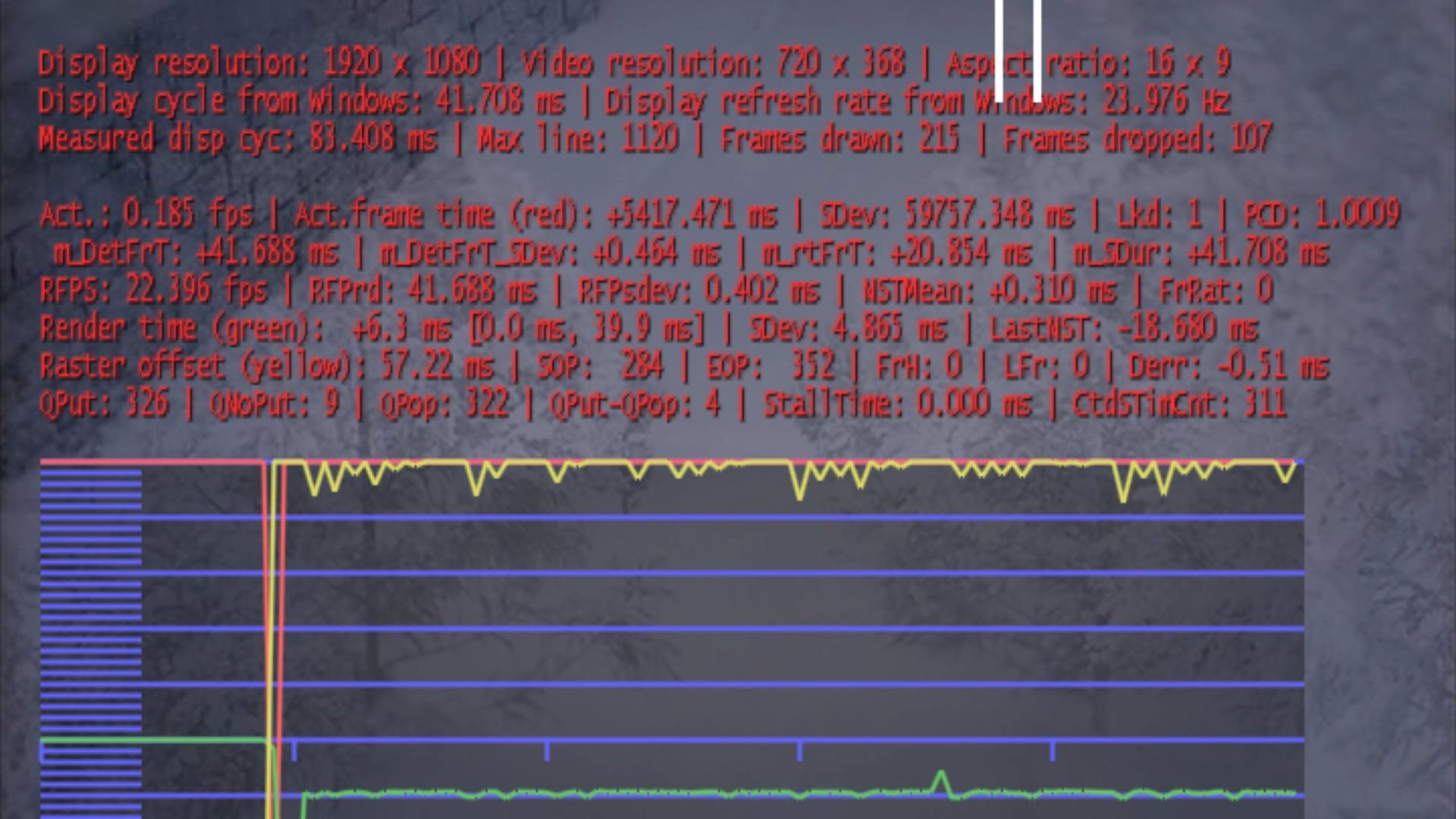
    Here you have a log. I constantly played two files with 23.976 fps/Hz and 29.97 fps/59.94 Hz. The 29.97 fps file stuttered immediately after the first refreshrate change from 23.976 -> 59.94 Hz.

    I repeated this steps until the 23.976 fps video heavily began to stutter and dropped nearly half of the frames (~12 fps). The screenshot shows this case.

    As long there is no refreshrate change the videos always play smooth without any stutter thanks to your modified dshowhelper.dll. Your modifications also prevents stutter at the beginning of the playback of 1080i and 1080p files with high bitrates. Switching from "Das Erste HD" (1280x720) to ServusTV HD (1920x1080) I always had stutter for a few seconds at the beginning (also on my Client Desktop PC with Quadcore and Radeon 5770!). With your dll the channel change is now fluid. :D
     

    Attachments

    • 24p-stutter.jpg
      24p-stutter.jpg
      405.4 KB

    Owlsroost

    Retired Team Member
  • Premium Supporter
  • October 28, 2008
    5,539
    5,038
    Cambridge
    Home Country
    United Kingdom United Kingdom
    Re: AW: MP1 EVR Presenter/dshowhelper community development

    Here you have a log. I constantly played two files with 23.976 fps/Hz and 29.97 fps/59.94 Hz. The 29.97 fps file stuttered immediately after the first refreshrate change from 23.976 -> 59.94 Hz.

    I repeated this steps until the 23.976 fps video heavily began to stutter and dropped nearly half of the frames (~12 fps). The screenshot shows this case.

    As long there is no refreshrate change the videos always play smooth without any stutter thanks to your modified dshowhelper.dll. Your modifications also prevents stutter at the beginning of the playback of 1080i and 1080p files with high bitrates. Switching from "Das Erste HD" (1280x720) to ServusTV HD (1920x1080) I always had stutter for a few seconds at the beginning (also on my Client Desktop PC with Quadcore and Radeon 5770!). With your dll the channel change is now fluid. :D

    Interestting - the dshowhelper thinks the display *is* running at 12 fps - the relevant two lines from the log (and the screen capture) are:

    21-06-2010 17:14:09.676 [e44]Display cycle from Windows: 41.708 ms
    21-06-2010 17:14:09.676 [e44]Measured display cycle: 83.408 ms <- this is approx 12Hz !!

    I don't run Win 7, but take a look at this thread - Dual Monitors Windows 7 Problems - particularly the Wednesday, April 07, 2010 12:31 PM post by Twizzlerite

    Tony
     

    hirscho

    Portal Pro
    December 24, 2006
    186
    20
    Home Country
    Germany Germany
    Hi Owlsroost

    Version 0020 is working well for me for xvid videos without reclock, but I have lot of frame drops on TV with 720p (H.264) or 576i (MPEG2) material at 50Hz. Do you have an idea why?

    hirscho
     

    mironicus

    Portal Pro
    March 9, 2008
    688
    44
    AW: Re: AW: MP1 EVR Presenter/dshowhelper community development

    Interestting - the dshowhelper thinks the display *is* running at 12 fps - the relevant two lines from the log (and the screen capture) are:

    21-06-2010 17:14:09.676 [e44]Display cycle from Windows: 41.708 ms
    21-06-2010 17:14:09.676 [e44]Measured display cycle: 83.408 ms <- this is approx 12Hz !!

    I don't run Win 7, but take a look at this thread - Dual Monitors Windows 7 Problems - particularly the Wednesday, April 07, 2010 12:31 PM post by Twizzlerite

    Very interesting finding. I tried the registry fix - it does seem to reduce the problem but not entirely (could also be a placebo).

    However - after stopping the playback and restarting - the video runs fluid again. There should be a way to bypass that behaviour in Windows, so the OS should think "Everything is OK - I must not slow down the framerate". :)

    My guess is that a little pause after a refreshrate change should be done before the actual videoplay starts. My TV also needs about 2 seconds to change the refreshrate itself - so a little delay in this process should not "hurt". I am no programmer but I am able to compile Mediaportal. Could anyone give me a hint where I can add this delay in the code after a refreshrate change has been made? :D

    Or to make a more intelligent approach:
    As Mediaportal always measures the display cycle it should delay the starting of the entire videoplayback until the measured display cycle matches the video fps.
     

    Users who are viewing this thread

    Top Bottom