MP1 EVR Presenter/dshowhelper community development (3 Viewers)

mironicus

Portal Pro
March 9, 2008
688
44
AW: MP1 EVR Presenter/dshowhelper community development

Please let DPC Latency Checker run for 10 minutes and then check if there are any big spikes - DPC Latency Checker - both with playing video and not playing.

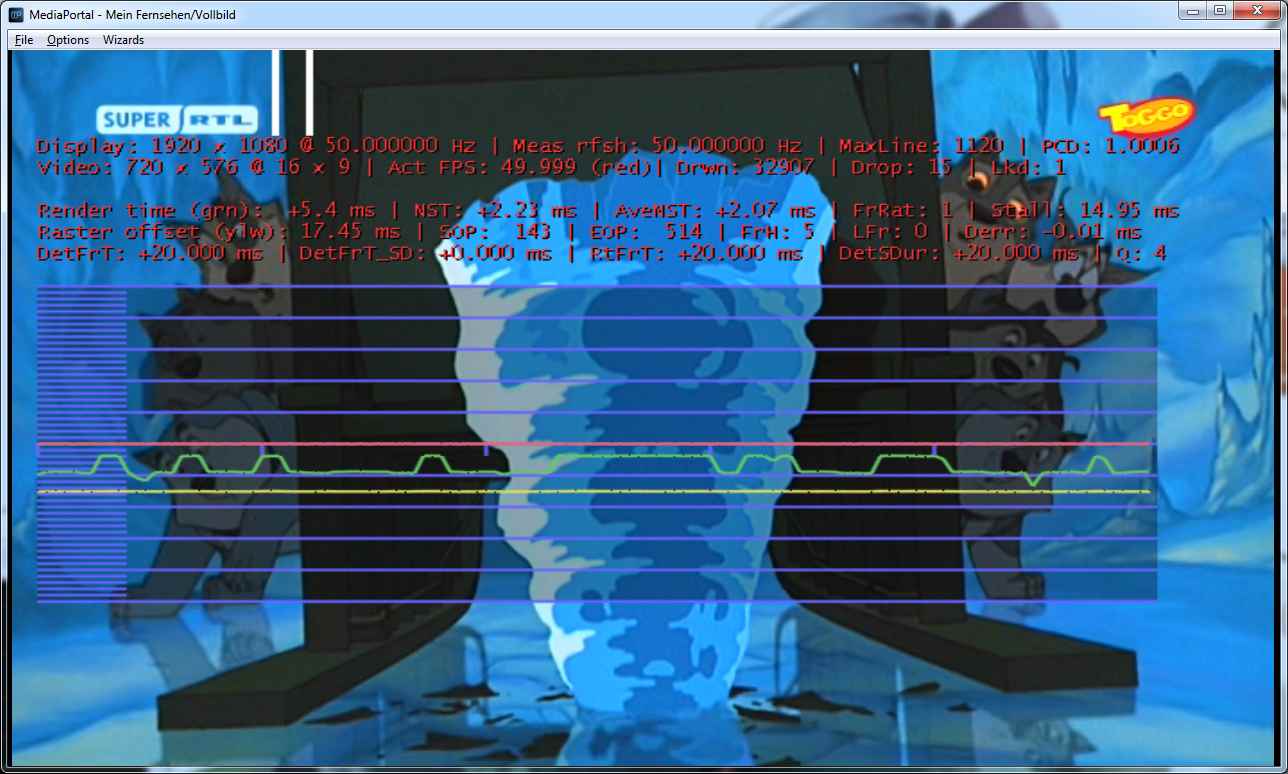
Oh, I have already tried this two days ago and let Mediaportal running at the same time with DPC. The Latency was always green even while those little hiccups occured. :)

Update: Made a picture.
 

Attachments

  • 50fps-hiccups.jpg
    50fps-hiccups.jpg
    84.2 KB

mironicus

Portal Pro
March 9, 2008
688
44
AW: MP1 EVR Presenter/dshowhelper community development

tourettes

50 fps/50 Hz Videos seems to be "very" sensitive to everything. Everytime I press the buttons to grab a screenshot Mediaportal reports one dropped frame.

If I playback a 25 fps video that runs at 50 Hz and I want to grab a screenshot Mediaportal don't care. It does not loose any frames while doing this. Even the displayed graph behaves fine and remains straight and calm.

Update: If I playback a 50fps video at 60 Hz and try to grab a screenshot... Mediaportal does NOT drop a frame! :D
 

davidf

Retired Team Member
  • Premium Supporter
  • April 3, 2006
    796
    348
    Scotland
    Home Country
    Scotland Scotland
    tourettes said:
    I did some profiling of the dshowhelper's CPU usage - it is not taking that much of the overall CPU usage itself, so the thread boosting should really help for the "lazy" trimer issue. But if the dErr value is less than 1 ms then there is not much that the increased timer / scheduling accuracy will help.


    About the CPU usage itself: Getting current time (GetCurrentTimestamp() and there the most of the time is spent in MulDiv64 method) is using approx 25% of the time - I guess the code is really agressive when it comes to polling the current time. Not sure if there would be any optimization points - of course using timeGetTime / GetTickCount would use much less CPU but those are too innaccurate.

    I played with (hacking in) the WaitableTimer last night which dropped the CPU markedly (it also stuffed the timing owlsroost had got working as well) This gave a reduction the amount of polling and does seem to be accurate. The most sensitive thing seems to be the number of threads running under MMCS that seems to cause all sorts of issues if there are too many. I'll try and correct the timing again and see what it looks like at that point. I think it would be possible to get a very accurate timer (self correcting) running which could get to within 1 ms of any point in the raster display without too much messing around, at least if I ignore the renderer for now.

    tourettes said:
    But first we should figure out if the ION's ATOM CPU is to blame or if is the GPU. If it is the CPU then optimizing some code and removing too agressive polling could help. But if it is the GPU -> not worth trying to play around dshowhelper.dll code. There isn't that much DirectX realted that could be done differently.

    I'll use that tool which was posted and have a look - although from messing the timing quite a few times last night I'm betting on the CPU. robyf's dual core is working fine whereas my single core can get stuttery but only when the Audio Renderer is added, the only difference in the 2 setups is the extra core on the 330 over the 230.
     

    davidf

    Retired Team Member
  • Premium Supporter
  • April 3, 2006
    796
    348
    Scotland
    Home Country
    Scotland Scotland
    Not quite getting the accuracy Tourettes saw:

    12-09-2010 22:02:36.838 [1150]After WaitableTimer new sample time 37520
    12-09-2010 22:02:36.840 [1150]WaitableTimer for -4000 based on next sample time 16640
    12-09-2010 22:02:36.841 [1150]After WaitableTimer new sample time 7592
    12-09-2010 22:02:36.848 [1150]WaitableTimer for -110995 based on next sample time 126995
    12-09-2010 22:02:36.858 [1150]After WaitableTimer new sample time 30430
    12-09-2010 22:02:36.867 [1150]WaitableTimer for -112263 based on next sample time 128263
    12-09-2010 22:02:36.877 [1150]After WaitableTimer new sample time 32468
    12-09-2010 22:02:36.879 [1150]WaitableTimer for -4000 based on next sample time 12260
    12-09-2010 22:02:36.880 [1150]After WaitableTimer new sample time 2805
    12-09-2010 22:02:36.886 [1150]WaitableTimer for -113224 based on next sample time 129224
    12-09-2010 22:02:36.896 [1150]After WaitableTimer new sample time 35105
    12-09-2010 22:02:36.898 [1150]WaitableTimer for -4000 based on next sample time 14342
    12-09-2010 22:02:36.899 [1150]After WaitableTimer new sample time 5189
    12-09-2010 22:02:36.905 [1150]WaitableTimer for -114783 based on next sample time 130783
    12-09-2010 22:02:36.915 [1150]After WaitableTimer new sample time 35998
    12-09-2010 22:02:36.917 [1150]WaitableTimer for -4000 based on next sample time 15605
    12-09-2010 22:02:36.918 [1150]After WaitableTimer new sample time 7364
    12-09-2010 22:02:36.925 [1150]WaitableTimer for -111223 based on next sample time 127223
    12-09-2010 22:02:36.935 [1150]After WaitableTimer new sample time 30073
    12-09-2010 22:02:36.944 [1150]WaitableTimer for -114419 based on next sample time 130419
    12-09-2010 22:02:36.954 [1150]After WaitableTimer new sample time 32511
    12-09-2010 22:02:36.956 [1150]WaitableTimer for -4000 based on next sample time 12038
    12-09-2010 22:02:36.957 [1150]After WaitableTimer new sample time 2621
    12-09-2010 22:02:36.964 [1150]WaitableTimer for -109923 based on next sample time 125923
    12-09-2010 22:02:36.974 [1150]After WaitableTimer new sample time 24868
    12-09-2010 22:02:36.985 [1150]WaitableTimer for -90917 based on next sample time 106917
    12-09-2010 22:02:36.995 [1150]After WaitableTimer new sample time 6761
    12-09-2010 22:02:37.004 [1150]WaitableTimer for -90662 based on next sample time 106662
    12-09-2010 22:02:37.014 [1150]After WaitableTimer new sample time 8139
    12-09-2010 22:02:37.021 [1150]WaitableTimer for -113451 based on next sample time 129451
    12-09-2010 22:02:37.031 [1150]After WaitableTimer new sample time 32449
    12-09-2010 22:02:37.033 [1150]WaitableTimer for -4000 based on next sample time 11693
    12-09-2010 22:02:37.034 [1150]After WaitableTimer new sample time 2552
    12-09-2010 22:02:37.047 [1150]WaitableTimer for -47419 based on next sample time 63419
    12-09-2010 22:02:37.052 [1150]After WaitableTimer new sample time 14724
    12-09-2010 22:02:37.059 [1150]WaitableTimer for -115756 based on next sample time 131756
    12-09-2010 22:02:37.069 [1150]After WaitableTimer new sample time 37230
    12-09-2010 22:02:37.071 [1150]WaitableTimer for -4000 based on next sample time 16713
    12-09-2010 22:02:37.072 [1150]After WaitableTimer new sample time 7203

    But it seems to be pretty good (for a hack in as it polling and delaying). There are three threads runnung under MCSS with the Scheduler at Critical and the others at Low all on Playback settings. I doubt it get more accurate than this for the timer, It looks OK on the dev machine and will test on the ION as soon as my wife falls asleep (while watching TV).
     

    Owlsroost

    Retired Team Member
  • Premium Supporter
  • October 28, 2008
    5,539
    5,038
    Cambridge
    Home Country
    United Kingdom United Kingdom
    All looks interesting - thanks David - did you basically hack the new timer into the 'TimerThread' ?

    Actually, it's not so much the accuracy of the timers that's important, it's the reliability - it's the occasional 'lost' 5ms+ that causes the random dropped frames, whereas a small amount of jitter isn't really a problem.

    I've never particularly liked the polling in the TimerThread, but I was getting desperate for some sort of timer that didn't use the same underlying timer mechanism in the OS.....

    Tony
     

    tourettes

    Retired Team Member
  • Premium Supporter
  • January 7, 2005
    17,301
    4,800
    Actually, it's not so much the accuracy of the timers that's important, it's the reliability - it's the occasional 'lost' 5ms+ that causes the random dropped frames, whereas a small amount of jitter isn't really a problem.

    Yes, that is issue we are up against. On the non-MMCSS audio renderer test there was high spikes that were close to 4 ms, where as the MMCSS enabled one had nothing over the 1 ms (if I remember correctly) - the sampling time was only approx 8 minutes.

    I've never particularly liked the polling in the TimerThread, but I was getting desperate for some sort of timer that didn't use the same underlying timer mechanism in the OS.....

    Actually polling has some nasty side effect that could cause the timer "accuracy" to fail. Timers itself would be as accurate but the OS scheduler might consider the threads CPU quota consumed when the polling consumes the CPU cycles available in the time slice. If that would happen the thread wouldn't get scheduled when the timer fires on time.
     

    davidf

    Retired Team Member
  • Premium Supporter
  • April 3, 2006
    796
    348
    Scotland
    Home Country
    Scotland Scotland
    All looks interesting - thanks David - did you basically hack the new timer into the 'TimerThread' ?

    I tried that first and ended up removing it as it didn't do much, I ended up placing it in scheduler thread to test the reliability.

    Actually, it's not so much the accuracy of the timers that's important, it's the reliability - it's the occasional 'lost' 5ms+ that causes the random dropped frames, whereas a small amount of jitter isn't really a problem.

    That was quite interesting when I gave it a bit of testing last night...

    What I got be to be stable enough to test:
    During polling the earliest sample time is calculated - this results in resetting the timer with about half the required delay. This resulted in multiple cycles before correct point was hit i.e. 20ms to time became 10 which next cycle becomes 5 becomes 2.5 etc.
    After a few failed attempts and lots of stuttering pictures I did the obvious think and put the waitable timer just after this calculation to kick in for any delays over 1ms with a minimum timer of 0.4ms and a max of 20ms. I also took 1.6ms off the delay to ensure it didn't overshoot. The existing polling was left as it also undershot. (I suspect that if the three threads were brought down to 1 where the mixer queue was checked after a sample event then the timer would work better as the number of threads under MCSS seriously affects the accuracy i.e. pull all possible samples after a render or drop.) Scrap that - the errors are based on machine load so it doesn't seem to matter what you do.

    First test BBC News with ticker on bottom (SD) with PDVD9 and MS codecs:
    Perfectly stable with smooth ticker - no stuttering with Audio Renderer working. This was with all logging turned off to reduce the possibility of side effects.

    Second test BBC HD (1440x1080? which is a squashed HD picture used by the BBC) using MS Codec:
    Stable picture but audio dropout for 5 seconds (this is due to falsely reported framerates from the codec as Tourettes spotted some time ago). And now the strange bits (although I can probably guess what's up for some of them). When viewing the guide i.e. small TV picture, it stuttered and the picture froze returning to full screen continued perfect playback. I guess the 1.6ms delay needs some adjustment feedback to set itself correctly on the clock accuracy at that point in time because the polling is still needed in the event of a "miss" or the timer needs to be put in a loop. I didn't try to detect too much delay because this was the umpteenth attempt and I didn't expect to get a better result than stuttering to be honest.

    Next HD test BBC HD (1440i?) using PDVD Codec:
    As before but no audio dropout, after 30 seconds the picture stopped being updated. I guess something very bad happened and happened again when I retried. I think sound kept going. As I had logging turned off that's all I can tell you with certainty.

    I think some of the earlier issues I had were caused by the fact that the scheduler thread has multiple input points i.e. timer and new sample so you can't act any sooner due to the scrubbing/late frame and other logic in the presenter. I suspect that a nice way to do it would be to call the routine every 2ms or so to allow samples to be dropped/taken form the mixer in the event of a 16x or 32x playback and then use the timer to wait if within 2ms of a presentation time. This would allow a single thread to do all the work and possibly get a better degree of accuracy on the timer (possibly not as the timer accuracy decreases with load). I'll try that next after I get back from holidays. If I get a chance tonight I'll post the patch/code as I'd be interested to see how it would perform on better hardware - there is a 4670 upstairs but it'll be hard for me to test with it for a while (long story).
     

    davidf

    Retired Team Member
  • Premium Supporter
  • April 3, 2006
    796
    348
    Scotland
    Home Country
    Scotland Scotland
    Sad admission - I had a serious play with the code last night after a night out but I've put it back to what I thought it was (should've backed it up) but it doesn't work on SD never mind HD. I think I have the thread priorities wrong. The one thing I did find out is that as the machine gets put under more of a load the deviation of the timer increases and it doesn't matter how few MCSS threads you have. I updated the previous post to reflect this. It would be very interesting to know if the timer gets more accurate on more graphicly capable machines.

    Anyway I'm out of time, it time for a holiday...
     

    Users who are viewing this thread

    Top Bottom