MP1 EVR Presenter/dshowhelper community development (6 Viewers)

krzysior

Portal Member
December 10, 2008
25
2
Tested v60 and i still have problem with GUI after playing 24 FPS file (for me GUI refresh dropped to 24 FPS).
Ofcourse it only happens if 24 FPS file is first played after MP start. And like before, 25 FPS files are unwatchable in that situation.
Restarting MP doesn't help...
 

mcrob83

MP Donator
  • Premium Supporter
  • November 10, 2009
    206
    12
    St.Marienkirchen, Eferding
    Home Country
    Austria Austria
    AW: MP1 EVR Presenter/dshowhelper community development

    Tried to apply the patch, but I'm not able to do that, altough I reverted to svn 27312.
    svnpatch.jpg
     

    kilik360

    MP Donator
  • Premium Supporter
  • September 3, 2010
    575
    239
    Home Country
    Canada Canada
    Hi Guys ! First I want to thank Owlsroost for his great work with dshowhelper.dll custom "weekly" build. Because I had a problem with live TV ( 720p feed STB to HD-PVR ) and 1080i ATSC signlal but only in 1080p resolution. You can see my post for more details : https://forum.team-mediaportal.com/...hd-pvr-ota-frame-drop-1080p-resolution-92721/

    So Yeah I've tested dshowhelper_v0056 last night and wow, no more frame drop from the STB feed (HD-PVR). That's really great.
    I only have problem with 1080i signal now. I have between 5 to 8 framedrop/sec if i'm at a 1080p resolution. Everyhing run smooth at 720p. I hope that i will be able to help you fix this issue with my logs.

    here it is and again thanks a lot ! Honnestly I really appreciate, and my wife maybe twice more : )
     

    Attachments

    • ATSC.1080i.jpg
      ATSC.1080i.jpg
      364 KB

    edterbak

    Portal Pro
    March 4, 2008
    2,114
    1,176
    Home Country
    Netherlands Netherlands
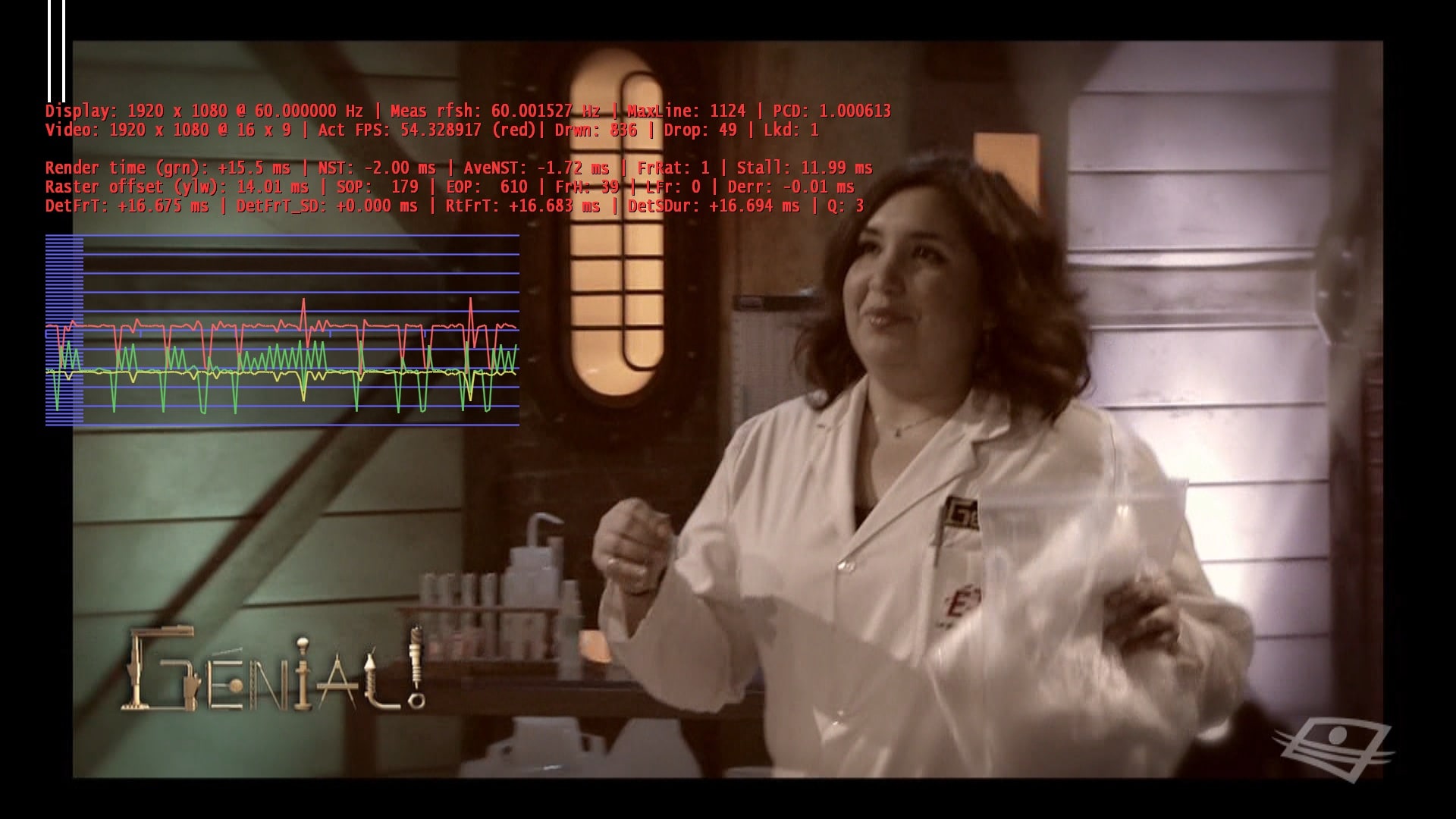
    Owlroost: Is it a good idea to add one line in the shift1 stats to state the vid/audio decoder (+version) used? This could make it very easy to see if the codec is actually used instead of using graphstudio. It also could reduce false bugreports. Im a noob, so I dont know if this is possible or easy.

    FYI; Im al also seeing slow GUI after certain movies. Playing another movie and stopping often fixes it for me, but its not improving WAF or 'user friendly' :)

    In addition I also sometimes see a movie NOT dropping any frames, but the movie is juddery like hell. VERY regular 1fps I see or so and the green line is spikey. Something like that. FF/FWD or Pause doesnt help. Stop/Play for a coulpe of times does... sometimes. Very weird IMO.

    Ofcourse I will post logs tonight. give me some time to reproduce. It might be related to ATI drivers/settings or SAF codecs used....

    Thanks you all for this work. The goal is AWESOME!!!!
     

    mcrob83

    MP Donator
  • Premium Supporter
  • November 10, 2009
    206
    12
    St.Marienkirchen, Eferding
    Home Country
    Austria Austria

    mrmojo666

    MP Donator
  • Premium Supporter
  • January 24, 2006
    603
    182
    Turin
    Home Country
    Italy Italy
    Hi Guys ! First I want to thank Owlsroost for his great work with dshowhelper.dll custom "weekly" build. Because I had a problem with live TV ( 720p feed STB to HD-PVR ) and 1080i ATSC signlal but only in 1080p resolution. You can see my post for more details : https://forum.team-mediaportal.com/...hd-pvr-ota-frame-drop-1080p-resolution-92721/

    So Yeah I've tested dshowhelper_v0056 last night and wow, no more frame drop from the STB feed (HD-PVR). That's really great.
    I only have problem with 1080i signal now. I have between 5 to 8 framedrop/sec if i'm at a 1080p resolution. Everyhing run smooth at 720p. I hope that i will be able to help you fix this issue with my logs.

    here it is and again thanks a lot ! Honnestly I really appreciate, and my wife maybe twice more : )

    it looks like a vga performance problem, have you tried disabling all video enhancement in ati drivers? also different kinds of deinterlace settings ?

    i hope it could help :)
     

    Snader

    MP Donator
  • Premium Supporter
  • September 5, 2007
    270
    10
    Aalsmeer
    Home Country
    Netherlands Netherlands
    v60 gives me some kind of slowdown after a couple of minutes when wachting a HTDV PAL recording; live tv hasn't given any problems yet.
     

    Owlsroost

    Retired Team Member
  • Premium Supporter
  • October 28, 2008
    5,539
    5,038
    Cambridge
    Home Country
    United Kingdom United Kingdom
    Thanks for the feedback everyone - the version I'm currently testing seems to be OK with the 24Hz situation (at least on my Vista system), but I'm still getting some stuttering problems after refresh rate changes (for the first play - it's OK for subsequent plays).

    I'm running out of things to try.....:confused:

    Tony
     

    peque

    Moderator - Spanish Forums
  • Premium Supporter
  • August 4, 2007
    861
    99
    Home Country
    Spain Spain
    I'll do it...

    Just some words to clarify... I've faced two different stuttering problems:

    - v58 related. No problem with v56 and older (I didn't try v57 too much to be able to say something). Was heavy and constant stuttering after some seconds/minutes of viewing, SD/HD livetv (not traduced in framedrops).
    - Sttutering here and there, every some minutes (not traduced in framedrops)... Any dshowhelper tried... surely driver related. Only HD... I can't see it in SD material.

    bye!

    With v60, I'm facing same problem as with v58... :(. Just going back to v45, heavy stuttering is gone.
     

    Users who are viewing this thread

    Top Bottom