MP1 EVR Presenter/dshowhelper community development (7 Viewers)

edterbak

Portal Pro
March 4, 2008
2,114
1,176
Home Country
Netherlands Netherlands
Hi mrmojo.

Thanks for the feedback. :) I read your post about the dts decoder in the saf forum. Tried it.
Also I tested v66. I have to say, I can hardly notice any lipsinc issue anymore.

HDTV perfect lines no drops and no lipsinc
x264 perfect lines nearly no drops (only at start) sound needs some stabalizing befor it is nearly spot on (delay is hardly noticable)
dvd perfect lines no drops and sound seems good as well. :)

Dont know what the cause was. But ill do some more testing to se if its really gone :)
 

cecet23

MP Donator
  • Premium Supporter
  • March 18, 2009
    137
    16
    Perugia
    Home Country
    Italy Italy
    I have problem with both...I tried v0056 as well and I have problem in livetv..

    the best one for me seems v0055 but with frame drops sometimes..
     

    edterbak

    Portal Pro
    March 4, 2008
    2,114
    1,176
    Home Country
    Netherlands Netherlands
    I think I fixed my lipsinc issue. It was my own fault.
    A while back I tested the buffersize and set it to 0. I forgot to put it back to 50000ms... :( STUPID!! Seems fine now, but I will test and report back if its truely ok now.
     

    sover

    Portal Pro
    April 11, 2008
    163
    24
    Home Country
    Russian Federation Russian Federation
    Yesterday night i keep my livetv HD 1080i playing for 7hours with v66. In the morning i have a result - 150dropped frames from 500000 drawn (i think it's my disconts of signal). So no any lipsync or shutter. So it's very good.
    But one question about 24p material:
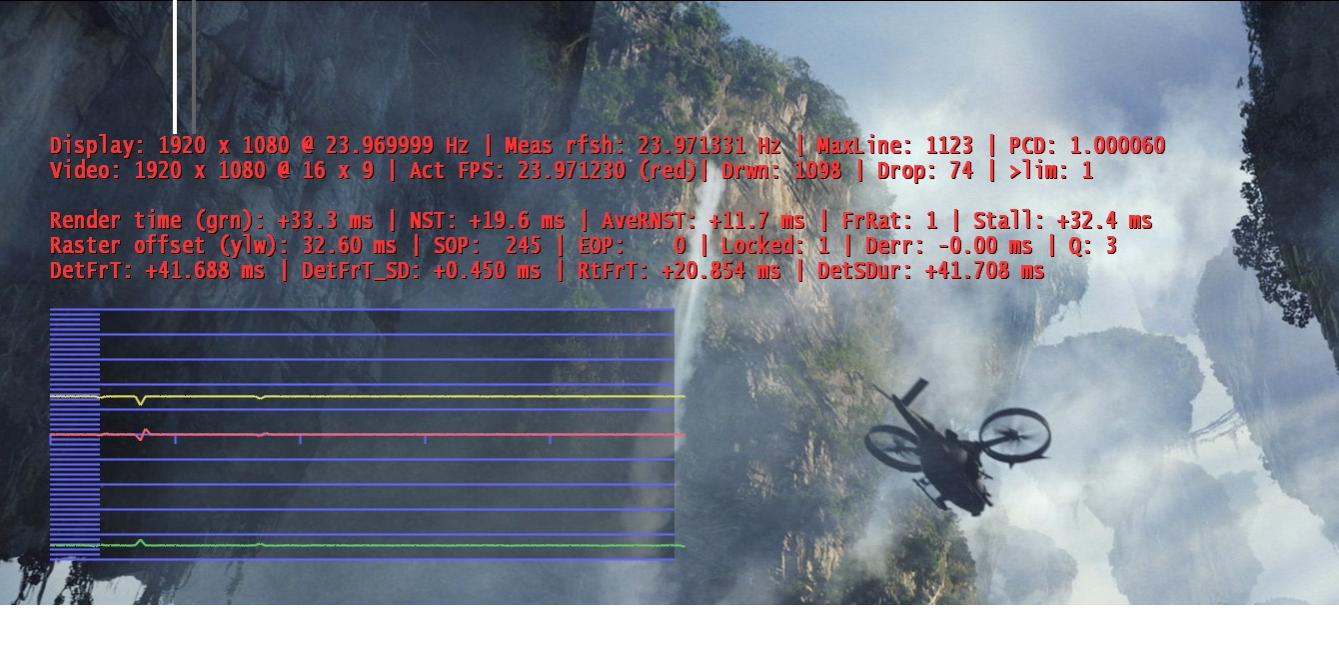
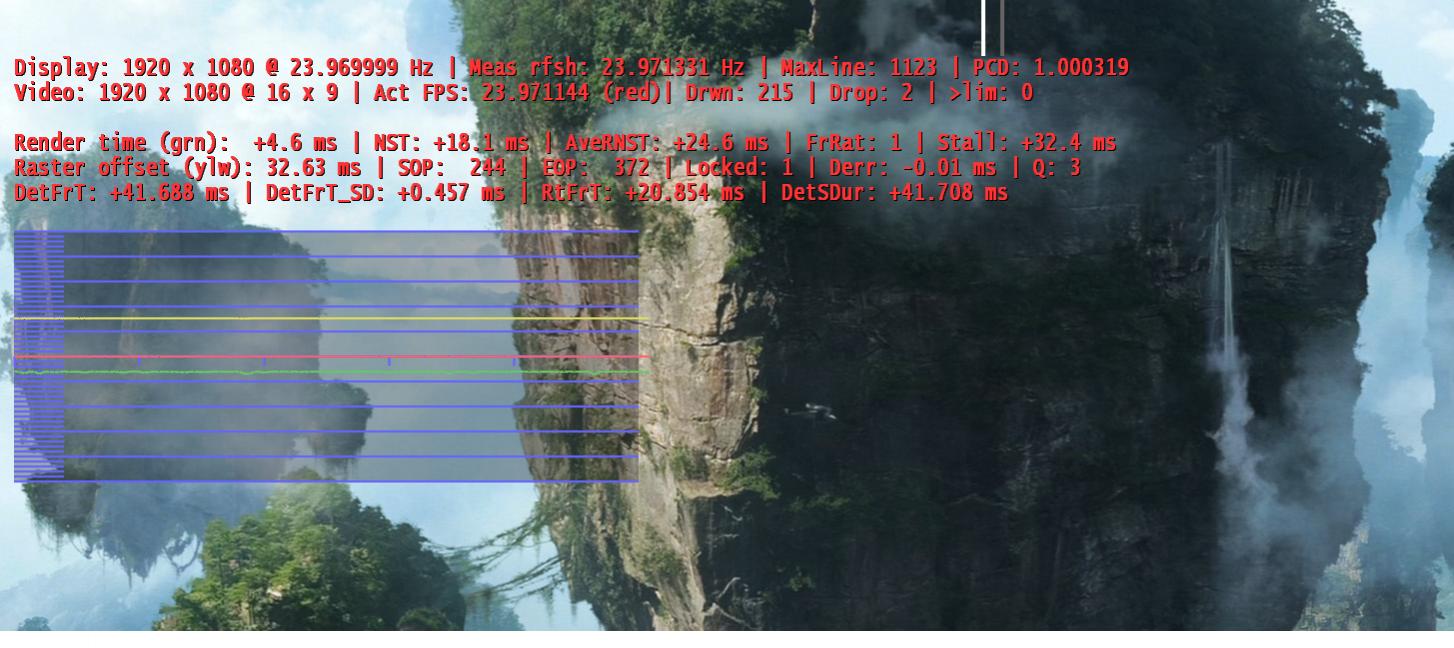
    On the first pic grren line is on the bootom, on the second after pause or skipstep it is in the middle. Is it normal?
     

    Attachments

    • ??????????.jpg
      ??????????.jpg
      117.1 KB
    • ??????????2.jpg
      ??????????2.jpg
      132 KB

    Owlsroost

    Retired Team Member
  • Premium Supporter
  • October 28, 2008
    5,539
    5,038
    Cambridge
    Home Country
    United Kingdom United Kingdom
    OK folks - v0067 attached for trials :)

    This is basically an improved version of v0065.

    The render stats display has changed a little:

    'Repeat:' is a count of repeated frames (the opposite of dropped frames)

    'Rptd FPS:' is the video fps reported by the decoder (sometimes incorrectly....)

    'Detd FPS:' is the video fps detected from the video stream timestamps (after de-interlacing)

    Tony

    Note: If you are using the MP AudioRenderer you must use the modified version from this post - https://forum.team-mediaportal.com/707555-post675.html - otherwise MP will crash...
     

    Owlsroost

    Retired Team Member
  • Premium Supporter
  • October 28, 2008
    5,539
    5,038
    Cambridge
    Home Country
    United Kingdom United Kingdom
    But one question about 24p material:
    On the first pic grren line is on the bootom, on the second after pause or skipstep it is in the middle. Is it normal?

    It should normally be in the middle, but it's OK on the bottom if it's stable at that position - it's when it switches between the two positions that it tends to drop frames or stutter.

    Tony
     

    edterbak

    Portal Pro
    March 4, 2008
    2,114
    1,176
    Home Country
    Netherlands Netherlands
    OK folks - v0067 attached for trials :)

    This is basically an improved version of v0065.

    The render stats display has changed a little:

    'Repeat:' is a count of repeated frames (the opposite of dropped frames)

    'Rptd FPS:' is the video fps reported by the decoder (sometimes incorrectly....)

    'Detd FPS:' is the video fps detected from the video stream timestamps (after de-interlacing)

    Tony
    Hi Tony,

    Is it possible (quick/easy) to add a line for video/audio decoder used? Could help with debugging and easy recognition within MP.

    ps. Im not home for the rest of this week. So I will test during the weekend. THanks for the work m8!
     

    peque

    Moderator - Spanish Forums
  • Premium Supporter
  • August 4, 2007
    861
    99
    Home Country
    Spain Spain
    I've finally installed Win7 to try Microsoft dshow decoders for livetv and.... wow! What a change! Now I can't see any stuttering, and hardware deinterlacing is better than Cyberlink PowerDVD 10 one. Really good product... :) I'm now using dshowhelper v55. I'll try new releases anyway.

    Thanks for all.
     

    Owlsroost

    Retired Team Member
  • Premium Supporter
  • October 28, 2008
    5,539
    5,038
    Cambridge
    Home Country
    United Kingdom United Kingdom
    Hi Tony,

    Is it possible (quick/easy) to add a line for video/audio decoder used? Could help with debugging and easy recognition within MP.

    ps. Im not home for the rest of this week. So I will test during the weekend. THanks for the work m8!

    Short answer - no :)

    (dshowhelper doesn't have the information available currently - code would have to be added to get the info from the filter graph)

    Tony
     

    Owlsroost

    Retired Team Member
  • Premium Supporter
  • October 28, 2008
    5,539
    5,038
    Cambridge
    Home Country
    United Kingdom United Kingdom
    I've finally installed Win7 to try Microsoft dshow decoders for livetv and.... wow! What a change! Now I can't see any stuttering, and hardware deinterlacing is better than Cyberlink PowerDVD 10 one. Really good product... :) I'm now using dshowhelper v55. I'll try new releases anyway.

    Thanks for all.

    Can you make your system specs visible please ?


    I've just added a v0055a dll to the first post in the thread - this is a minor bug fix update of v0055, so you might want to try that too :)

    Tony
     

    Users who are viewing this thread

    Top Bottom