MPDisplay++ - Extended Display/Touchscreen Plugin (4 Viewers)

Status
Not open for further replies.

Wondermusic

Retired Extension Developer
  • Premium Supporter
  • September 7, 2009
    1,117
    275
    Wuppertal
    Home Country
    Germany Germany
    AW: Re: AW: Re: AW: MPDisplay2 - MP Secondary Display

    No, I mean; In the homescreen of StreamedMP, you can add some submenu's. By example; to the tv-tab, I have added "my tv recordings". Do you understand?
    Well, if I have watched television, watched a movie or have listen to some music, and I go bach to the homescreen, I still see the letters of the submenu's on my television, and that's only happening if I use the plugin..

    Grtz

    OK - now I understand what you mean. :)
    I'll take a look at it this evening if I can reproduce it. (First I have to look how you set this up – I normally use X-Factor)

    Cheers,
    Wonder


    EDIT: I received the new version a couple of minutes ago. I'll pre test this version and than I'll upload it to our server. I'll post here again when the new version is available (as mpe1 and single dll- file for those, who allready downloaded the 0.6.0 Version).
     

    Wondermusic

    Retired Extension Developer
  • Premium Supporter
  • September 7, 2009
    1,117
    275
    Wuppertal
    Home Country
    Germany Germany
    AW: MPDisplay2 - MP Secondary Display

    The Download of Version 0.6.0.1 is now available.
    You will find the new Version on our Server

    Just one issue with Moving Pivtures left. Only the categories are displayed. Videos itself are not visible. This issue will be solved in next version.

    Cheers,
    Wonder
     

    sa_ddam213

    Retired Team Member
  • Premium Supporter
  • March 3, 2009
    312
    281
    Canterbury
    Home Country
    New Zealand New Zealand
    Re: MPDisplay2 - MP Secondary Display

    @Wondermusic
    I tried this in PureVisionHD folder (hope it was made for it) and the width seems to fit but the height needs to be lot larger.
    See screenshot

    I hope you have not that much effort on customizing arround on this...

    Greets,
    Katharsis

    Hey Katharsis,

    By chance are you using Windows7 if so the problem may be the default font scaling in windows.
    In Win7 I think the font scaling is set to 150% this will need to be 100% or it will effect the scaling function of MPDisplay2.

    Have a look here : https://forum.team-mediaportal.com/mediaportal-plugins-47/mptouch-mediaportal-touchscreen-plugin-80636/
    On the first page on this thread this is discused

    Hope This Helps

    Cheers
    Sa
     

    mtjoernelund

    Portal Pro
    April 28, 2008
    102
    3
    Home Country
    Denmark Denmark
    Re: MPDisplay2 - MP Secondary Display

    Just updated to version 6.0.1 Alpha and initial thought is that it seems more stabile than previous version. How it behaves after resume from standby yet remains to be seen. The new splash screen looks very very cool (I know that it is just eye candy, but anyways...)

    However the new function prompting for which radio source you want to use I am not to happy about. Perhaps this can be made configurable in the future? I only use one source for radio, so this only leads to an extra step for me to come to where I want to go.

    Once again thanks to you guys for an absolutely fantastic piece of work. IMHO this is perhaps the one plugin that really differentiate MP from other mediacenter softwares!!!
     

    Wondermusic

    Retired Extension Developer
  • Premium Supporter
  • September 7, 2009
    1,117
    275
    Wuppertal
    Home Country
    Germany Germany
    AW: MPDisplay2 - MP Secondary Display

    Hi mtjoernelund,

    if you are unhappy with this option you can make a workaround for now. Open the Window_Home.xml with your favorite editor (best is notepad++) and change the following line...

    Code:
    	<section name="Control3">
    		<entry name="Type">Button</entry>
    		<entry name="PosX">870</entry>
    		<entry name="PosY">146</entry>
    		<entry name="Width">261</entry>
    		<entry name="Height">192</entry>
    		[B][COLOR="Red"]<entry name="MPD2WindowID">15</entry>[/COLOR][/B]
    		<entry name="Image">Radio.png</entry>
    		<entry name="Visible">True</entry>
    	</section>

    to

    Code:
    	<section name="Control3">
    		<entry name="Type">Button</entry>
    		<entry name="PosX">870</entry>
    		<entry name="PosY">146</entry>
    		<entry name="Width">261</entry>
    		<entry name="Height">192</entry>
    		[B][COLOR="SeaGreen"]<entry name="MPD2WindowID">4</entry>
    		<entry name="MPWindowID">30</entry>[/COLOR][/B]
    		<entry name="Image">Radio.png</entry>
    		<entry name="Visible">True</entry>
    	</section>
    This is a code fragment of PureVisionHD Window_Home.xml
    In other skins the control number could be another one. Just watch out for Image "Radio.png"

    I don't know for sure if we can change it so that everyone can configure this how he want's, but i think we'll try.

    Cheers,
    Richy
     

    mtjoernelund

    Portal Pro
    April 28, 2008
    102
    3
    Home Country
    Denmark Denmark
    Re: MPDisplay2 - MP Secondary Display

    Wonder

    Thanks for the fast response. I will try your work around. My point of view is that the fewer button presses the better from a user point of view. But at the same time I understand that several people has asked for support of other radio streams, and then this a very elegant solution.

    If it can be made configurable I would think that was great, but if I can make your work around work, then I am perfectly happy.
     

    Wondermusic

    Retired Extension Developer
  • Premium Supporter
  • September 7, 2009
    1,117
    275
    Wuppertal
    Home Country
    Germany Germany
    AW: MPDisplay2 - MP Secondary Display

    Which MPD2 Skin you are using? I can upload the "new" Window_home.xml.
     

    Katharsis

    Portal Member
    November 4, 2009
    47
    1
    Home Country
    Germany Germany
    Re: MPDisplay2 - MP Secondary Display

    @Wondermusic
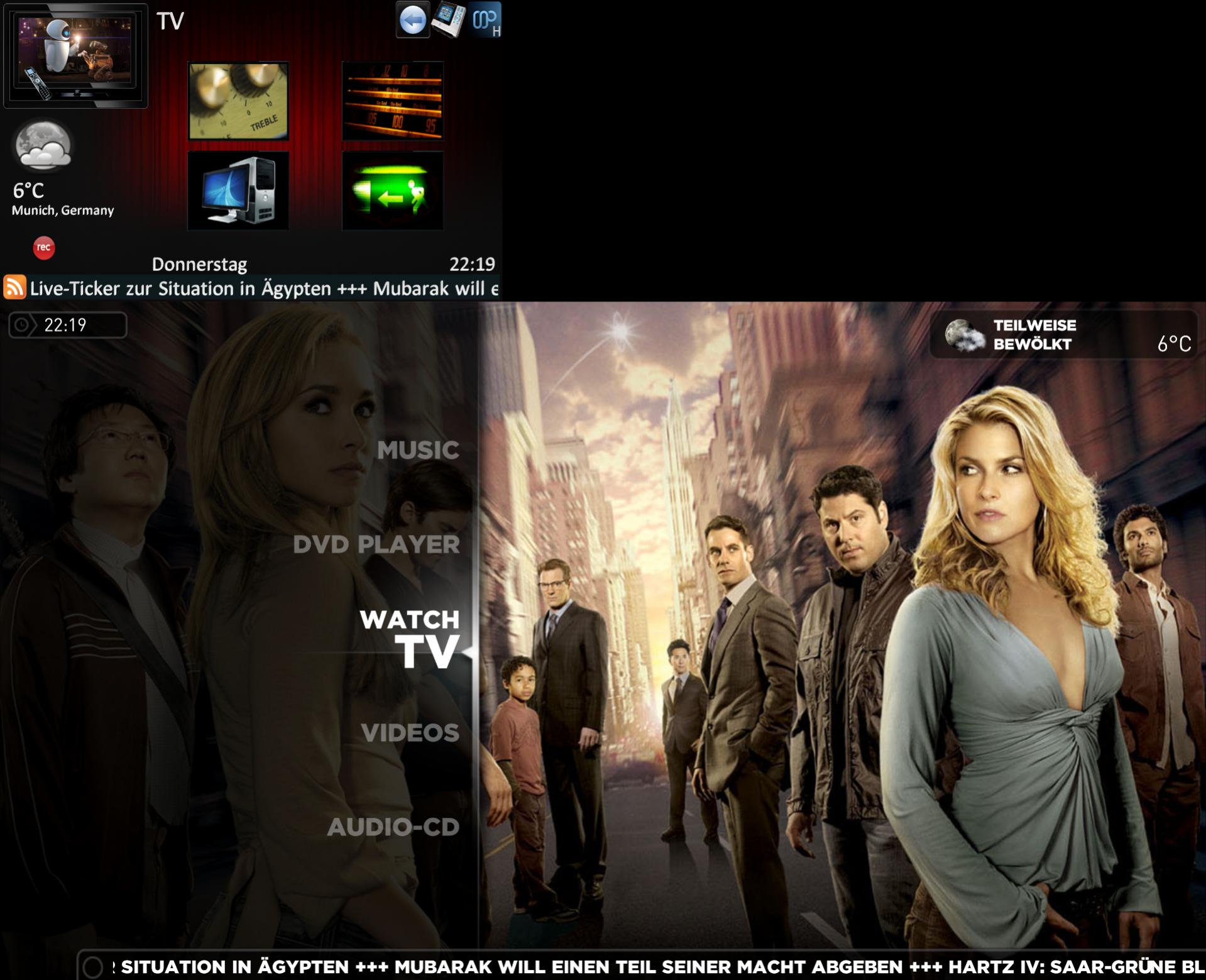
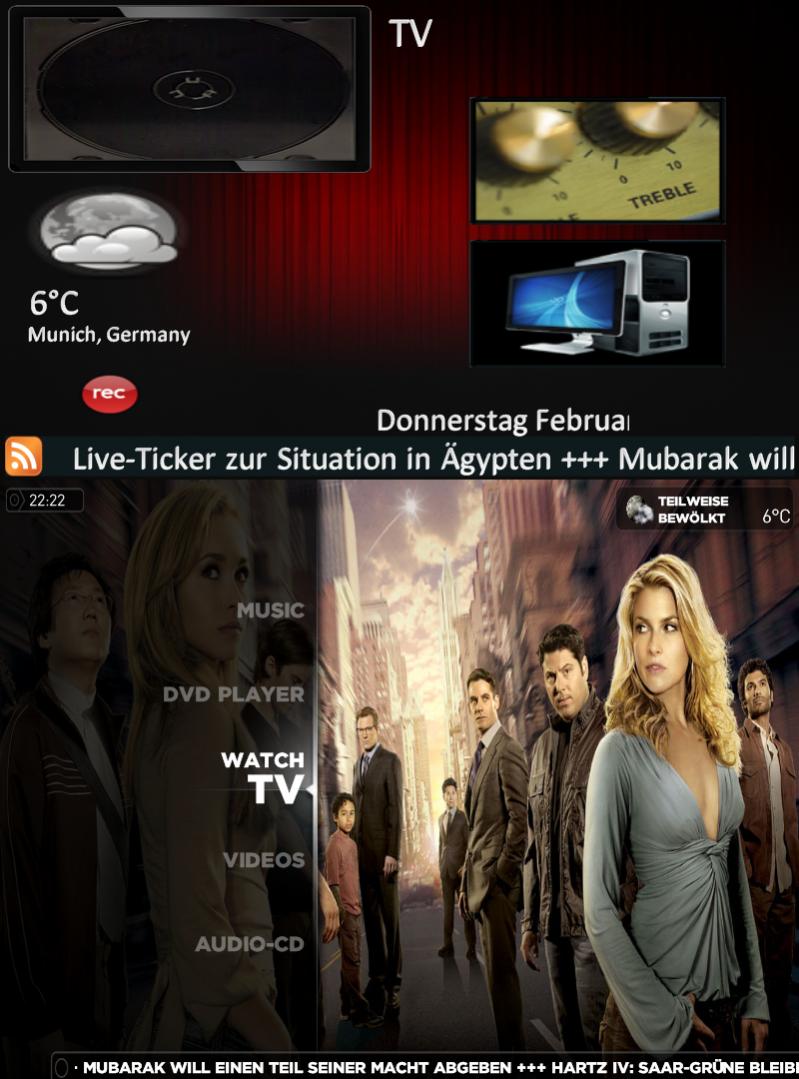
    I tried this in PureVisionHD folder (hope it was made for it) and the width seems to fit but the height needs to be lot larger.
    See screenshot

    I hope you have not that much effort on customizing arround on this...

    Greets,
    Katharsis

    Hey Katharsis,

    By chance are you using Windows7 if so the problem may be the default font scaling in windows.
    In Win7 I think the font scaling is set to 150% this will need to be 100% or it will effect the scaling function of MPDisplay2.

    Have a look here : https://forum.team-mediaportal.com/mediaportal-plugins-47/mptouch-mediaportal-touchscreen-plugin-80636/
    On the first page on this thread this is discused

    Hope This Helps

    Cheers
    Sa

    Hi sa_ddam213,

    thank you for still thinking of my problem!

    I checked your hint but scaling was already set at 100%.
    But by desperated playing arround a little, i found out, that with a resolution of the Main screen at 1920x1080 and the Mimo USB @unchangeable 800x480 it will surprisingly fit:)
    It seems there is a dependency with running different resolutions between the Mainscreen and the 2. (Touch)screen
    The big problem now is, that i cant run at 1920x1080 because im still using a backprojecting TV with scary eyeskilling max of 800x600. But maybe this can help you a little bit in finding a solution for this. The strange thing is, that any other application runs well at the right size and fits at the 800x480 USB device. Only your vital plugin not - at least with my resolution combo.

    I attched screenshots again to compare...

    Greets,
    Katharsis
     

    Attachments

    • 1920x1080_Main_and_800x480_USB_TFT.jpg
      1920x1080_Main_and_800x480_USB_TFT.jpg
      251.2 KB
    • 800x600_Main_and_800x480_USB_TFT.jpg
      800x600_Main_and_800x480_USB_TFT.jpg
      102.7 KB

    Wondermusic

    Retired Extension Developer
  • Premium Supporter
  • September 7, 2009
    1,117
    275
    Wuppertal
    Home Country
    Germany Germany
    AW: Re: AW: Re: AW: MPDisplay2 - MP Secondary Display

    No, I mean; In the homescreen of StreamedMP, you can add some submenu's. By example; to the tv-tab, I have added "my tv recordings". Do you understand?
    Well, if I have watched television, watched a movie or have listen to some music, and I go bach to the homescreen, I still see the letters of the submenu's on my television, and that's only happening if I use the plugin..

    Grtz

    Hey powermarcel,

    do you still have the problem with the new version?
    I tested here with submenus and streamedMP and it doesn't matter if the plugin is enabled or disabled. The submenu is allways there whengoing back to main menu. After pressing left key the submenu diappears.


    If it can be made configurable I would think that was great, but if I can make your work around work, then I am perfectly happy.

    OK, I talked with sa_ddam about adding a configuration for such things. And he is right when he sais, that this wouldn't be the best direction for the plugin because it's hard to please everyones wishes. Because of that, he added a skin support like this so everyone who want's other options can implement them by theirselves.

    I will make a skinners guide after release of the first Beta, that everyone can implement wanted features (or other menu entries like in this case) by themselves. I hope this is ok for you.
    But skinning is not that hard as you might think. I started skinning with this plugin and I never done something like this before.

    Cheers,
    Richy
     

    powermarcel10

    Retired Team Member
  • Premium Supporter
  • November 30, 2010
    2,836
    899
    37
    Groningen
    Home Country
    Netherlands Netherlands
    Re: MPDisplay2 - MP Secondary Display

    Hi Wondermusic,

    thanks for testing it.. I have still the samed problem. Very strange that you didn't have the samed problem.. What am I doing wrong? I gonna check if I can change some settings..

    I'll post it tomorrow!
     
    Status
    Not open for further replies.

    Users who are viewing this thread

    Top Bottom