multiple tuners of same type? (1 Viewer)

henke72

New Member
December 28, 2010
4
0
Home Country
Sweden Sweden
Hi,

I have the latest Media Portal 1 installed on Windows 7 Premium and are using 3 FireDTV-C external tuners.
One of them is equipped with a CAM and a smartcard while the other don't.

My problem is that all the tuners show up using the same name and do not find any way to differentiate between the different tuners within MediaPortal setup program. I even don't know which FireDTV-C that contains the CAM and which doesn't.

What I undertand the tuner containing the CAM must be configured in the MP setup program that it contains a CAM.
This to be able to map this tuner to the scrambled channels.

How do I do to find out which tuner is which?
Is it possible to rename the tuners?
Can I in some way map the found tuners in MP with the ones that FireDTV Support tool is listing?

BR
Henric
 

mm1352000

Retired Team Member
  • Premium Supporter
  • September 1, 2008
    21,544
    8,236
    Home Country
    New Zealand New Zealand
    Hi there

    Naming is a tricky business! TV Server only knows the name of the tuner from the driver, so if you have 3 identical cards then you will have 3 tuners with the same name in TV Server.

    To directly answer your questions:

    How do I do to find out which tuner is which?
    There are a couple of ways to do this. If you know how to find the tv.log then you could try restarting the TV Service and tuning to one channel on each card. I believe the presence or absence of a CAM is logged for FireDTV tuners.

    Another way that might be easier is to simply use trial and error. Map a different scrambled channel to each tuner and then see which channel can be decrypted. Then you know that the tuner that the channel is mapped to is the one with the CAM.

    Is it possible to rename the tuners?
    Unfortunately no. As already mentioned, TV Server uses the name supplied by the driver.

    Can I in some way map the found tuners in MP with the ones that FireDTV Support tool is listing?
    Again, no. The FireDTV Support Tool is completely separate software. There is no link between the FireDTV software and MediaPortal.
     

    henke72

    New Member
    December 28, 2010
    4
    0
    Home Country
    Sweden Sweden
    Ok, thanks for the quick response even though the solution wasn't so easy.
    This is totally hopeless,

    Under TV servers the FireDTV-C tuners have ID 3,6,7
    Under TV Channels, the tuners have no ID at ALL.
    Under Manual Control, the tuners have Card ID 1,2,3
    In the tv.log the tuners have Card ID 11,12,13

    What is this !? Very Messy, Is there any plans to get control over this?
    Don't get me wrong here, I love MP and the efforts put into it.

    BR
    Henric
     

    mm1352000

    Retired Team Member
  • Premium Supporter
  • September 1, 2008
    21,544
    8,236
    Home Country
    New Zealand New Zealand
    Ok, thanks for the quick response even though the solution wasn't so easy.
    This is totally hopeless,

    Under TV servers the FireDTV-C tuners have ID 3,6,7
    Under TV Channels, the tuners have no ID at ALL.
    Under Manual Control, the tuners have Card ID 1,2,3
    In the tv.log the tuners have Card ID 11,12,13

    What is this !? Very Messy, Is there any plans to get control over this?
    Don't get me wrong here, I love MP and the efforts put into it.

    BR
    Henric
    I know what you mean - it is absolutely a mess!
    The ID under TV Servers in the left hand pane is the ID from the database. This is the authoritative ID. It is *not* the same as the priority used in the right hand pane of The TV Server card list.
    Under TV channels the tuners are ordered by priority.
    Under manual control the "Card" column is an index of priority and the tuners are ordered by priority (this is probably the most confusing since it doesn't use either the ID or priority!!!).
    In the TV log tuners are listed in order of priority with database IDs also specified when TV Server loads. Any references like "Tune x to <channel>" refer to the database ID.

    So to summarise, most places use the database ID. There are currently no plans to change any of this, so it would be rest to start a thread in the improvement suggestions forum.
     

    Mew

    Portal Pro
    January 11, 2007
    356
    111
    55
    Hertfordshire
    Home Country
    England England
    Hi

    When I had a pair of Hauppauge HVR-4000s the only way I could determine which was which was by diconnecting the satellite and aerial cables from one and trying to scan. I needed to know which DVB-S tuner was associated with which DVB-T tuner in order to create a hybrid group. I got it wrong once which meant using the tuner on one card locked the other card as well.

    I have since exchanged one HVR-4000 for a HVR-4400 and the tuners have different names so it is no longer an issue for me.

    Mew
     

    henke72

    New Member
    December 28, 2010
    4
    0
    Home Country
    Sweden Sweden
    Hi

    When I had a pair of Hauppauge HVR-4000s the only way I could determine which was which was by diconnecting the satellite and aerial cables from one and trying to scan. I needed to know which DVB-S tuner was associated with which DVB-T tuner in order to create a hybrid group. I got it wrong once which meant using the tuner on one card locked the other card as well.

    I have since exchanged one HVR-4000 for a HVR-4400 and the tuners have different names so it is no longer an issue for me.

    Mew

    I understand, but switching out my fabulous FireDTV is not an option. I can record 3 free channels at the same time so I have no conflict in that sense. I can also start a manual timeshift and recording on a scrambled channel, it takes a while before it finds the tuner with the CAM but then it works (it is going through tuner by tuner to find the one that can decode the channel).

    But I am running 4TheRecord on top of MP, and there it don't work since the tuners are in a pool. One more level of complexity... :mad:

    So, it all works for Free channels, but not completely for scrambled ones. I could of course buy 3 CAM and the cards to have one in each FireDTV, but it is somewhat expensive!

    I will dig some more into it. Mabye have to start looking into the database.

    Ok, thanks for the quick response even though the solution wasn't so easy.
    This is totally hopeless,

    Under TV servers the FireDTV-C tuners have ID 3,6,7
    Under TV Channels, the tuners have no ID at ALL.
    Under Manual Control, the tuners have Card ID 1,2,3
    In the tv.log the tuners have Card ID 11,12,13

    What is this !? Very Messy, Is there any plans to get control over this?
    Don't get me wrong here, I love MP and the efforts put into it.

    BR
    Henric
    I know what you mean - it is absolutely a mess!
    The ID under TV Servers in the left hand pane is the ID from the database. This is the authoritative ID. It is *not* the same as the priority used in the right hand pane of The TV Server card list.
    Under TV channels the tuners are ordered by priority.
    Under manual control the "Card" column is an index of priority and the tuners are ordered by priority (this is probably the most confusing since it doesn't use either the ID or priority!!!).
    In the TV log tuners are listed in order of priority with database IDs also specified when TV Server loads. Any references like "Tune x to <channel>" refer to the database ID.

    So to summarise, most places use the database ID. There are currently no plans to change any of this, so it would be rest to start a thread in the improvement suggestions forum.


    I actually from the tv.log found which tuner in the TV Server list that had the CAM based on the priority number. It was printed in the list of available tuners in the log, and for each tuner the priority was listed. The tuner with ID 13 had priority 6, then I knew which one that was since the all have different priorities. But the problem still pops up in the TV Channes section, then I have lost the thread again.:confused:
     

    mm1352000

    Retired Team Member
  • Premium Supporter
  • September 1, 2008
    21,544
    8,236
    Home Country
    New Zealand New Zealand
    I wouldn't be swapping my FireDTV (if I had one) either! If you ask me DigitalEverywhere tuners probably have the best support for the widest range of features...

    I'm not sure from your last post whether you managed to sort the identities out or not. Anyhow, I've come up with a better way to determine which tuner has the CAM.

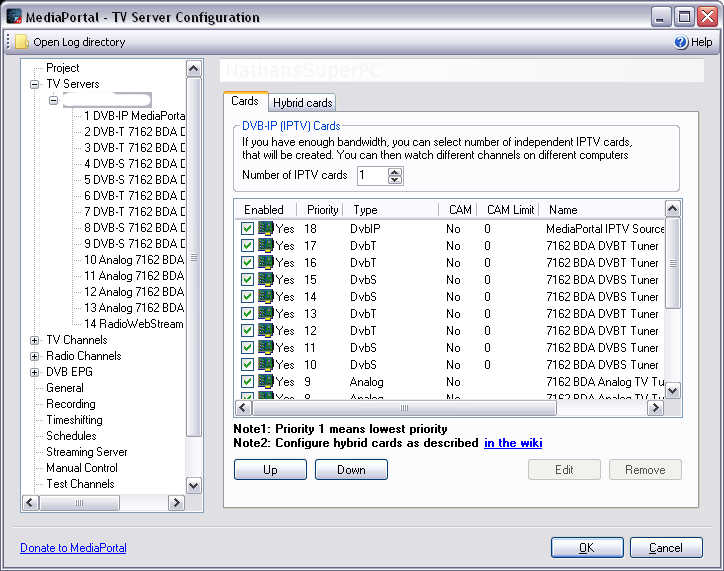
    1. Disable FireDTV 1 in TV Server configuration (see screenshot).
    2. See if you can still watch a scrambled channel.
    3. If not then FireDTV 1 has the CAM and you're done.
    4. Disable FireDTV 2.
    5. See if you can still watch a scrambled channel.
    6. If not then FireDTV 2 has the CAM and you're done.
    7. If you can then FireDTV 3 has the CAM and you're done.

    Thank goodness the tuners don't get mixed up once they're installed. You can see from my screenshot that I have 3 sets of 4 tuners with the same name (2 x Pinnacle PCTV7010ix) - a similar headache for me!!!
     

    Attachments

    • DisableTuner.jpg
      DisableTuner.jpg
      79.2 KB

    henke72

    New Member
    December 28, 2010
    4
    0
    Home Country
    Sweden Sweden
    I wouldn't be swapping my FireDTV (if I had one) either! If you ask me DigitalEverywhere tuners probably have the best support for the widest range of features...

    I'm not sure from your last post whether you managed to sort the identities out or not. Anyhow, I've come up with a better way to determine which tuner has the CAM.

    1. Disable FireDTV 1 in TV Server configuration (see screenshot).
    2. See if you can still watch a scrambled channel.
    3. If not then FireDTV 1 has the CAM and you're done.
    4. Disable FireDTV 2.
    5. See if you can still watch a scrambled channel.
    6. If not then FireDTV 2 has the CAM and you're done.
    7. If you can then FireDTV 3 has the CAM and you're done.

    Thank goodness the tuners don't get mixed up once they're installed. You can see from my screenshot that I have 3 sets of 4 tuners with the same name (2 x Pinnacle PCTV7010ix) - a similar headache for me!!!


    Thank you for all support you given, it has life easier for me!
    The procedure above seems good, I will try it out. And will hopefully solve the rest as time go by.

    BR
    Henric

    What do you use 3 times 4 tuners for???
    Many kids or?
     

    mm1352000

    Retired Team Member
  • Premium Supporter
  • September 1, 2008
    21,544
    8,236
    Home Country
    New Zealand New Zealand
    What do you use 3 times 4 tuners for???
    Many kids or?

    No kids, so it is *way* over the top really! :p
    I saw the cards for sale cheap from Ebay Germany and couldn't resist ;)

    Without getting into too much detail, I use the 4 DVB-T tuners to record HD channels from the 3 muxes in my area (at least 2 more set to be activated at analog switch-off in 2012). The DVB-T tuners are actually hybrid DVB-T/analog. I occasionally use the analog tuners for watching regional TV channels, listening to FM radio or capturing video from s-video/composite sources. The four DVB-S tuners are used for watching/recording channels from Optus D1 and D2.
     

    mrfg

    Portal Member
    February 11, 2011
    7
    2
    Home Country
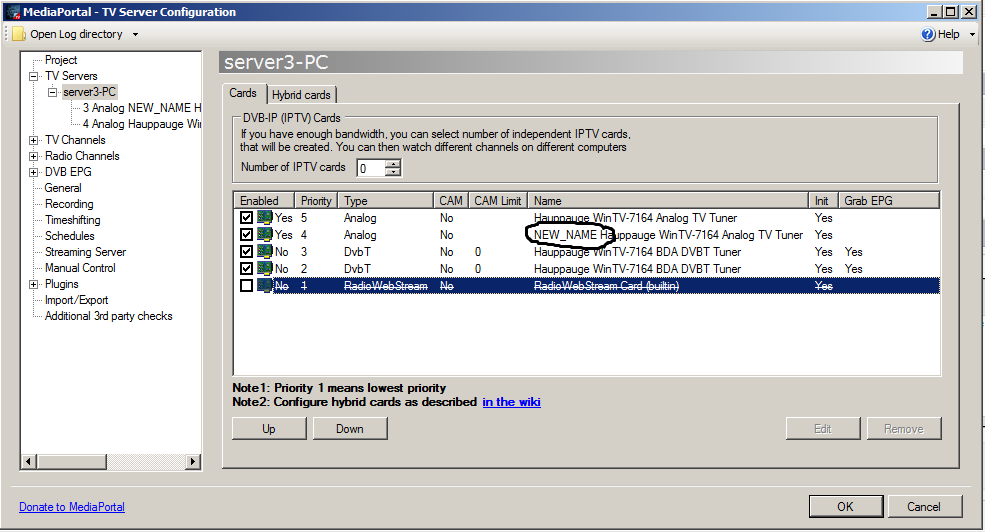
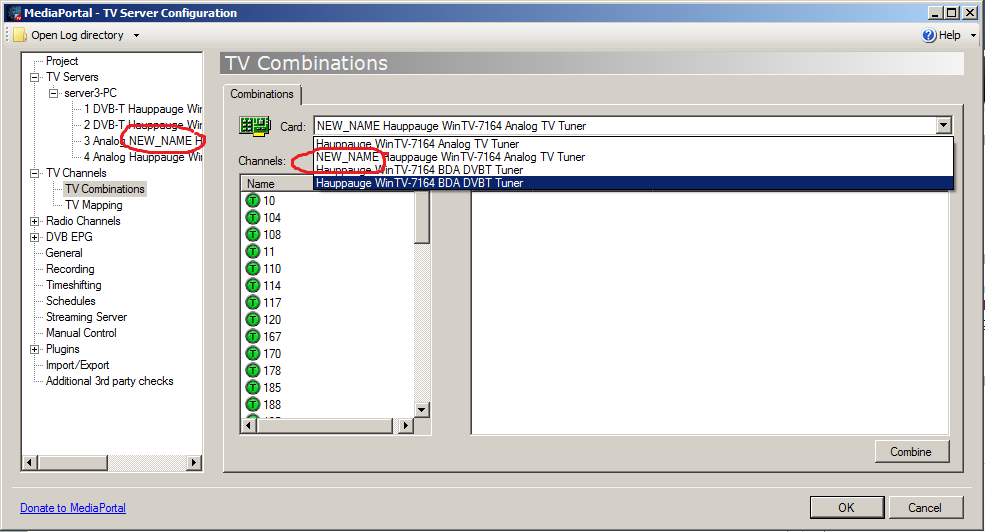
    I don't know the way of MP handling cards. I guess, first time MP takes card's name from the system registry. And then (maybe) MP working with device path not device name.
    I just renamed card name in db. I think it works. Restarted several times tv-server. no changes. :)
     

    Attachments

    • card_rename.png
      card_rename.png
      47.1 KB
    • card_rename1.png
      card_rename1.png
      58 KB

    Users who are viewing this thread

    Top Bottom