[confirm] Music - Now Playing (1 Viewer)

wagenveld

Portal Pro
June 14, 2008
50
4
Home Country
Ireland Ireland
MediaPortal Version: MediaPortal 1.2beta
MediaPortal Skin: StreamedMP
Windows Version: Windows 7 x64 SP1
CPU Type: AMD E350
HDD: Intel X25-M 80GB
Memory: 2GB
Motherboard: Asus E35M1-I
Video Card:
Video Card Driver:
Sound Card:
Sound Card AC3:
Sound Card Driver:
1. TV Card:
1. TV Card Type:
1. TV Card Driver:
2. TV Card:
2. TV Card Type:
2. TV Card Driver:
3. TV Card:
3. TV Card Type:
3. TV Card Driver:
4. TV Card:
4. TV Card Type:
4. TV Card Driver:
MPEG2 Video Codec: ffdshow
MPEG2 Audio Codec: ffdshow
h.264 Video Codec: ffshow
Satelite/CableTV Provider:
HTPC Case: Silverstone SG05
Cooling:
Power Supply:
Remote: Logitech diNovo Mini
TV: Samsung 46 6 series
TV - HTPC Connection: HDMI


I am seeing something weird since the upgrade to 1.2 beta - when playing music the now playing screen will show the current track. Then I switch to another track on a different album and the now playing screen will not update. I can reproduce this every time. The playing time looks to be updating OK but the track name, artist, cover etc stay on the previous track's. I am using the builtin ASIO output - not PureAudio.
 

jameson_uk

Retired Team Member
  • Premium Supporter
  • January 27, 2005
    7,257
    2,533
    Birmingham
    Home Country
    United Kingdom United Kingdom
    I am seeing something weird since the upgrade to 1.2 beta - when playing music the now playing screen will show the current track. Then I switch to another track on a different album and the now playing screen will not update. I can reproduce this every time. The playing time looks to be updating OK but the track name, artist, cover etc stay on the previous track's. I am using the builtin ASIO output - not PureAudio.

    I don't understand exactly what you are saying. You need to provide more details about what screens you are talking about and possibly provide screenshots to explain.

    You thread says about music now playing but the logs you have attached do not have you ever switching to that screen :confused:

    There is something odd I will look at in your logs it does change track
    Code:
    2011-06-24 18:58:00.774086 [Info.][MPMain(1)]: g_Player.Play(Z:\music\Buena Vista Social Club\01 Chan Chan.flac Music)
    but this seems to have vanished by the time you get to
    Code:
    2011-06-24 18:58:01.646136 [Info.][MPMain(1)]: g_Player.OnStarted()  media:Music
    :confused:

    Could you try disabling the ASIO and see if you still get the same problem?
     

    wagenveld

    Portal Pro
    June 14, 2008
    50
    4
    Home Country
    Ireland Ireland
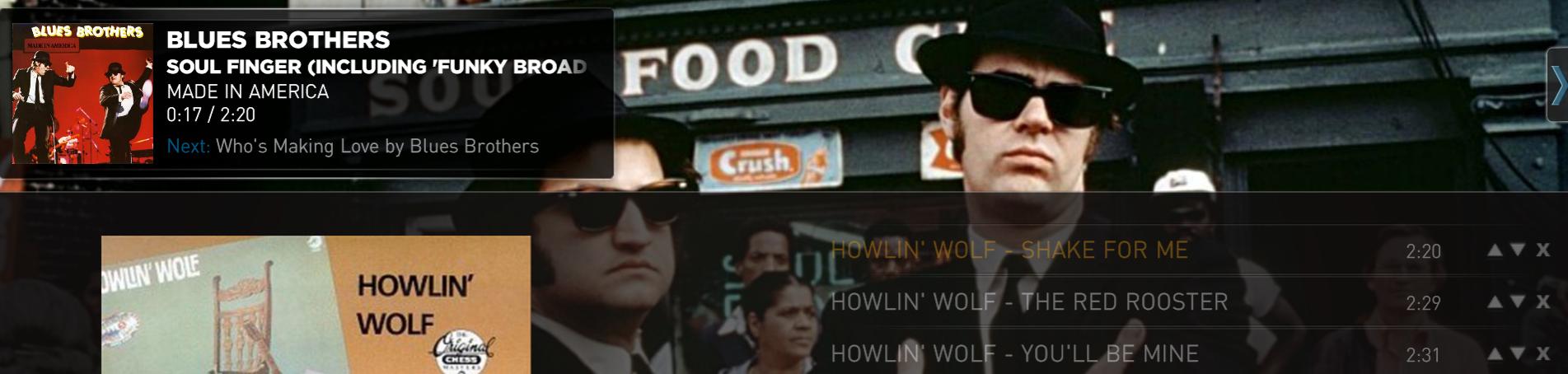
    Hya jameson, thanks for looking at this. I've attached a screenshot. Here I'm actually playing the highlighted track "Shake for me", but now playing shows the previous track I was playing. If I let it play and it goes automatically to the next track only then now playing will update correctly. Also I have switched off ASIO and at first I couldn't reproduce it, but a couple of times switching between songs and the issue is still there. Switched back to ASIO and the same story, it doesn't seem to happen all the time but very regular. In the logs in the first post it did definitely happen.

    edit: btw this is in StreamedMP but the logs were done in Debug - Default skin where it happens in exactly the same way, only the layout is different obviously.
     

    Attachments

    • Capture.jpg
      Capture.jpg
      97.9 KB

    jameson_uk

    Retired Team Member
  • Premium Supporter
  • January 27, 2005
    7,257
    2,533
    Birmingham
    Home Country
    United Kingdom United Kingdom
    Hya jameson, thanks for looking at this. I've attached a screenshot. Here I'm actually playing the highlighted track "Shake for me", but now playing shows the previous track I was playing. If I let it play and it goes automatically to the next track only then now playing will update correctly. Also I have switched off ASIO and at first I couldn't reproduce it, but a couple of times switching between songs and the issue is still there. Switched back to ASIO and the same story, it doesn't seem to happen all the time but very regular. In the logs in the first post it did definitely happen.

    edit: btw this is in StreamedMP but the logs were done in Debug - Default skin where it happens in exactly the same way, only the layout is different obviously.

    OK so it is the overlay not the now playing screen. I have been trying for a few minutes now and I am not seeing any issues. Every time I change track it is working fine so I need exact details of how to reproduce this. What screens do you go to, what buttons do you press...

    Is there anything odd about your setup? Is your music local or remote? Anything that would be different to another setup?
     

    wagenveld

    Portal Pro
    June 14, 2008
    50
    4
    Home Country
    Ireland Ireland
    Music is on my NAS via a mapped network drive, seems normal to me. I use my onboard audio optical out to a DAC - using DirectSound this will look like any other digital output so nothing weird there I think. To reproduce it I simply hit enter on any song, then hit back twice to select another album and hit enter again to select another song.
    Up until last week I was running 1.1 final and I've never seen this behaviour there. I have since completely reinstalled W7 including SP1 and MP1.2b from scratch, also building the Music database again from scratch.
    I am also using Audioscrobbler with scrobbling enabled. I will test without now. Playlist behaviour is set to Play Mode.

    edit: all right it seems the culprit is indeed Audioscrobbler - I have disabled it (and the last.fm) plugin and I can't reproduce the issue anymore. What does that mean for my bug, does it need to be moved?
     

    Seidelin

    Retired Team Member
  • Premium Supporter
  • August 14, 2006
    1,754
    652
    Farum
    Home Country
    Denmark Denmark
    Audioscrobbler is included in MP, so this is the correct place.

    However, reading your report leaves me quite confused. Can you provide step by step instructions to reproduce the issue you see? Write it as clear and step by step like as you can.
    Something like this:

    1. Open MP Configuration.
    2. Go to Music section
    3. Make sure "some setting is active". "Second setting" must also be active.
    4. close configuration. Start MP.
    5. Go my music, shares view.
    6. Select music file, and click Enter.
    etc.
    etc.

    Unless you can do that I don't see how we can confirm and fix your issue.
     

    wagenveld

    Portal Pro
    June 14, 2008
    50
    4
    Home Country
    Ireland Ireland
    Hey Seidelin, thanks for replying, steps below

    - Audioscrobbler enabled, scrobbling ON
    - Playlist behaviour Play mode
    - Music view Genres
    - Go into Genre, Album, select song to play and press enter
    - Esc twice to go back to album list
    - Select a different album, select a song and press enter

    Note it doesnt happen all the time for some reason, but am I the only one seeing this? Again, this is a clean install, clean database etc.
     

    jameson_uk

    Retired Team Member
  • Premium Supporter
  • January 27, 2005
    7,257
    2,533
    Birmingham
    Home Country
    United Kingdom United Kingdom
    Note it doesnt happen all the time for some reason, but am I the only one seeing this? Again, this is a clean install, clean database etc.

    I have tried on two different machines to replicate this but I have not been able to do so. I have audioscrobbler enabled too.

    So basically if you have audioscrobbler enabled this happens one time out of ten or something but with the plugin disabled it never happens?
     

    jameson_uk

    Retired Team Member
  • Premium Supporter
  • January 27, 2005
    7,257
    2,533
    Birmingham
    Home Country
    United Kingdom United Kingdom
    also do you have cross-fading enabled?
     

    wagenveld

    Portal Pro
    June 14, 2008
    50
    4
    Home Country
    Ireland Ireland
    1 in 10 is about right Jameson. I haven't seen it at all when I had audioscrobbler turned off. I will test a bit longer this weekend. No on the cross fading - yes on gapless playback.
     

    Users who are viewing this thread

    Top Bottom