My Films 5 - AMC Updater (1 Viewer)

Status
Not open for further replies.

z3us

Portal Pro
December 4, 2007
1,047
123
46
Home Country
Spain Spain
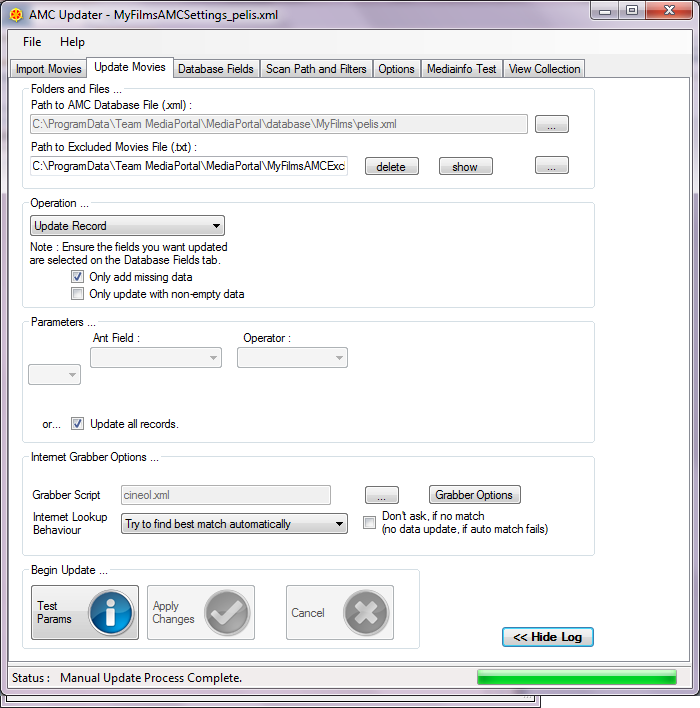
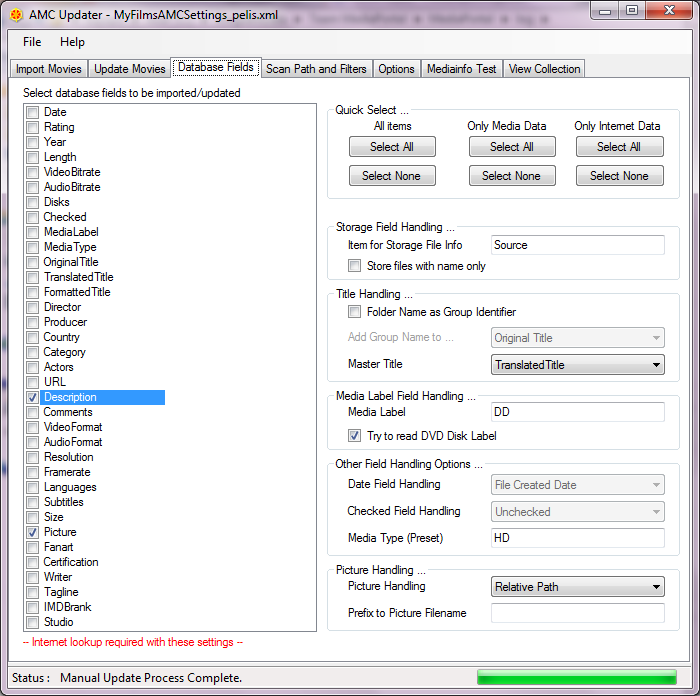
Guzzi. When performing a manual update with "only add missing data" checked, the log always says " Updated: Source" for every movie, even if it was not empty and it was neither marked in the "database fields" tab.
Is that a bug?
Thx again
 

Attachments

  • amcu1.png
    amcu1.png
    80 KB
  • amcu2.png
    amcu2.png
    92.1 KB
  • pelis.xml
    46.9 KB

Guzzi

Retired Team Member
  • Premium Supporter
  • August 20, 2007
    2,159
    750
    AW: Re: My Films 5 - AMC Updater

    Guzzi. When performing a manual update with "only add missing data" checked, the log always says " Updated: Source" for every movie, even if it was not empty and it was neither marked in the "database fields" tab.
    Is that a bug?
    Thx again
    Good finding ;-) - I noticed that too.
    The reason is, that "Source" is not a real database field, but a mapped virtual field. Practically it COULD be "source" - or could be URL or whatever. Will think about how we could change the handling to avoid that output ...
     

    Guzzi

    Retired Team Member
  • Premium Supporter
  • August 20, 2007
    2,159
    750
    AW: Re: My Films 5 - AMC Updater

    Guzzi. When performing a manual update with "only add missing data" checked, the log always says " Updated: Source" for every movie, even if it was not empty and it was neither marked in the "database fields" tab.
    Is that a bug?
    Thx again
    Good finding ;-) - I noticed that too.
    The reason is, that "Source" is not a real database field, but a mapped virtual field. Practically it COULD be "source" - or could be URL or whatever. Will think about how we could change the handling to avoid that output ...
    Hi z3us, I added a fix in #1707 - conditions are now applied for source field as for all other fields.
     

    z3us

    Portal Pro
    December 4, 2007
    1,047
    123
    46
    Home Country
    Spain Spain
    Guzzi. When performing a manual update with "only add missing data" checked, the log always says " Updated: Source" for every movie, even if it was not empty and it was neither marked in the "database fields" tab.
    Is that a bug?
    Thx again
    Good finding ;-) - I noticed that too.
    The reason is, that "Source" is not a real database field, but a mapped virtual field. Practically it COULD be "source" - or could be URL or whatever. Will think about how we could change the handling to avoid that output ...
    Hi z3us, I added a fix in #1707 - conditions are now applied for source field as for all other fields.
    As tester, am I supposed to have access to that file? Or is it part of a future release?


    Enviado desde mi GT-I9000 usando Tapatalk
     

    Guzzi

    Retired Team Member
  • Premium Supporter
  • August 20, 2007
    2,159
    750
    AW: My Films 5 - AMC Updater

    Good finding ;-) - I noticed that too.
    The reason is, that "Source" is not a real database field, but a mapped virtual field. Practically it COULD be "source" - or could be URL or whatever. Will think about how we could change the handling to avoid that output ...
    Hi z3us, I added a fix in #1707 - conditions are now applied for source field as for all other fields.
    As tester, am I supposed to have access to that file? Or is it part of a future release?

    Both ;-) ... actually, it will of course be included in a future release - and in this case, I have not yet made a current build for it - but whenever you want a build (e.g. to test certain fix like this one) just drop me a short PM. Otherwise I will provide testversion, when I think it's needed or time for regression testing - and that one of course also will include all changes.
    Just be aware that currently there is some "work-in-progress" - so a testversion might have issues in other areas I am currently working on - e.g. I just noticed the new "edition support" adds dupe strings to titles, if option is set...
     

    rabenste

    New Member
    October 14, 2011
    3
    0
    Home Country
    Germany Germany
    AMC Updater not starting anymore

    Hi,

    AMCU was running for some days quite well on my desktop PC and I was able to import my movies.

    From one day to another AMCU is not starting anymore. Meaning it creates the icon for the window in the taskbar but the window is not displayed.

    Unfortunately the log is not so helpfull for this issue:

    19.10.2011 20:21:44 -
    19.10.2011 20:21:44 - AMCUpdater 5.1.0.1468 Starting
    19.10.2011 20:21:44 - Arguments Found : 3
    19.10.2011 20:21:44 - Running in forced GUI Mode with Configfile
    12.11.2011 16:06:56 -
    12.11.2011 16:06:56 - AMCUpdater 5.1.0.1468 Starting
    12.11.2011 16:06:56 - Arguments Found : 3
    12.11.2011 16:06:56 - Running in forced GUI Mode with Configfile

    Its quite strange as I am also using AMCU on my Notebook (only Mediaportal Client connected to TV) and I have the same behaviour here -> Running for some days and then without an change (as I can remember) not starting anymore.

    I tried already completly reinstalling MyFilms but had no luck.

    Both systems are Windows 7 X64, with my desktop almost fresh installed 2 weeks before.

    I have also downloaded the AMCU 0.8 from sourceforge and its running quite well till now. But this isnt a real solution.

    Thanks for the help :D

    Alex
     

    z3us

    Portal Pro
    December 4, 2007
    1,047
    123
    46
    Home Country
    Spain Spain
    Only thing I can think of as the cause is that you would have renamed or deleted your cfg of MyFilms or AMCupdater. The direct access created is linked with that cfg.
     

    rabenste

    New Member
    October 14, 2011
    3
    0
    Home Country
    Germany Germany
    AW: My Films 5 - AMC Updater

    Hi,

    finally I have managed to solve the issue!:D

    I have monitored the process with sysinternals process monitor and seen that it tries to access something in my user profile. I thought AMCU and also mediaportal store all data in %programdata%, so I had a look and there was a user.config under :

    C:\Users\Alex\AppData\Local\AMCUpdater

    I have delete the file and now its working again. :)

    Here is the content of the file, looks like some .NET related stuff:

    <?xml version="1.0" encoding="utf-8"?>
    <configuration>
    <configSections>
    <sectionGroup name="userSettings" type="System.Configuration.UserSettingsGroup, System, Version=2.0.0.0, Culture=neutral, PublicKeyToken=b77a5c561934e089" >
    <section name="AMCUpdater.My.MySettings" type="System.Configuration.ClientSettingsSection, System, Version=2.0.0.0, Culture=neutral, PublicKeyToken=b77a5c561934e089" allowExeDefinition="MachineToLocalUser" requirePermission="false" />
    </sectionGroup>
    </configSections>
    <userSettings>
    <AMCUpdater.My.MySettings>
    <setting name="LogFormLocation" serializeAs="String">
    <value>0, 0</value>
    </setting>
    <setting name="MainFormSize" serializeAs="String">
    <value>160, 38</value>
    </setting>
    <setting name="MainFormLocation" serializeAs="String">
    <value>-32000, -32000</value>
    </setting>
    <setting name="LogFormVisible" serializeAs="String">
    <value>False</value>
    </setting>
    <setting name="LogFormSize" serializeAs="String">
    <value>532, 196</value>
    </setting>
    </AMCUpdater.My.MySettings>
    </userSettings>
    </configuration>

    I was also able to reproduce this by putting the file back into that folder, and ta da the application was not creating the window properly again.

    What is quite strange is that the file gets not recreated after I deleted it ...

    Alex
     

    Guzzi

    Retired Team Member
  • Premium Supporter
  • August 20, 2007
    2,159
    750
    AW: My Films 5 - AMC Updater

    That is the settings file where it stores window size/position for main and log window. Never had such issue so far - but have to say I only have WinXP, so that might be different.
    If you're able to give me instructions to reproduce, I can fix it (but will need to reproduce it for that of course).
     

    rabenste

    New Member
    October 14, 2011
    3
    0
    Home Country
    Germany Germany
    AW: My Films 5 - AMC Updater

    Hi,

    I dont know how these values came into the file, perhaps a problem during saving...

    <setting name="MainFormLocation" serializeAs="String">
    <value>-32000, -32000</value>

    But this means that the window will be rendered out of the visible area, so perhaps its enough to check during startup of AMCU if the values of MainFormLocation are lower then the display resolution...
     
    Status
    Not open for further replies.

    Users who are viewing this thread

    Top Bottom