Completed My htpc silverstone LC16-M (1 Viewer)

rmeredit

MP Donator
  • Premium Supporter
  • April 10, 2007
    164
    20
    Melbourne
    Home Country
    Hi Dyamant,

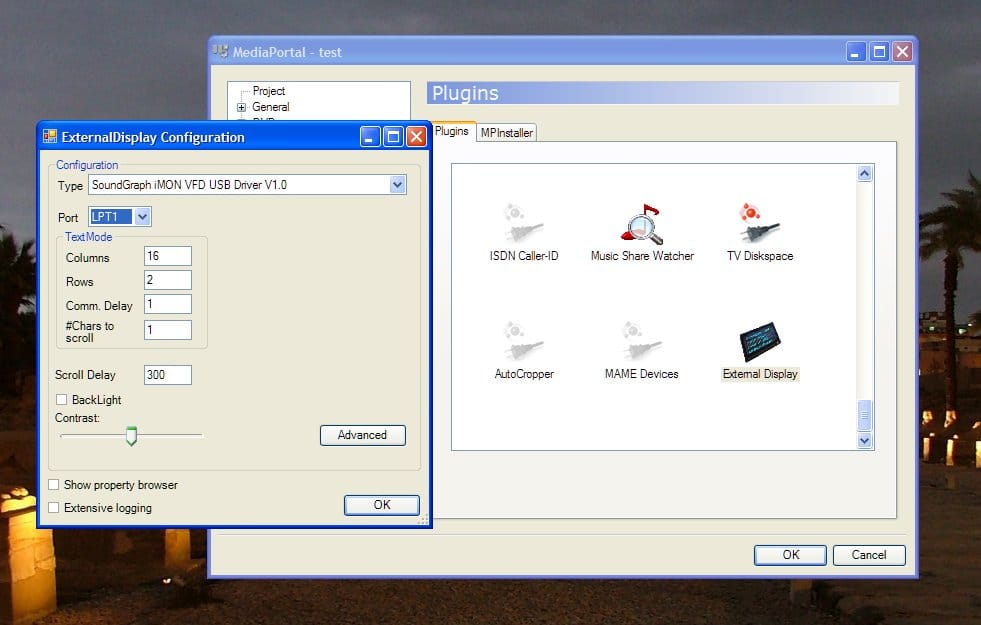
    Make sure that you turn Frontview completely off - might be a good idea to reboot too. You don't want the 3rd party plugin thing. Also make sure that you use the correct driver. There's another iMon driver you can choose in MP config - this won't work. It must be the SoundGraph iMON USB Driver V1.0 (scroll right past the iMon driver listed under the 'i's.

    Cheers,

    Rob
     

    rmeredit

    MP Donator
  • Premium Supporter
  • April 10, 2007
    164
    20
    Melbourne
    Home Country
    The VFD in your case is exactly the same as in mine (I have the 16M - the MR only has the addition of a card-reader), and I'm running under XP SP2.

    Is your VFD displaying anything? Does it work with Frontview?
     

    the letter b

    New Member
    February 8, 2008
    1
    0
    Hi Folks,

    Would love to know if dyamant has had any luck with the VFD in his case - I just purchased the LC16MR too and I am having similar problems.

    I note in the original guide it asks you to put the VFD in to 'plug-in mode' - i cant see where that exists anymore.
     

    rmeredit

    MP Donator
  • Premium Supporter
  • April 10, 2007
    164
    20
    Melbourne
    Home Country
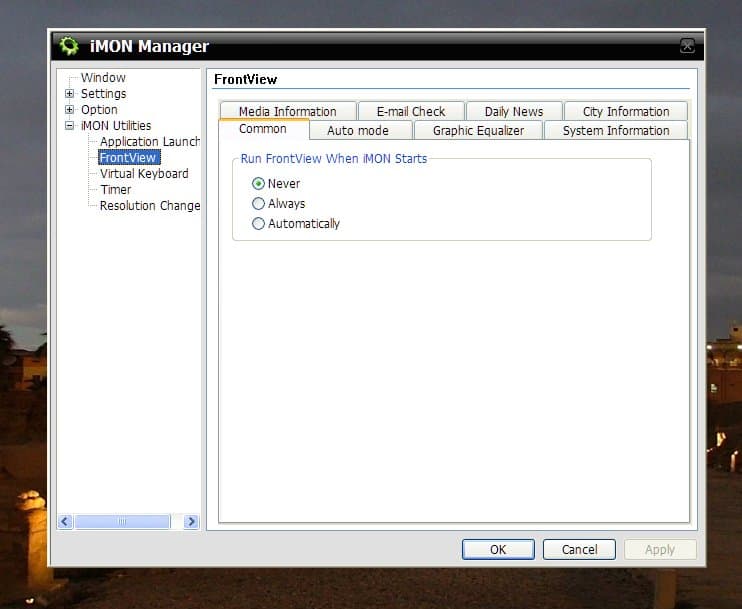
    Don't use plugin mode. Go to iMon Tools, and navigate to the Frontview settings. Make sure the "Start Frontview with iMon" option is set to Never. Click Ok. etc. Frontview should turn off.

    In MediaPortal Config go to plugins, and open up the vfd plugin config. Make sure you choose the correct driver! There are two that look like they might do the job. You want the Soundgraph iMon 1.0 USB driver.

    Reboot everything, start up MediaPortal and it should work.
     

    RadyR

    Portal Member
    June 13, 2007
    11
    0
    Home Country
    Hungary Hungary
    Hi,

    same problem here (vfd not working with mp).
    I have an LC20M, which has the same vfd as the LC16M(R) (at least in theory). I've followed the tutorial posted by pappabear72 (thank you for that) step-by-step (well, almost, i've installed mp first and then the imon driver from the cd inculded with the silverstone case).
    FrontView doesn't give me the plugin option (weird) so i turned it off completely (never load).
    Next interesting thing is that the External Display plugin doesn't offer the SoundGraph iMON USB Driver V1.0.
    I have "SoundGraph iMON Integrated VFD USB Driver V1.0" and "SoundGraph iMON Integrated VFD/LCD Driver V1.0".
    Tried both, even played around with the port settings (LPTx, COMx, USB...), but nothing.
    The VFD works with FrontView, but if i shut it down (frontview) it displays its standard message (Welcome iMon...). What am i doing wrong?

    Thanks in advance.
     

    rmeredit

    MP Donator
  • Premium Supporter
  • April 10, 2007
    164
    20
    Melbourne
    Home Country
    Here are my settings. First, iMon - open iMon Manager and make sure FrontView is turned off (see iMon.jpg).

    Then, make sure MP is configured properly - open MediaPortal Configuration, go to Plugins, and scroll down to the External Display plugin. Enable it by right clicking, and clicking on Disabled (counter intuitive, I know). Then right click on it and select configure. Change the settings to match MPExternalDisplayPlugin.jpg.

    Then, make sure you reboot or at the very least, exit iMon, and restart it manually. Perhaps just reboot to be safe. Start up MP.

    If it still doesn't work, there's not much I can help with. Ignore plugin mode, or 3rd party stuff in iMon. Just leave it as per normal, and make sure FrontView is set to Never start up.

    Good luck,

    Rob.
     

    Attachments

    • iMon.jpg
      iMon.jpg
      58.2 KB
    • MPExternalDispPlugin.jpg
      MPExternalDispPlugin.jpg
      85.6 KB

    aidbish

    MP Donator
  • Premium Supporter
  • March 7, 2007
    207
    20
    righthandside 3/4 way up
    On mine i had to select usb as the port in the externalplugin.jpg above
    also i have frontview running in task bar, but its using plugin mode
    how i got this to change was the following, in main config page of imon, make sure 3rd paty plugin is not ticked.
    secondly, right click on imon icon in task bar, select imon utilities then select frontview
    on the menu that appears select plugin mode there
    thats all i did to get it running.
     

    RadyR

    Portal Member
    June 13, 2007
    11
    0
    Home Country
    Hungary Hungary
    rmeredit, aidbish:
    Thank you both for your replies. I've set up iMon and MP exactly like rmeredit, but it didn't work.
    Unfortunatelly I have no plugin mode in frontview. Maybe because i installed imon from the silverstone cd.
    Tried the official soundgraph driver, but it didn't recognize my pad, frontview didn't work, so it was completely
    useless :(
    basically i've ran out of options and have to use frontview, to display something on the vfd...
    I will keep trying though.

    One more thing: are you able to turn on your pc via the imon pad? I' ve followed the manual during case assembly,
    connected the wires right, but still no luck. Can't fire up my htpc with the remote :(
     

    Users who are viewing this thread

    Top Bottom