My Video do not position on first page (1 Viewer)

Beppeoioi

Portal Member
July 6, 2008
9
1
Home Country
Italy Italy
Hello everyone,
I have a problem on my MediaPortal 1.1.3
In the configuration, in the video section, I set the view on title and sort by Date.
When I start the program and go on my video, movies are sorted by date but the program is placed on the page 52/67
I want the program to the default position on the first page, the page 1 / 67.
How can I do?
thanks
 

mbuzina

Retired Team Member
  • Premium Supporter
  • April 11, 2005
    2,839
    726
    Germany
    Home Country
    Germany Germany
    I think MP remembers the position you were last, so scroll to top, exit videos & restart it you should be at the top (I guess). You can use the page buttons or Pg Up & Dwn to scroll quickly.
     

    Beppeoioi

    Portal Member
    July 6, 2008
    9
    1
    Home Country
    Italy Italy
    I think MP remembers the position you were last, so scroll to top, exit videos & restart it you should be at the top (I guess). You can use the page buttons or Pg Up & Dwn to scroll quickly.

    Thanks for the reply.
    Unfortunately I tried to place them on the first page and i exit from my videos.
    I closed and restarted the program, but this always opens on page 52 of 67
    (who knows why the page just 52 ...).
    Where is stored the info of the default my video page?
    I can change the setting?

    thanks again

    Giuseppe.
     

    rekenaar

    Retired Team Member
  • Premium Supporter
  • December 17, 2006
    4,421
    805
    Home Country
    South Africa South Africa
    Hi Giuseppe

    What is your current setting in MP Configuration, Videos, Video Folders for "Remember last used folder"?
     

    Beppeoioi

    Portal Member
    July 6, 2008
    9
    1
    Home Country
    Italy Italy
    Hi Giuseppe

    What is your current setting in MP Configuration, Videos, Video Folders for "Remember last used folder"?

    Hi,
    the "Remember last used folder" in not check.
    I tried to enable the option but the problem is not solved.
    Opening my videos page is the default 52/67
    I also tried to MediaPortal upgrade from version 1.1.3 to 1.2.0 , but without result.
    The problem persists.
    my OS is windows 7 32bit :(
     

    Beppeoioi

    Portal Member
    July 6, 2008
    9
    1
    Home Country
    Italy Italy
    Hello everyone,
    I think the problem I reported is a bug in the program.
    I discovered that the default movie order of MediaPortal is by name.
    When I go to change the configuration of the view and order by date,
    the first is the default page 52/67 just because of the continent's first film list
    in order based on the name.
    So the sort is changed, but by default MediaPortal is always positioned on the first title order of name based , on page 52/67
    Can anything be done?
    Thanks to all.
     

    Paranoid Delusion

    Moderation Manager
  • Premium Supporter
  • June 13, 2005
    13,052
    2,978
    Cheshire
    Home Country
    United Kingdom United Kingdom
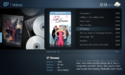
    See what you mean, you are getting below with any config\video\view settings

    12-13-46.png

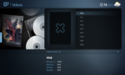
    or

    12-14-15.png

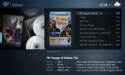
    When you want

    12-14-53.png

    Which currently does not seem possible to keep if you exit MP, Deda one for you I think ;)
     

    Beppeoioi

    Portal Member
    July 6, 2008
    9
    1
    Home Country
    Italy Italy
    See what you mean, you are getting below with any config\video\view settings

    View attachment 89082

    or

    View attachment 89081

    When you want

    View attachment 89080

    Which currently does not seem possible to keep if you exit MP, Deda one for you I think ;)

    When you do a clean install of MediaPortal, selecting MyVideo the next page shows the list of movies sorted by name, this is the default.
    For example, the first movie on the list is "300" then follow those that begin with the letter A then B, and so on.
    If I go in the left menu and choose to sort by date, the last movie that I added to the collection appear correctly on top of the list.
    I close the program and when I restart and go to my video, it return on the default sort by name.

    I saw that the MediaPortal configuration program you can configure the view of my video section.

    Imposed the view on the title and the sort based on the date (not on the year),
    because I want to see at the top the movies that I added recently.

    I start Medioportal and entering in my video section, movies are sorted correctly by date, but the default page is displayed is 52/67 instead of the Page 1 / 67
    This page It contains the film "300", which was first on the list when the view was set to sort by name.

    My impression is that the sorting is done correctly but MediaPortal is placed not on the first movie with the most recent date, but continues to position itself on the first movie of the list ordered by name ( page 52/67)...
     

    Deda

    Lead Dev MP1 Videos
  • Premium Supporter
  • March 18, 2009
    2,423
    2,385
    Zagreb
    Home Country
    Croatia Croatia
    Yeah, got it. Final sort (in this case is a date) should be done after adding items in the list (which are initially sorted by name in case we use title view) and before selected item variable is set.
    What is wrong is that items sorted by name are added to the list and selected item variable is set to the first item, then after sort is performed by date (but selected item is still not changed) MP position itself to the item which was set with "sort by name".

    So, sort is ok, but selected item is initially set "by name".

    Btw, recently added and watched views will be included in 1.3.0.

    Mantised: http://mantis.team-mediaportal.com/view.php?id=3727
     

    Users who are viewing this thread

    Top Bottom