MyFilms v4.7.3 Logorules (9 Viewers)

zebons

Portal Pro
January 2, 2006
1,484
114
I take a look and :
- - <section name="ID0000">
<entry name="LogosPath">D:\Documents and Settings\All Users\Application Data\Team MediaPortal\MediaPortal\thumbs\logos</entry>
</section>
Does that directory exist ? It's used to store Logos Images created (concatenation of Logo picture)
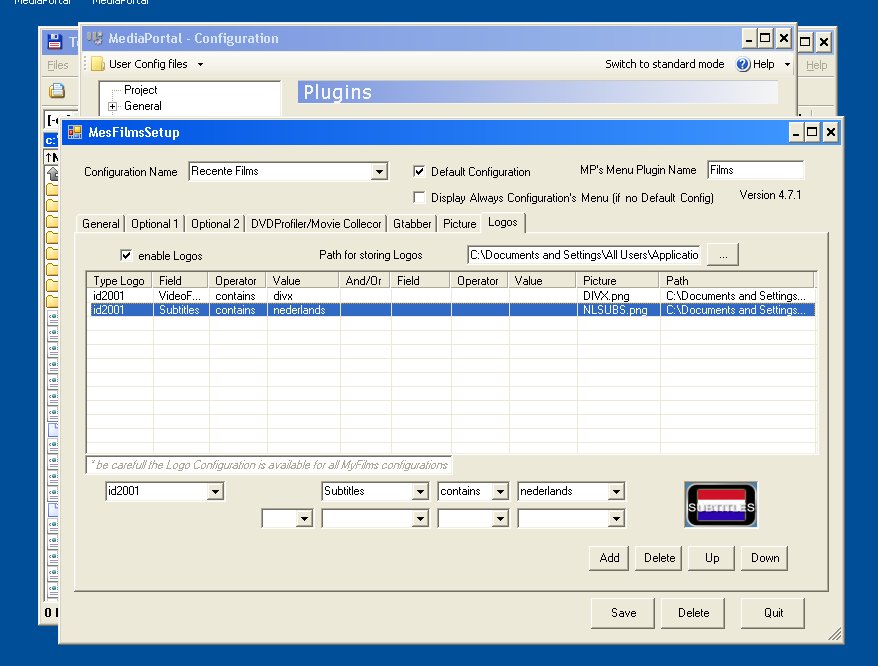
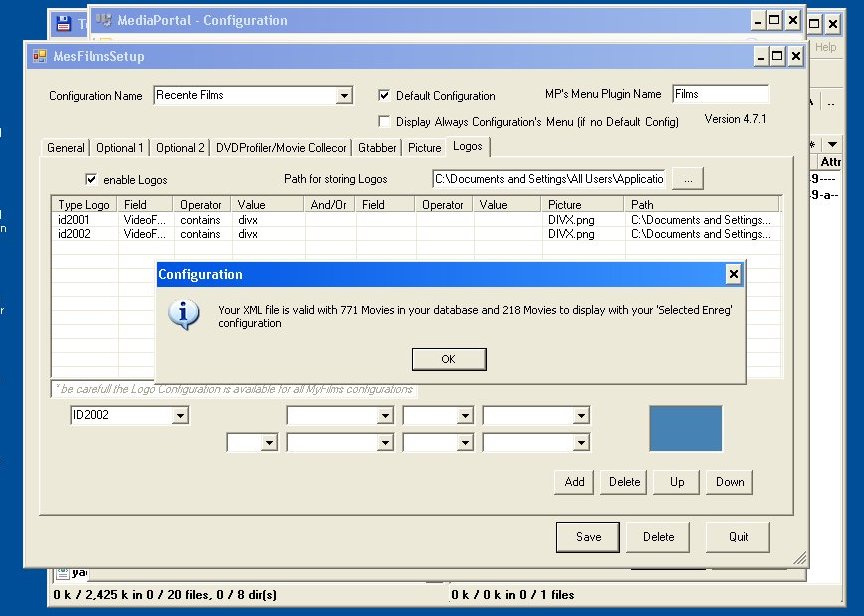
- In your Logo config, I notice that some rules have not been updated (no ptah to the logo picture) Case for ID2001_0 and all ID2002 rules ?
Can you try to update or suppress those lines and tell me if it works.
- I notice a bug on Logo management code and will deliver a new version soon, but you don't seem to be concerned (some rules are written by mistake with lower cases id2001 instaed of ID2001).

-Yes, the directory exists
- That rules are some of the default that came with the plugin. I supressed them and the logos still arent showing. I must say that I have to delete the rules by manually editing the xml, because in the config I cant.
-Hope that everything goes ok. I suggest the inclussion of the operators < and >

thanks
Can you give your mediaportal.log ?
I suggest the inclussion of the operators < and > Already done isn't it ? You can define a rule with 2 conditions linked by <AND > or <OR>
 

z3us

Portal Pro
December 4, 2007
1,047
123
46
Home Country
Spain Spain
- I notice a bug on Logo management code and will deliver a new version soon, but you don't seem to be concerned (some rules are written by mistake with lower cases id2001 instaed of ID2001).
-Hope that everything goes ok. I suggest the inclussion of the operators < and >

thanks
Already done isn't it ? You can define a rule with 2 conditions linked by <AND > or <OR>
You didnt understand me.
> is "greater than"
< is "lower than"
So a logo rule could be:
If lenght > 120 then show 2hours.png logo

I will post my mediaportal log later, at home
 

psiebe

Portal Pro
March 29, 2007
93
1
54
Home Country
Netherlands Netherlands
Hi Zebons,

Just retried, removed both logofiles I had and searched for others, (none) after that, I reconfigured a logorule, saved and exiting the first recreated (an empty)MyFilmsLogos.xml repeating these steps also recreated the logofile for my default config, but again empty. repeating the steps again updates the default config's logofiles timestamp, but not the contents.

I've included the files, and screenshots and the skinfiles I used

Thanks,
Patrick
 

Attachments

  • ruleset.jpg
    ruleset.jpg
    98.1 KB
  • ruleset-save.jpg
    ruleset-save.jpg
    94.2 KB

z3us

Portal Pro
December 4, 2007
1,047
123
46
Home Country
Spain Spain
I take a look and :
- - <section name="ID0000">
<entry name="LogosPath">D:\Documents and Settings\All Users\Application Data\Team MediaPortal\MediaPortal\thumbs\logos</entry>
</section>
Does that directory exist ? It's used to store Logos Images created (concatenation of Logo picture)
- In your Logo config, I notice that some rules have not been updated (no ptah to the logo picture) Case for ID2001_0 and all ID2002 rules ?
Can you try to update or suppress those lines and tell me if it works.
- I notice a bug on Logo management code and will deliver a new version soon, but you don't seem to be concerned (some rules are written by mistake with lower cases id2001 instaed of ID2001).

-Yes, the directory exists
- That rules are some of the default that came with the plugin. I supressed them and the logos still arent showing. I must say that I have to delete the rules by manually editing the xml, because in the config I cant.
-Hope that everything goes ok. I suggest the inclussion of the operators < and >

thanks
Can you give your mediaportal.log ?

Here you have
 

zebons

Portal Pro
January 2, 2006
1,484
114
Can you try with that dll version (to be decompress into (C:\Program Files\Team MediaPortal\MediaPortal\plugins\Windows).
You surely have to review your Logos rules for testing.

Thanks for feedbacks.
 

z3us

Portal Pro
December 4, 2007
1,047
123
46
Home Country
Spain Spain
Can you try with that dll version (to be decompress into (C:\Program Files\Team MediaPortal\MediaPortal\plugins\Windows).
You surely have to review your Logos rules for testing.

Thanks for feedbacks.

Done, but logos still not showing
 

simjoc

Portal Member
October 12, 2008
6
0
Home Country
Netherlands Netherlands
Tried all the sugesstions you make, nothing worked.
Copied from mediaportal.log
2008-10-18 07:48:28.315000 [Debug][10]: MyFilms: using Logos False
2008-10-18 07:48:30.338000 [Debug][MPMain]: TextureManager: CleanupThumbs()
2008-10-18 07:48:30.338000 [Debug][MPMain]: TextureManager: dispose: C:\Program Files\Team MediaPortal\MediaPortal\Dan in Real Life.jpg total: 6 mem left: 848297984
2008-10-18 07:48:30.342000 [Debug][MPMain]: TextureManager: dispose: C:\Program Files\Team MediaPortal\MediaPortal\Catch and Release.jpg total: 6 mem left: 849346560
2008-10-18 07:48:30.353000 [Debug][MPMain]: TextureManager: dispose: C:\Program Files\Team MediaPortal\MediaPortal\Crank.jpg total: 6 mem left: 850395136
2008-10-18 07:48:30.355000 [Debug][MPMain]: TextureManager: dispose: C:\Program Files\Team MediaPortal\MediaPortal\Crash.jpg total: 6 mem left: 851443712
2008-10-18 07:48:30.356000 [Debug][MPMain]: TextureManager: dispose: C:\Program Files\Team MediaPortal\MediaPortal\Death at a Funeral.jpg total: 6 mem left: 852492288
2008-10-18 07:48:30.358000 [Debug][MPMain]: TextureManager: CleanupThumbs()
2008-10-18 07:48:30.370000 [Info.][MPMain]: Loading references from C:\Program Files\Team MediaPortal\MediaPortal\Skin\Monochrome\references.xml
2008-10-18 07:48:30.372000 [Info.][MPMain]: original skin size:1366x768
2008-10-18 07:48:30.507000 [Debug][MPMain]: Window: MesFilms.MesFilmsDetail init
2008-10-18 07:48:52.562000 [Info.][MPMain]: Main: Exit requested
 

Attachments

  • mediportal.jpg
    mediportal.jpg
    147.6 KB

zebons

Portal Pro
January 2, 2006
1,484
114
Tried all the sugesstions you make, nothing worked.
Copied from mediaportal.log
2008-10-18 07:48:28.315000 [Debug][10]: MyFilms: using Logos False
2008-10-18 07:48:30.338000 [Debug][MPMain]: TextureManager: CleanupThumbs()
2008-10-18 07:48:30.338000 [Debug][MPMain]: TextureManager: dispose: C:\Program Files\Team MediaPortal\MediaPortal\Dan in Real Life.jpg total: 6 mem left: 848297984
2008-10-18 07:48:30.342000 [Debug][MPMain]: TextureManager: dispose: C:\Program Files\Team MediaPortal\MediaPortal\Catch and Release.jpg total: 6 mem left: 849346560
2008-10-18 07:48:30.353000 [Debug][MPMain]: TextureManager: dispose: C:\Program Files\Team MediaPortal\MediaPortal\Crank.jpg total: 6 mem left: 850395136
2008-10-18 07:48:30.355000 [Debug][MPMain]: TextureManager: dispose: C:\Program Files\Team MediaPortal\MediaPortal\Crash.jpg total: 6 mem left: 851443712
2008-10-18 07:48:30.356000 [Debug][MPMain]: TextureManager: dispose: C:\Program Files\Team MediaPortal\MediaPortal\Death at a Funeral.jpg total: 6 mem left: 852492288
2008-10-18 07:48:30.358000 [Debug][MPMain]: TextureManager: CleanupThumbs()
2008-10-18 07:48:30.370000 [Info.][MPMain]: Loading references from C:\Program Files\Team MediaPortal\MediaPortal\Skin\Monochrome\references.xml
2008-10-18 07:48:30.372000 [Info.][MPMain]: original skin size:1366x768
2008-10-18 07:48:30.507000 [Debug][MPMain]: Window: MesFilms.MesFilmsDetail init
2008-10-18 07:48:52.562000 [Info.][MPMain]: Main: Exit requested
Something is wrong...
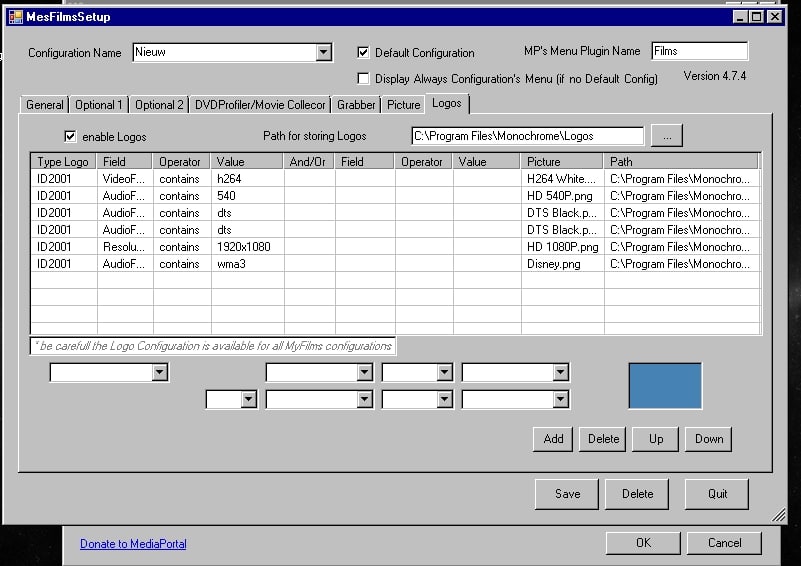
On your setup screen, Logos are enabled and in MP.log we get 'MyFilms: using Logos False'
Can you try with that dll (v4.7.5) it'd be better :oops:
 

Users who are viewing this thread

Top Bottom