[NEW] MyFilms v4.7.9a (1 Viewer)

zebons

Portal Pro
January 2, 2006
1,484
114
Hi

First thanks a lot for that great PlugIn (using 3 databases ona daily basis, from 3 computers : perfect).

I've tried many ways (all I could imagine, but I don't have that much of imagination I fear ...) to get logos visible.

- MP 1.0 RC3
- My Films 4.7.6
- Skin Blue3 or Blue3Wide -> no change : no logos :(

Is there anything obvious I missed please?

Regards
For Logos, you have to define your own Logos rules in the setup.
After installing the 4.7x version, if you enter in the setup and enable Logos, you get a Template of rules.
You have to select each of them and define the complete path to the Logo thimb file. Logos Thumbs aren't delivered in the MyFilms package and template rules are based on Logos Thumbs of TVSeries.
Save your setup and you should have Logos...
 

Eyep0p

Portal Pro
June 24, 2007
146
3
Home Country
Germany Germany
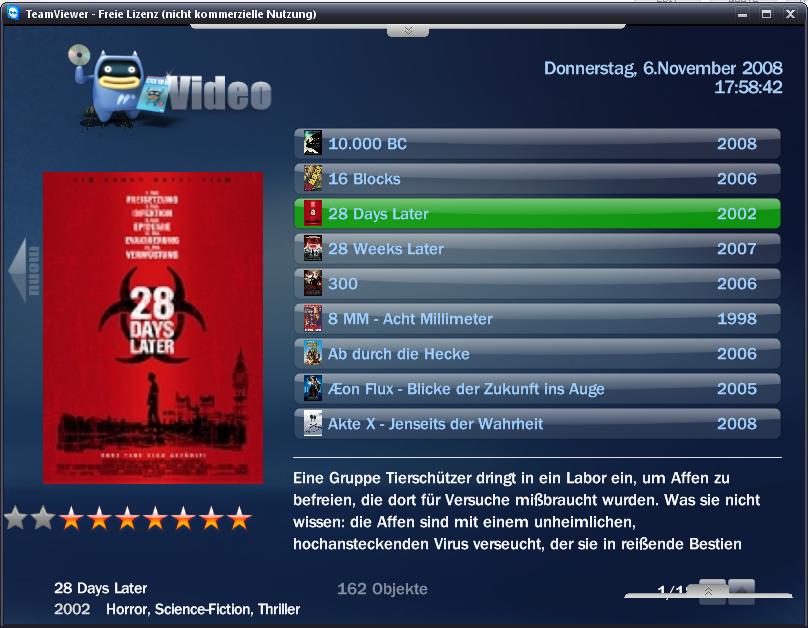
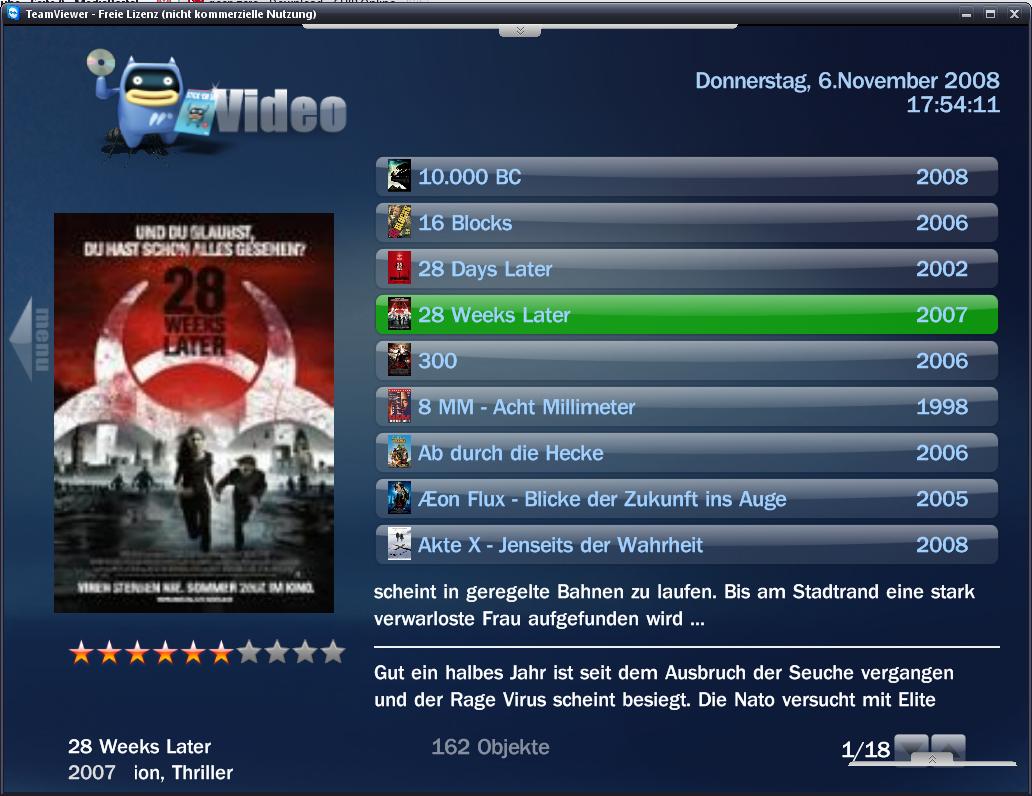
this is fullscreen, but i captured the teamviewer window. (its a tool like UltraVNC, to remotecontrol your PC)
here is the screen from the pc itself!
I think it's a MP display bug. In my case I have the same issue when I'm in windows mode but not in fullscreen (my resolution is 1280*1024). I'll take a look on skin parameters but can you try with a higher resolution ? and eventually post a subject on the MP1 General Support forum ?

[EDIT] : Can you try with the skin file joined (to put in the skin\Blue3 directory)

hi zebons!

thank you for that xml file... tested it with following result... (left screen)
with the old file on 1024x768 see the right picture.
 

Attachments

  • myfilms3.JPG
    myfilms3.JPG
    77.2 KB
  • myfilms2.JPG
    myfilms2.JPG
    115.6 KB

zebons

Portal Pro
January 2, 2006
1,484
114
this is fullscreen, but i captured the teamviewer window. (its a tool like UltraVNC, to remotecontrol your PC)
here is the screen from the pc itself!
I think it's a MP display bug. In my case I have the same issue when I'm in windows mode but not in fullscreen (my resolution is 1280*1024). I'll take a look on skin parameters but can you try with a higher resolution ? and eventually post a subject on the MP1 General Support forum ?

[EDIT] : Can you try with the skin file joined (to put in the skin\Blue3 directory)

hi zebons!

thank you for that xml file... tested it with following result... (left screen)
with the old file on 1024x768 see the right picture.
Do you think the new file is better for you ?
In that case, I'll put it in the mpi package as it works also for higher resolutions.
 

Eyep0p

Portal Pro
June 24, 2007
146
3
Home Country
Germany Germany
don't use it for the package! as you can see on the screen the stars are mirrored!
maybe i get time to look in the skin file and find the prob. i think the stars are scaled wrong.
 

BraX

Portal Member
October 13, 2007
28
2
Home Country
France France
Thanks for your quick answer, and sorry to have been unprecise in my first post :

I, of course, have activated the logos in the plugin. I made a test rule that i'm sure should display the logo when in MP (i'm using latest SVN 20683 from top of my mind by the way).

Can't make those logos appear. Not a biggie, but now I know it exists, I, of course, want them :p

Thanks again

Screenshot

MesFilms.jpg
 

zebons

Portal Pro
January 2, 2006
1,484
114
Thanks for your quick answer, and sorry to have been unprecise in my first post :

I, of course, have activated the logos in the plugin. I made a test rule that i'm sure should display the logo when in MP (i'm using latest SVN 20683 from top of my mind by the way).

Can't make those logos appear. Not a biggie, but now I know it exists, I, of course, want them :p

Thanks again

Screenshot

MesFilms.jpg
Can you attach folliwing files :
  • MyFilms.xml setup file
  • MyFilmsLogos_<skinname>.xml setup Logos file
  • MediaPortal.log made during MyFilms plugin tests
  • MesFilms.xml and MesFilmsDetails.xml skin files
 

bywood1969

Portal Member
March 4, 2008
8
1
Home Country
United Kingdom United Kingdom
Hi Zebons,

Just loaded up 4.7.6 anf looks great. I mainly use your plugin with MP and had one question I'm hoping you can answer or point me in the right direction. I have copied a number of DVD's using DVD Decryopter and then DVD Shrink to just extract the movie. Your plugin runs these perfectly however is there any way to automatically go back to the My Films screen when the movie has ended - currently I get a black screen and have to press Backup on the remote. Easy for me but not intuitive to other users?

Cheers,
 

BraX

Portal Member
October 13, 2007
28
2
Home Country
France France
Hi Zebons,

Here are the requested files.

I couldn't find a "MyFilmsLogos_<skinname>.xml" file, I just have a "MyFilmsLogos_configname.xml" where configname is one of my configuration files for MyFilms.

Thanks for helping me
 

Attachments

  • MesFilmsDetail.xml
    30.6 KB
  • MesFilms.xml
    30.6 KB

zebons

Portal Pro
January 2, 2006
1,484
114
Hi Zebons,

Here are the requested files.

I couldn't find a "MyFilmsLogos_<skinname>.xml" file, I just have a "MyFilmsLogos_configname.xml" where configname is one of my configuration files for MyFilms.

Thanks for helping me
I take a look on your files and see one possible problem : some Logos rules aren't completely defined (surely you don't use them). Can you delete Logos entries that you don't use and try again ?
 

grubi

Portal Pro
June 16, 2007
1,207
87
127.0.0.1
Home Country
Germany Germany
HI.

It's just the first time looking at myFilms. What I'm looking for: Is there a view where only the not viewed films are displayed? This would be much usefull for big collections.

Regards,
grubi.
 

Users who are viewing this thread

Top Bottom