New Skinelements in ThumbnailPanel (1 Viewer)

Bavarian

Retired Team Member
  • Premium Supporter
  • April 4, 2005
    698
    167
    Germany, Bayern
    Home Country
    Germany Germany
    Hi Skinners,

    from SVN 23486 on you have a new feature in ThumbnailPanel to play with. :D

    ThumpnailPanel now has Frames. :eek:

    The SkinEngiene is painting the Frames in front of the Thumbs.

    The new skinning elements are:

    Code:
    <control>
    [INDENT]<type>thumbnailpanel</type>
    ...
    [B]<showFrame>[COLOR="RoyalBlue"]true[/COLOR]</showFrame>
    <frameNoFocus>[COLOR="RoyalBlue"]Thumb_Frame_NoFocus.png[/COLOR]</frameNoFocus>
    <frameFocus>[COLOR="RoyalBlue"]Thumb_Frame_Focus.png[/COLOR]</frameFocus>[/B]
    ...
    [/INDENT]
     </control>

    Here are one example of this new feature:

    Currently myMusic is looking like this:
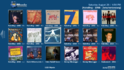
    OldThumbnailPanel.png

    Now you are able to round the corners with the new feature, like this:
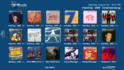
    NewThumbnailPanel.png


    I hope to see a lot of new frames in your up comming skins. :)
     

    emphatic

    Design Group
  • Team MediaPortal
  • August 25, 2006
    3,758
    1,250
    Alingsås
    Home Country
    Sweden Sweden
    How is this different from before? Does it mean that you can have real transparency directly around these images, or do these frames have to be the same color as the background (like some skinners has done in the past)?

    Thanks!
    Emph
     

    Bavarian

    Retired Team Member
  • Premium Supporter
  • April 4, 2005
    698
    167
    Germany, Bayern
    Home Country
    Germany Germany
    Hi Emph,

    let me start with the definition of one panel item:

    "Old" ThumbnailPanel draws:
    1) Folder
    2) Thumb


    "New" ThumbnailPanel draws:
    1) Folder
    2) Thumb
    3) Frames

    In other words, the skin engine is drawing first the Folder, then on top the Thumb and then on top the Frame.
    This means that some parts of the Frames need transparency otherwise you will not be able to see the Thumbs.
     

    Spragleknas

    Moderator
  • Team MediaPortal
  • December 21, 2005
    9,471
    1,822
    Located
    Home Country
    Norway Norway
    I don't think you understand the question (or I did not understand the answer :D).

    Is the "cut off" in the rounded corners (now seen as blue) the background (ie. background.png), or just part of the frame image containing the same colour as the background to "disguise" it?
     

    Bavarian

    Retired Team Member
  • Premium Supporter
  • April 4, 2005
    698
    167
    Germany, Bayern
    Home Country
    Germany Germany
    The "cut off" in the rounded corners are part of the frame image containing the same color as the background to "disguise" it.
     

    Spragleknas

    Moderator
  • Team MediaPortal
  • December 21, 2005
    9,471
    1,822
    Located
    Home Country
    Norway Norway
    Ah... so not what emphatic was hoping for, I guess. This won't work if you use advanced background or fanart then...
     
    J

    joostzilla

    Guest
    Ah... so not what emphatic was hoping for, I guess. This won't work if you use advanced background or fanart then...

    I agree, what we really need is a mask. The frame on top still has some nice design possibilities though. Focus glow, highlights etc.
    Btw why cant we have masks. The thumbmask works fine in filmstrip. Why not for thumbnail panels?
     

    Harley

    Retired Team Member
  • Premium Supporter
  • May 7, 2004
    2,053
    1,993
    Germany
    Home Country
    Germany Germany
    ...works perfekt !

    Thumbframe screenshot.jpg

    Many thanks to Bavarian ! ;):)

    Greetings Harley
     

    Harley

    Retired Team Member
  • Premium Supporter
  • May 7, 2004
    2,053
    1,993
    Germany
    Home Country
    Germany Germany
    Ah... so not what emphatic was hoping for, I guess. This won't work if you use advanced background or fanart then...


    That will be no big problem, if you use a smal border arround that covers the edges, you can use it also with advanced backgrounds or fanart.

    Greetings Harley :)
     

    Users who are viewing this thread

    Top Bottom