Newbie Question (3 Viewers)

Dickdastardly

Portal Member
August 7, 2012
31
2
Home Country
United Kingdom United Kingdom
What does the power scheduler plugin option: Only allow standby when on home window mean?
If I don't tick this box my computer with go to stand by after the time setting I have made,regardless of whether Im running MP or not.Not really ideal,but if I select the option to 'only allow standby when on home window,will my computer standby after a set recording?
 

mbuzina

Retired Team Member
  • Premium Supporter
  • April 11, 2005
    2,839
    726
    Germany
    Home Country
    Germany Germany
    As I said, I recommend PS++ and not the built in one. The option you mentioned does exactly what it says, it only sends the pc to sleep if MP is running and on the home screen. Your second part of the question depends if you let MP restart on the homescreen (as I do) or if you let it resume on the last screen that was active.
     

    Dickdastardly

    Portal Member
    August 7, 2012
    31
    2
    Home Country
    United Kingdom United Kingdom
    How do I :
    Let MP restart on the homescreen (as I do) or if you let it resume on the last screen that was active.
     

    Dickdastardly

    Portal Member
    August 7, 2012
    31
    2
    Home Country
    United Kingdom United Kingdom
    Sorry if Im repeating the question but:

    I have just found out that Win Xp has a hibernate function.Is it possible to set a couple of recordings in MP then put sytem in 'hibernate' mode.When it is time for the recording could my computer be restarted,the program recorded then go back into 'hibernate' mode?
    Im just confused about this arrangement.
     

    Lehmden

    Retired Team Member
  • Premium Supporter
  • December 17, 2010
    12,584
    3,973
    Lehmden
    Home Country
    Germany Germany
    Hi.
    Sure this is possible. This is done by a TV Server plugin. There is the plugin PowerSheduler. It's included to all recent MediaPortal versions. And as an alternative with more options there is PowerSheduler++ a community plugin. You can find this in the plugins section of the forum...
     

    mbuzina

    Retired Team Member
  • Premium Supporter
  • April 11, 2005
    2,839
    726
    Germany
    Home Country
    Germany Germany
    It depends on your bios. Some Systems can do this with hibernation, others can do this only on standby, just test it.
     

    Fafnir

    MP Donator
  • Premium Supporter
  • November 19, 2006
    201
    48
    45
    Home Country
    Germany Germany
    It depends on your bios. Some Systems can do this with hibernation, others can do this only on standby, just test it.
    True, it depends on the BIOS but also on your Windows. Hibenation was always problematic on WinXP for my systems.
    Wake up from S3 and S4 sleep works without any glitch under Win7.
    Win XP always worked with suspend-to-RAM - as mbuzina says: Test it. Good luck!

    Greetings Fafnir
     

    Dickdastardly

    Portal Member
    August 7, 2012
    31
    2
    Home Country
    United Kingdom United Kingdom
    Everythings gone pear shaped now.Had to do a acronis recovery.MP would not switch to hibernate or standby.Windows screen said preparing to hibernate or standby then system would freeze along with mouse pointer.The only way around the problem was to stop Tv services.
    So Im back to where I started.All I want to do is set a recording place my pc in standby or hibernate mode have MP restart my pc record the program then resume standby or hibernate.
    Maybe im just plain thick,but I can't work it out.Thanks for all your help and suggestions.Looks like I'll just be watching Tv instead of recording it.
     

    Holzi

    Super Moderator
  • Team MediaPortal
  • April 21, 2010
    7,934
    2,235
    Ba-Wü
    Home Country
    Germany Germany
    Everythings gone pear shaped now.Had to do a acronis recovery.MP would not switch to hibernate or standby.Windows screen said preparing to hibernate or standby then system would freeze along with mouse pointer.The only way around the problem was to stop Tv services.
    So Im back to where I started.All I want to do is set a recording place my pc in standby or hibernate mode have MP restart my pc record the program then resume standby or hibernate.
    Maybe im just plain thick,but I can't work it out.Thanks for all your help and suggestions.Looks like I'll just be watching Tv instead of recording it.

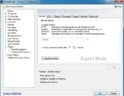
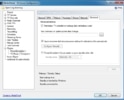
    Have you tested the PowerScheduler++?
    It works fine for me. Here are my settings:
    2.jpg
    1.jpg

    After 5mins of idling the HTPC goes to standby.
     

    Users who are viewing this thread

    Top Bottom