No E.P.G Guide (1 Viewer)

Dickdastardly

Portal Member
August 7, 2012
31
2
Home Country
United Kingdom United Kingdom
Have just done a fresh channel search and it now has film4+1 but I have lost the epg for all channels.It just states that 'no data is available'.
Can't understand what has happened and don't know how to resolve it.Don't understand how to set-up the epg.
Any help would be appreciated.
 

Dickdastardly

Portal Member
August 7, 2012
31
2
Home Country
United Kingdom United Kingdom
DVB-T/T2 via aerial.
Everything was working fine until I deleted the channel list,after the new scan nothing 'no data available'.The epg was working fine,without deleting my channel list I did a scan,it found Film4+1 and added it to the guide however there was no epg for this channel,so I decided to delete the channel list and re-scan now there is no epg for any channel.
I don't know how to set-up the epg properly and the team mediaportal help page isn't really helping.
 

Dickdastardly

Portal Member
August 7, 2012
31
2
Home Country
United Kingdom United Kingdom
Have performed a fresh channel search and now some of the epg data is showing in the guide ,but there are lots that are not.I don't know what else I can do.Please help.
 

wizard123

Retired Team Member
  • Premium Supporter
  • January 24, 2012
    2,523
    2,715
    Home Country
    United Kingdom United Kingdom
    Are you using webepg plugin or just default settings of letting it grab epg data over the air ?
     

    Dickdastardly

    Portal Member
    August 7, 2012
    31
    2
    Home Country
    United Kingdom United Kingdom
    I've just this minute done another fresh scan and now I have no channel epg data.
    I am just grabbing epg data over the air.
     

    wizard123

    Retired Team Member
  • Premium Supporter
  • January 24, 2012
    2,523
    2,715
    Home Country
    United Kingdom United Kingdom
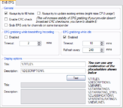
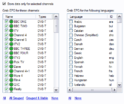
    I don't think doing fresh scans are going to help you, can you take a screenshot of your epg grabbing settings in tvserver config ?
     

    robbo100

    Retired Team Member
  • Premium Supporter
  • May 5, 2009
    1,290
    309
    UK
    Home Country
    United Kingdom United Kingdom

    Dickdastardly

    Portal Member
    August 7, 2012
    31
    2
    Home Country
    United Kingdom United Kingdom
    robbo100 I've tried watching tv and waiting...........still no different.
    wizard123 I've attached the screen shot files.
    It does say in the set-up that not all the channels need selecting but only one from a group however I don't know which channels they are.[DOUBLEPOST=1378993965][/DOUBLEPOST]For some strange reason I now have a full EPG guide however I have another problem:In the channel list Quest has been given channel number 38 but if I select this number on my keyboard I get Rocks + Co1(this channel has been given the channel number 40)if I select 36 on my keyboard I get Quest.
    Very strange but it is only a minor inconvenience,but I'd like to sort that out as well if possible.
     

    Attachments

    • DVB EPG.png
      DVB EPG.png
      24.1 KB
    • EPG Settings.png
      EPG Settings.png
      19.1 KB
    Last edited:

    wizard123

    Retired Team Member
  • Premium Supporter
  • January 24, 2012
    2,523
    2,715
    Home Country
    United Kingdom United Kingdom
    From your screenshot it is set to only grab epg data when idle not when timeshifting so makes sense you were not getting anything while watching tv. As for the channel number i'm not sure have you right clicked and edited the channel ?
     

    Users who are viewing this thread

    Top Bottom