No video/sound with nova-t 500 (1 Viewer)

postalmind

Portal Member
October 21, 2008
7
0
MediaPortal Version: MediaPortal v0.9.3.20432
MediaPortal Skin: default
Windows Version: Xp SP3
CPU Type: Athlon 3500+
Video Card: Nvidia 7800Gt
Sound Card: Integrated

1. TV Card: Hauppauge Nova-t 500
MPEG2 Video Codec: Dscaler
MPEG2 Audio Codec: Dscaler
h.264 Video Codec: None/unspecified


Hello, i've got some trouble with Mediaportal, I've scanned the channels and many channels are found.
But when I switch to the TV, there is no video and no sound.
I'm using the last driver from Hauppauge and the SP3.

Attached the logs : I don't see anything strange :confused:

Thanks.
 

postalmind

Portal Member
October 21, 2008
7
0
crazyfool
Yes i use 3 different codecs (hauppauge,mp and dscaler), any else i should test ?

Paranoid Delusion
I didnt use the TVserver, just the TV plugin. Should I use the TV server ?

And the configuration pane shows me only one tuner, but at worst i don't care.

thanks for you reply.
 

Paranoid Delusion

Moderation Manager
  • Premium Supporter
  • June 13, 2005
    13,052
    2,978
    Cheshire
    Home Country
    United Kingdom United Kingdom
    The graphedit picture shows no filters assigned in config to the TV tuner, are they shown under the television options.

    Regarding using TVServer, if your happy only being able to access 2 channels at once (1 recording\1watching or 2 recording), then use MP's built in TV module, if you wish to use more (2 + recording and another viewing, depending on how many channels broadcast on each transponder fequency, i can record upto 11 at once if i wished) then TVServer needed, but you would have to delete all mediaportal user files, during the uninstallation and start afresh.
     

    postalmind

    Portal Member
    October 21, 2008
    7
    0
    The graphedit picture shows no filters assigned in config to the TV tuner, are they shown under the television options.
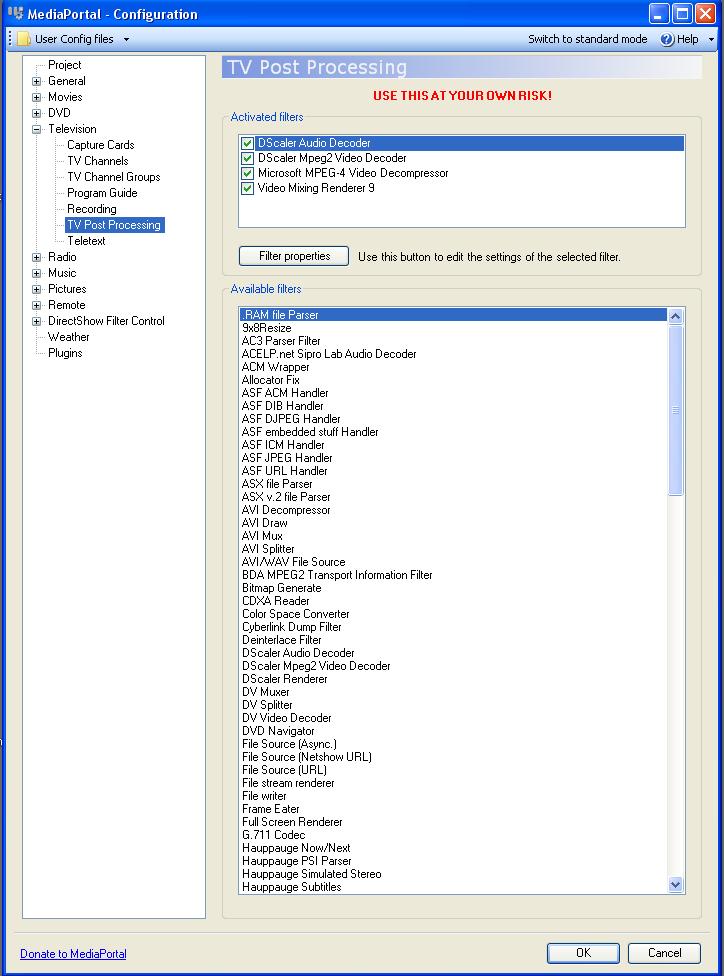
    Ok i saw the list of filters in the TV options, but the list is huge, which one should i choose ? I tried some of them but it don't work. (see the pic)

    And i think the TV plugins is enough for me so i will use it for now.

    Thanks for your help.
     

    Attachments

    • config.jpg
      config.jpg
      103.9 KB

    Paranoid Delusion

    Moderation Manager
  • Premium Supporter
  • June 13, 2005
    13,052
    2,978
    Cheshire
    Home Country
    United Kingdom United Kingdom
    LOL, you definately do not want those enabled, go up to the "Television" your codecs are selected there.

    Do not activate any postprocessing, just unticking will disable those.

    Regards
     

    postalmind

    Portal Member
    October 21, 2008
    7
    0
    Oh, ok so the problem comes form the codecs ?
    I untick the filters and i select different codecs configuration, i've installed K-lite codec and ffdshow but there still no video/sound. What codec do you use ?
     

    Paranoid Delusion

    Moderation Manager
  • Premium Supporter
  • June 13, 2005
    13,052
    2,978
    Cheshire
    Home Country
    United Kingdom United Kingdom
    in above screen keep the audio renderer as default sound device.

    Try installing .net3.0, then under directshow filters\renderer, try changing to EVR

    does that make any difference.

    Use the MPV for Video and ffdshow for audio.
     

    postalmind

    Portal Member
    October 21, 2008
    7
    0
    I followed your advices : default device for audio renderer , MPV for video and ffdshow for audio.
    I've installed Net.30 and i try with VMR9 and EVR but nothing more than a black screen and no audio.
    I don't see any other reason for this problem.
    I think that i've no luck . Thanks anyway. :D
     

    Users who are viewing this thread

    Top Bottom