United States of America
New installation of MediaPortal on a 64-bit Windows Vista SP2 (beta...yes, I know) w/ a Hauppauge WinTV-HVR-1800 card. The setup went smooth and I followed all of the directions. This is a singleseat installation and I chose NOT to have HDTV support. I only need basic cable analog support.
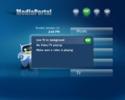
When clicking the TV button, I always get the message "Live TV in background - No Video/TV playing - Make sure a video is playing".
Within TV-Server Configuration, I can preview the tv channels just fine and the tv channels also come through fine in other applications (WinTV, Media Center, etc).
No TVService service was installed when I installed MediaPortal, though I'm not sure if it's supposed to be installed with the singleseat configuration...I haven't found a clear answer to that in the docs or forums. If this is required, how do I install it? I tried running the install again, but it said everything was already installed so the installation had nothing to do.
The latest Hauppauge drivers have been installed & I have attached the output from the logs collector.
Thanks!
Mac
When clicking the TV button, I always get the message "Live TV in background - No Video/TV playing - Make sure a video is playing".
Within TV-Server Configuration, I can preview the tv channels just fine and the tv channels also come through fine in other applications (WinTV, Media Center, etc).
No TVService service was installed when I installed MediaPortal, though I'm not sure if it's supposed to be installed with the singleseat configuration...I haven't found a clear answer to that in the docs or forums. If this is required, how do I install it? I tried running the install again, but it said everything was already installed so the installation had nothing to do.
The latest Hauppauge drivers have been installed & I have attached the output from the logs collector.
Thanks!
Mac