
No Video/TV playing (1 Viewer)

Megalomac

New Member
December 27, 2008
3
0
Home Country
United States of America United States of America
New installation of MediaPortal on a 64-bit Windows Vista SP2 (beta...yes, I know) w/ a Hauppauge WinTV-HVR-1800 card. The setup went smooth and I followed all of the directions. This is a singleseat installation and I chose NOT to have HDTV support. I only need basic cable analog support.

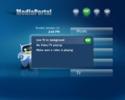
When clicking the TV button, I always get the message "Live TV in background - No Video/TV playing - Make sure a video is playing".

Within TV-Server Configuration, I can preview the tv channels just fine and the tv channels also come through fine in other applications (WinTV, Media Center, etc).

No TVService service was installed when I installed MediaPortal, though I'm not sure if it's supposed to be installed with the singleseat configuration...I haven't found a clear answer to that in the docs or forums. If this is required, how do I install it? I tried running the install again, but it said everything was already installed so the installation had nothing to do.

The latest Hauppauge drivers have been installed & I have attached the output from the logs collector.

Thanks!

Mac
 

Megalomac

New Member
December 27, 2008
3
0
Home Country
United States of America United States of America
Wow...still no replies? Didn't I ask nicely enough, or is this issue a stumper?

As far as I can tell, this app just plain doesn't work. I can see the nice ui, but it doesn't do a whole lot of good on my htpc if I can't get a tv signal. Again, the tv works fine from in the tvcard manufacturer-provided app and in MCE.
 

xr04148

Portal Member
July 1, 2008
9
0
Home Country
Germany Germany
Hi,

is the TV-service running? Go to service in your system and check, if it has started automatically...
 

x4mer

MP Donator
  • Premium Supporter
  • November 8, 2007
    306
    24
    Toronto
    Home Country
    Canada Canada
    Background video

    The error message you're getting, is the error that's thrown when background video is selected while no video is currently playing. I get the error message, as seen in the attached pic, when clicking the toolbar icon highlighted in the pic. Your Mediaportal log says:

    "2008-12-26 16:34:56.088000 [Info.][MPMain]: Main: Using live TV as background"

    I don't know of any setting that should automatically put TV in background mode all the time, so I am at a loss as to what's causing your problem.
     

    Attachments

    • bkgnd_vid.JPG
      bkgnd_vid.JPG
      62.9 KB

    Megalomac

    New Member
    December 27, 2008
    3
    0
    Home Country
    United States of America United States of America
    Thanks for the replies.

    xr04148, the tv-service is not installed as I mentioned in my first email. I do want to watch tv, but the singleseat installation did not install the service. Is this service required in order to view tv?

    x4mer - yes, that's the exact error I am receiving. Thanks for posting it! Though I don't really understand your explanation...the main point of my post was to determine how to get a tv signal via mediaportal. I assumed that that button was to get to live tv, and all I get is that error.

    I don't need live tv as background (whatever that really means), but I'm very new to MediaPortal, so I'm probably just not setting something up correctly.

    Mac
     

    xr04148

    Portal Member
    July 1, 2008
    9
    0
    Home Country
    Germany Germany
    I am running a multiseatinstallation, I think, yes you need the tv-service for a single one as well. Start
    the installation programm again, you will get three options (I try to remember), choose the tv-server and
    install it.......
     

    x4mer

    MP Donator
  • Premium Supporter
  • November 8, 2007
    306
    24
    Toronto
    Home Country
    Canada Canada
    I assumed that that button was to get to live tv, and all I get is that error.

    I don't need live tv as background (whatever that really means), but I'm very new to MediaPortal, so I'm probably just not setting something up correctly.

    Mac

    No, that button is not for live TV. Once you have video of any sort running, either via TV or the video libraray etc., that button is used to then make that video the background 'wallpaper' of the theme currently in use.

    To launch TV, you have to go through the TV entry in the main menu as seen in the bottom of my pic. Then enter the guide (if you have aleady imported EPG data somehow), and pick a channel. Otherwise select the button a few ticks down on the left (inside the TV section) that says to turn TV on.

    You say in your first post that you ran TV Server configuration. If this exists on your system, then the TV Service was installed. Plus, you say you were able to check the channels in the TV server config app, so definately TV service is running, as that util relies on the TV Service to work at all. If TV Service is not running, then it comes up during the launch of the TV Server Config util, stating that it is not running & asking if you would like to start it.

    From your logs:

    2008-12-26 16:34:45.899000 [Info.][MPMain]: Main: TV service is in status Running - proceeding...
     

    Users who are viewing this thread

    Top Bottom