(Old) My Emulators (9 Viewers)

mortstar

MP Donator
  • Premium Supporter
  • January 30, 2008
    414
    41
    Home Country
    England England

    Kingfisher

    MP Donator
  • Premium Supporter
  • March 16, 2008
    26
    6
    Bedfordshire
    Home Country
    England England
    Missing Thumbnails

    I think I've found the solution to the missing thumbnail icons for the emulators.

    Whilst browsing the SVN, I noticed the following change to "options.cs" last October :

    "Changed the paths of thumbs and DB file to the absolute path gotten from Assemby info instead of just using the working folder"

    It then occured to me that, under Vista, the thumbs directory etc. are NOT in the MediaPortal install directory (ie under Program Files), but are stored in another Team MediaPortal directory under ProgramDATA.

    So, I created a thumbs directory in the Program Files\Team MediaPortal\Mediaportal directory, placed the icons in there under \myemulators\emulators, and hey presto, icons are back. :D

    No idea if this has affected XP as I only use Vista, but I suspect it doesn't.

    Hope this helps anyone.
     

    Chreekar

    Community Plugin Dev
    November 11, 2006
    234
    52
    Stockholm
    Home Country
    Sweden Sweden
    Thanks for the help, I am impressed of the research :D The next question is of course how to make a solution to this problem without involving the user to create a folder. Does anyone know if MP has some variables that one can use to locate the path of things like DB and thumbs? Otherwise, I'll have to make an operating system check and use different folders when in XP and when in Vista...
     

    chefkoch

    Retired Team Member
  • Premium Supporter
  • October 5, 2004
    3,129
    1,635
    Dresden / Munich / Maastricht
    Home Country
    Germany Germany
    Thanks for the help, I am impressed of the research :D The next question is of course how to make a solution to this problem without involving the user to create a folder. Does anyone know if MP has some variables that one can use to locate the path of things like DB and thumbs? Otherwise, I'll have to make an operating system check and use different folders when in XP and when in Vista...

    yup it has,

    i just wanted to show you the source file which does the job, but then i notice we have it twice in mp code, which is an issues imo. Already talked with some devs about it.
    Anyway here are the files:
    #1: SourceForge.net Repository - [mediaportal] View of /trunk/mediaportal/Utils/Configuration/Config.cs
    #2: SourceForge.net Repository - [mediaportal] View of /trunk/mediaportal/Core/Util/Config.cs

    maybe one of them will be deleted next days, but not sure.
    You can check the sources of some config sections of the config tool for mp, if you want to know how to use the Config.Dir enums.

    regards
    chefkoch
     

    KeyMaster

    New Member
    April 15, 2008
    3
    0
    Hi,

    First let me say thank you Chreekar, this plug in seems very cool. I am having trouble though. I searched through these pages, but didn't see a solution... please forgive me if I missed it.

    I have installed the plugin and I configured it. I go to Media Portal, and I see the My Emulators there. I configured it for Project 64, pointing the plug in to the Project 64 executable, and to the Roms folder.

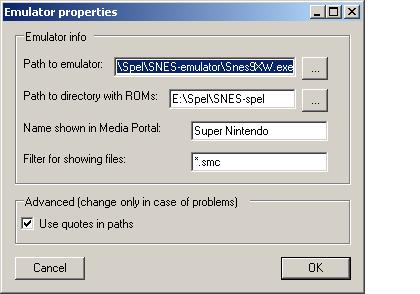
    Here's my first question: What does it mean to "...and a name
    and filter for which files will be shown."? This is from the read me on how to install the plugin. I don't know what to put in that 'filter' field in the configuration window. Is this important?

    This leads me to the next problem that I'm having. Ok, when I choose the Project 64 emulator while inside Media Portal, I can see the list of all my roms there. When i go to click on a rom, I get the black screen (like Project 64 is starting up) but then I get an error-- it says "Error: Attempt to open file failed", then I get the regular project 64 rom selection screen, but I can pick roms from it though.

    I'll put some links to screen shots here:

    The part of the readme I don't understand:
    http://i89.photobucket.com/albums/k202/cdh12345/dontgetit.jpg

    What happens when I first click on rom:
    http://i89.photobucket.com/albums/k202/cdh12345/filefail.jpg

    What happens when I click OK on the error that follows:
    http://i89.photobucket.com/albums/k202/cdh12345/pjwindow.jpg

    I really would like to get this great looking plugin working for me and my son. Any help at all would be very appreciated. Thank you in advance :)
     

    G.B. Wolf

    MP Donator
  • Premium Supporter
  • March 22, 2007
    227
    3
    Braunschweig
    Home Country
    Germany Germany
    Here's my first question: What does it mean to "...and a name
    and filter for which files will be shown."? This is from the read me on how to install the plugin. I don't know what to put in that 'filter' field in the configuration window. Is this important?
    The filter is like the filter in the generic Windows "Open file"-dialog. You can limit the selection of the files to a single file extension. So if you have e.g. all your SNES ROMs in a folder and the save states, too, you could limit the selection to "*.smc" or whatever you ROMfile-extension is.

    To your problem:
    It seems that the emulator isn't called with the correct parameter to load the rom directly. Have you tested how to call the emulator via command line? Does it need e.g. some additional parameters?

    Best regards
    Wolf
     

    KeyMaster

    New Member
    April 15, 2008
    3
    0
    Have you tested how to call the emulator via command line? Does it need e.g. some additional parameters?

    I would be more than happy to do this, but I am afraid that I don't quite understand what you mean.
    Do you mean open Project 64 from the run window? I tried that; the path is: "C:\Program Files\Project64 1.6\Project64.exe". When I do that the emulator runs just fine. It opens up the regular project 64 rom selection window and when i choose a rom, it opens the game right up.
     

    Chreekar

    Community Plugin Dev
    November 11, 2006
    234
    52
    Stockholm
    Home Country
    Sweden Sweden
    Yeah, but start it with a path to a game. In this case you should try to put in
    "C:\Program Files\Project64 1.6\Project64.exe" "C:\Games\N64\game1.z64"
    or whatever the path to your games are. If that generates the same message, you could remove the quotes surrounding C:\Games\N64\game1.z64 in this case. If it works now, you should uncheck "Use quotes in paths" in the settings for that emulator in the plugin settings. I've atached an image to show this.
     

    Attachments

    • quotes.JPG
      quotes.JPG
      22 KB

    KeyMaster

    New Member
    April 15, 2008
    3
    0
    Ok, when I put in :

    "C:\Program Files\Project64 1.6\Project64.exe" "C:\Documents and Settings\cdh\My Documents\Misc\Console Emulators\Project 64 Roms\AeroFighters Assault.z64"

    The exact same thing happens as when in Media Portal, which is that the black screen opens up and I get the Error: Cannot open file.

    When I remove the quotes on the path to the rom only it works!

    So after that I unchecked the 'With Quotes' box in the configurator and it worked perfectly! Thank you very much for your help!

    This is an awesome plug in!
     

    Kingfisher

    MP Donator
  • Premium Supporter
  • March 16, 2008
    26
    6
    Bedfordshire
    Home Country
    England England
    Thanks for the help, I am impressed of the research :D The next question is of course how to make a solution to this problem without involving the user to create a folder. Does anyone know if MP has some variables that one can use to locate the path of things like DB and thumbs? Otherwise, I'll have to make an operating system check and use different folders when in XP and when in Vista...

    Well, I'm certainly no developer and it took me about a week of trying anything and everything before I had the now famous "lightbulb" moment :D

    As for locating the paths etc, (again, I'm no dev/software expert) is that not what the MediaPortalDirs.xml file is for in the installation folder? It certainly lists the locations of all the required folders for DB, thumbs, skins, plugins etc, and they are correct for Vista in my case.

    Again, hope this helps....

    EDIT :

    I've just done a quick basic install of MP on my spare XP machine, and sure enough, the MediaPortalDirs.xml reports the correct directory locations under XP also.

    It also assigns a "Dir id" value to each directory, so I'm guessing this can be used to address each folder directly.
     

    Users who are viewing this thread

    Top Bottom