
You are using an out of date browser. It may not display this or other websites correctly.
You should upgrade or use an alternative browser.
You should upgrade or use an alternative browser.
(Old) My Emulators (2 Viewers)
- Thread starter Chreekar
- Start date
- August 14, 2008
- 40
- 0
- Home Country
-
 Germany
First we talk about totally newbies and I think a link to a rom-site isn't conform to the forum-rules^^

- Thread starter
- Moderator
- #463
I've created a new thread where we can discuss what should be included and what should not. You find it here: https://forum.team-mediaportal.com/my-emulators-247/mega-distribution-44053/
Someone posted a solution on page 36... but I haven't managed to get it working either. 
How to get MAME ePSXe and others work?
The reason why MAME is not working is when you launch it with command line, the prompt must ben in the mame folder, and that's not the case in windows default (it's %userprofile%)
And with the myEmulators plugin you can't add some swicthes after the rom name?
I've got the solution, and it's really easy.
Simply create a batch file with that (example with mame):
Code:CD /D D:\the_path_of_your_mamep_exe_file mamep %1 -your_switchs_here
Then go to myEmulator configuration and instead of picking and executable file for the emulator, simply manually paste the path to the bat file into the texte field.

- August 18, 2008
- 181
- 69
- Home Country
-
United States of America
- Moderator
- #467
I'm doing a fresh MediaPortal install after an SQL foobar.
Am I being retarded? I can't find the version of My Emulators that let me open PC Games with a tickbox to open executable directly?!
Please help me
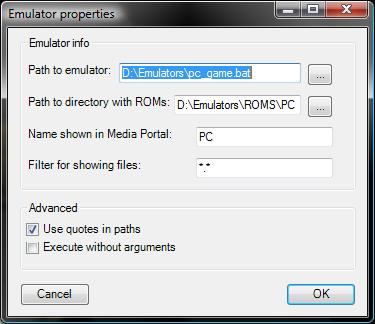
See the attached image for how I handled PC games with this plugin. I created a new emulator called "PC". The path to emulator points to a batch file called pc_game.bat which only has the following contents:
Code:
%*The "path to ROMS directory" points to a folder where I put windows shortcuts to my games. Works well for me.
Good luck.
Attachments
- Thread starter
- Moderator
- #468
The version available in the plugins section has the ability to execute PC games though the tick box you spoke about so this solution is not neccessary anymore. It is also possible to add switches after the ROM name, see the readme under USAGE.
Hi,
could anyone post his settings how to get the MAME emulator to work? (mame.exe 0.127)
I get an error: files not found ??
grtz
Look at this topic. I found the solution and posted the settings for mame (commandline), Mame Plus! and MameUI32.
I also posted configurations for other emulators...

- August 10, 2007
- 74
- 6
- Home Country
-
United States of America
See the attached image for how I handled PC games with this plugin. I created a new emulator called "PC". The path to emulator points to a batch file called pc_game.bat which only has the following contents:
Code:%*
The "path to ROMS directory" points to a folder where I put windows shortcuts to my games. Works well for me.
Good luck.
thank u so much ZealotSix, this is exactly what i've been wanting to do. i didnt want to list each pc game beside the other emulators, i wanted to have an emulator called PC that showed all my pc games.
i added this to the faq, and once i finish updating some other stuff i'll upload it.
Users who are viewing this thread
Online now: 3 (members: 0, guests: 3)