(Old) My Emulators (8 Viewers)

Chreekar

Community Plugin Dev
November 11, 2006
234
52
Stockholm
Home Country
Sweden Sweden
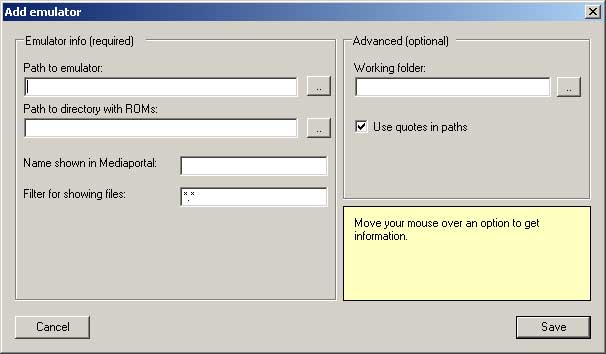
The work with the new version and UI is proceeding. I wanted some input on features for the configuration that I'm currently working on, so I thought I'd update you all. The attachment show how it looks at this stage. Anymore options you would like to have associated with each emulator?
 

Attachments

  • config.jpg
    config.jpg
    20.2 KB

TheOncleJuna

Portal Member
November 5, 2008
13
3
Home Country
Spain Spain
I don't know if this option is possible or is implemented in the new version:

In SNES emulator, I have all the clone roms of the same game compressed in one file .7z
With this method the compression is incredible.

For example this file (1.05MB):
---bits----- ----------name----------------
1.103.632 Capcom's Soccer Shootout.7z

include this roms (16.5MB):
---bits----- ----------name----------------
1.572.864 Capcom's Soccer Shootout (U) [b1].smc
1.572.864 Capcom's Soccer Shootout (U) [f1].smc
1.572.864 Capcom's Soccer Shootout (U) [f2+C].smc
1.572.864 Capcom's Soccer Shootout (U) [f2].smc
1.572.864 Capcom's Soccer Shootout (U).smc
2.097.152 J.League Excite Stage '94 (J) [o1].smc
2.097.152 J.League Excite Stage '94 (J) [o1][f1+C].smc
2.097.152 J.League Excite Stage '94 (J) [o1][f1].smc
1.572.864 J.League Excite Stage '94 (J).smc

Perhaps select the package of roms, and if find more than one can open a window with the content.
It will save a lot of hard disk. ...and only need one thumbnail.
 

Chreekar

Community Plugin Dev
November 11, 2006
234
52
Stockholm
Home Country
Sweden Sweden
I have downloaded the 7zip api earlier, but I haven't really understood how to use it yet. If I figure out how to read the contents of a .7z file, I might add this feature.
 

kiunch

New Member
November 8, 2008
2
0
I don't think MyEmulator need to support any kind of zip file, since most emulator(such as MAME) already support it. It will be nice to have that support though, for example some 2D DC game that's 500MB can be zip into 40MB.

Another features that will be nice to add is Sub-Folder, so you can make sub-folder like "action" "rpg" to arrange your collections instead of having hundreds of game in the same folders.

A better alternative (perhaps harder to do) is to be able to manually define the attribute of each game, such as Genre/Company/Year Made/Rating/How often played/ etc..... and giving the option to filter the list using those attribute. Some thing that's similar to how MediaPortal sort out movies and video.

A film strip mode for cover arts will be nice. Big icon just isn't quite big enough =P


Regardless of those feature tho, I have to save this plugin is already very well done, and very usable. Thank you for the great work, I can't wait for the next version to come out. Thanks for you I spent more time arranging my collections than playing them.
 

Chreekar

Community Plugin Dev
November 11, 2006
234
52
Stockholm
Home Country
Sweden Sweden
This is really funny. The three things you stated are the three new things I've planned to be working on. All of them won't be in the next version, but in the one after that they should :)
 

gamingexpert

Portal Pro
August 10, 2007
74
6
Home Country
United States of America United States of America
i agree about subdirectory support, i cant play my psx games because i have each in its own folder so i can keep multiple discs together and have game thumbnails show up on the folders.

not really related to this screen but i would also like a way to remove games from the database. like for dosbox games sometimes there are a few exe files in a folder and only one of them is actually the game but both will show up in mediaportal.
 

kiunch

New Member
November 8, 2008
2
0
This is really funny. The three things you stated are the three new things I've planned to be working on. All of them won't be in the next version, but in the one after that they should :)

Wow you see the future and read my mind, are you going to ask for my soul next =p?
 

hulkhaugen

Portal Pro
November 9, 2008
450
58
Arendal
Home Country
Norway Norway
Am i just stupid or what? I can't get the thumb for the games to show up, only the emulators. Is there a certain resolution they should have or something?

i placed the in the ...\Team MediaPortal\MediaPortal\Thumbs\myEmulators\games\ folder. I even renamed the roms as i want them to be, like 'Super Mario Bros.rom', and it appears as 'Super Mario Bros' in MediaPortal. The thumb is named 'Super Mario Bros.jpg', but still nothing. Should there be a subfolder for each emulator? I've tried several other thumbs too, like 'Mega Man' etc, but nothing....

EDIT: Hehe, just refreshed by clicking on Most Played, and then it worked.

But two things:
1. Is it possible to make DOSBox appear like NES games, or can i just execute it, and then run the games from the DOSBox terminal?
2. Can i create a folder for my Windows games, and make it appear as a Emulator, and from that folder execute the games?
 

SuAlfons

Portal Pro
June 5, 2005
55
0
Germany
Home Country
Germany Germany
Am i just stupid or what? I can't get the thumb for the games to show up, only the emulators. Is there a certain resolution they should have or something?
2. Can i create a folder for my Windows games, and make it appear as a Emulator, and from that folder execute the games?


Hello!

I can help you on that!

I defined a "Dummy" Emulator, that is actually the start.bat file.
Then I put the start.bat file in folder one director together with links (*.lnk) to the games
Now you make MyEmulators call "start.bat" with one of the *.lnk files as the "ROMS".

Only problem I have got so far -- NO SOUND. When I start any program from MyEmulators, I get no sound :-((
 

Users who are viewing this thread

Top Bottom
