(Old) My Emulators (3 Viewers)

bishopy2j

Portal Pro
March 29, 2008
68
2
Home Country
United States of America United States of America
just posted an issue (thumbnails, info not showing up for all ROMs) i am having with myemulators to newly created wiki (discussed earlier in posts). Please let me know if that will work or if i should post here, thank you.

i would post in this thread. i'm pretty sure that wiki doesnt even have any content yet, so nobody is really looking at it yet.


Vista Ultimate x64
MP 1.00; Streamed MP 0.3.270
myEmulators 2.5 (i think)

Having problems with MyEmulators and getting ROM covers and details to show up. I can get the emulator jpg to show up (C:\ProgramData\Team MediaPortal\MediaPortal\Thumbs\myEmulators\emulators) i have the same setup for games (C:\ProgramData\Team MediaPortal\MediaPortal\Thumbs\myEmulators\games). The names of .jpgs and the ROMs all match up. Is it something in my xml (attached for review). I am using ajp8164 version of the plugin and xml (attached as well). Please advise, thank you. Quick Note - URL for where i found the xml and dll https://forum.team-mediaportal.com/my-emulators-247/my-emulators-12771/index58.html
 

Attachments

  • myEmulators.xml
    30.6 KB

gamingexpert

Portal Pro
August 10, 2007
74
6
Home Country
United States of America United States of America
(1) Did you create a subfolder named how the emulator is named in Mediaportal?
Example: C:\ProgramData\Team MediaPortal\MediaPortal\thumbs\myEmulators\games\N64\1080 Snowboarding.jpg

(2) If you're using that version I'd install the latest SVN since it includes all of ajp8164's updates as well as some fixes and new features: https://myemulators.svn.sourceforge.net/svnroot/myemulators
 

bishopy2j

Portal Pro
March 29, 2008
68
2
Home Country
United States of America United States of America
just posted an issue (thumbnails, info not showing up for all ROMs) i am having with myemulators to newly created wiki (discussed earlier in posts). Please let me know if that will work or if i should post here, thank you.

i would post in this thread. i'm pretty sure that wiki doesnt even have any content yet, so nobody is really looking at it yet.

(1) Did you create a subfolder named how the emulator is named in Mediaportal?
Example: C:\ProgramData\Team MediaPortal\MediaPortal\thumbs\myEmulators\games\N64\1080 Snowboarding.jpg

(2) If you're using that version I'd install the latest SVN since it includes all of ajp8164's updates as well as some fixes and new features: https://myemulators.svn.sourceforge.net/svnroot/myemulators


in my thumbs - myemulators - games folder i didnt have a NES folder. once i created that i put my jpgs in there and they appeared in MP as desired. Thank you.

the SVN you posted, i tried that but i just get a black background. i get my emulators icons (in list view , etc...) same for roms. but i do not get detailed info about the roms. i also noticed that the .xml file is for blue skin, im using streamed mp skin. Any idea on when one will be made specfiically for Streamed MP?
 

emphatic

Design Group
  • Team MediaPortal
  • August 25, 2006
    3,758
    1,250
    Alingsås
    Home Country
    Sweden Sweden

    bishopy2j

    Portal Pro
    March 29, 2008
    68
    2
    Home Country
    United States of America United States of America
    ...
    Any idea on when one will be made specfiically for Streamed MP?

    have you tried these?: https://forum.team-mediaportal.com/streamedmp-301/my-emulators-streamedmp-50508/

    I'll also try to do an updated .xml-file when there's a new version of MyEmulators on the front page and add support for the new skinning features.

    Emph

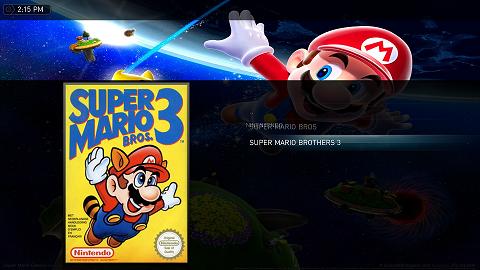
    Just tried Emphs xml file for Streamed MP and still nothing. I thought i was supposed to get information about the ROM when i highlighted that specific one. screenshots attached. Not sure if this matters but the screenshot is for NES emulator
     

    Attachments

    • myEmulators_Emph_xml.jpg
      myEmulators_Emph_xml.jpg
      50.1 KB
    • myEmulators_screenshot.jpg
      myEmulators_screenshot.jpg
      25.9 KB

    emphatic

    Design Group
  • Team MediaPortal
  • August 25, 2006
    3,758
    1,250
    Alingsås
    Home Country
    Sweden Sweden
    Just tried Emphs xml file for Streamed MP and still nothing. I thought i was supposed to get information about the ROM when i highlighted that specific one. screenshots attached. Not sure if this matters but the screenshot is for NES emulator

    Do you have any data in your ROM database? Mine looks like this (only MAME/Final Burn Alpha roms):

    nzEkwqavF.gif


    (I've scrolled it a bit to the right so you can see the "Year" and "Description" fields) This is from where the data is pulled in my .xml. I'm using some SVN of version 2.5.

    Emph
     

    bishopy2j

    Portal Pro
    March 29, 2008
    68
    2
    Home Country
    United States of America United States of America
    that was it, thank you. i put some information in those fields and it appeared. Another quick question(s) are those fields in the configuration only able to be updated manually? Also, where do you get your cover art for your ROMS?
     

    Clair

    Portal Pro
    November 15, 2007
    70
    0
    50
    Gorzów Wielkopolski
    Home Country
    Poland Poland
    Few days of break and there are almost revolution ;) Im glad - there are no flicking, Added possibility for export import data, many improvements.

    I still have "problem" with WinUAE, because of Subfolder Folder visibility.

    I.E. In Folder Configurations (where WinUae by default save a configs used fore each game separatelly) are two subfolders. Both are visible in MyEmulators (but i dont want to see this folders)
    When i try to change location of config files a folders migrates with this location. I can Hide this folders in explorer (but in MyEmulators they are still visible)

    Solutions:
    1 - MyEmulators Should ignore HIDDEN folders
    2 - MyEmulators Should Have a checkbox for disabling deep search (for each emulated system separatelly), after checking MyEmulators just ignore all subfolders of selected rom directory.
     

    dir

    MP Donator
  • Premium Supporter
  • August 30, 2006
    408
    36
    Home Country
    Afghanistan Afghanistan
    (1) Did you create a subfolder named how the emulator is named in Mediaportal?
    Example: C:\ProgramData\Team MediaPortal\MediaPortal\thumbs\myEmulators\games\N64\1080 Snowboarding.jpg

    (2) If you're using that version I'd install the latest SVN since it includes all of ajp8164's updates as well as some fixes and new features: https://myemulators.svn.sourceforge.net/svnroot/myemulators

    Worth noting - the version in the SVN has an old date, but it's still the newest version. Confusing when you unrar the contents and it asks you if you want to overwrite your current (Dec) version with this "new" version from Feb. Say yes, though!
     

    Users who are viewing this thread

    Top Bottom