
 United States of America
I'm a long time SageTV user and have chosen to move to MP because I like the control it allows over the playback graph.
However, I'm having a couple of, probably related, issues that don't occur with my default Windows 7 settings or with SageTV.
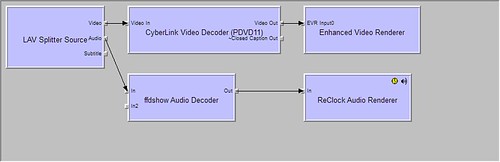
Here is my default Windows 7 playback graph.
I've worked hard to understand directshow over the years. My biggest success has been to get bitsreaming working for all HD playback types, Dolby TrueHD, DTS-HD Master, and lossless LPCM in WMP12. You can read about it on my blog.
My current problem with MP is...
1) Even though my default graph is working perfectly MP doesn't play anything when "Automatic Decoder Settings" is checked.
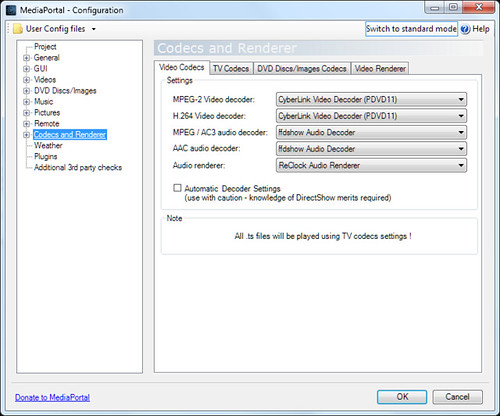
2) When the desired settings are configured on the Video Codecs tab everything plays as expected but two sets of the audio renderer show up in the playback graph.
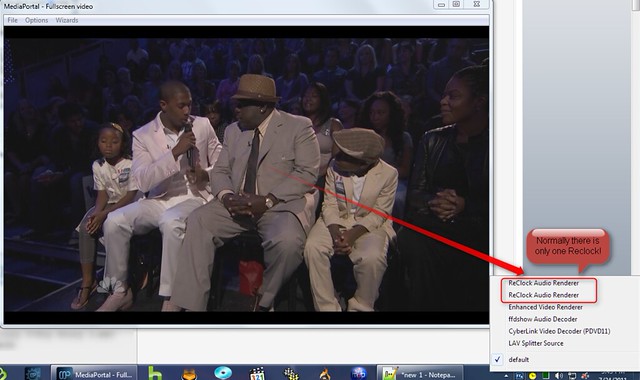
Maybe I shouldn't say this but playback is actually perfect with this setup. But, I'm a perfectionist and want everything to be clean. Also, I think the time from the press of the Play button to the video actually playing can be reduced by optimizing graph creation.
Any help is greatly appreciated. Thanks!
MediaPortal Version: 1.2 Beta
MediaPortal Skin: StreamedMP
Windows Version: Windows 7 SP1
CPU Type: Intel Core2 Duo E6600
HDD: Samsung Spinpint 300GB
Memory: 4GB
Motherboard: Asus P4DHW
Video Card: ATI Radeon HD5570
Video Card Driver: CCP 11.5
Sound Card: ATI Radeon HD5570
Sound Card AC3: Bitstreamed HDMI
Sound Card Driver: CCP 11.6
MPEG2 Video Codec: PDVD11
MPEG2 Audio Codec: FFDShow
h.264 Video Codec: PDVD11
Remote: Logitech Harmony One + USB-UIRT
TV - HTPC Connection: HDMI
However, I'm having a couple of, probably related, issues that don't occur with my default Windows 7 settings or with SageTV.
Here is my default Windows 7 playback graph.
I've worked hard to understand directshow over the years. My biggest success has been to get bitsreaming working for all HD playback types, Dolby TrueHD, DTS-HD Master, and lossless LPCM in WMP12. You can read about it on my blog.
My current problem with MP is...
1) Even though my default graph is working perfectly MP doesn't play anything when "Automatic Decoder Settings" is checked.
2) When the desired settings are configured on the Video Codecs tab everything plays as expected but two sets of the audio renderer show up in the playback graph.
Maybe I shouldn't say this but playback is actually perfect with this setup. But, I'm a perfectionist and want everything to be clean. Also, I think the time from the press of the Play button to the video actually playing can be reduced by optimizing graph creation.
Any help is greatly appreciated. Thanks!
MediaPortal Version: 1.2 Beta
MediaPortal Skin: StreamedMP
Windows Version: Windows 7 SP1
CPU Type: Intel Core2 Duo E6600
HDD: Samsung Spinpint 300GB
Memory: 4GB
Motherboard: Asus P4DHW
Video Card: ATI Radeon HD5570
Video Card Driver: CCP 11.5
Sound Card: ATI Radeon HD5570
Sound Card AC3: Bitstreamed HDMI
Sound Card Driver: CCP 11.6
MPEG2 Video Codec: PDVD11
MPEG2 Audio Codec: FFDShow
h.264 Video Codec: PDVD11
Remote: Logitech Harmony One + USB-UIRT
TV - HTPC Connection: HDMI

 it solve this issue but it will not be committed for 1.2.0.