Programmer help please to move all PosX/Y ? (1 Viewer)

2BitSculptor

Super Moderator
  • Team MediaPortal
  • January 23, 2008
    2,007
    1,052
    South Central Wisconsin
    Home Country
    United States of America United States of America
    • Thread starter
    • Moderator
    • #11
    YES! that was it.... :D

    The missed item is really not an issue.... The only thing I noticed was the MENU arrow graphic used for the hidden menus, it didn't move to the +40 location... but that is okay, I won't have to move it back. :D

    Is it also possible to 'scale' the xmls to a new size. in case you wanted to enlarge the graphics to fit a new screen aspect? (actually it looks like a lot to do :( ) ... was just wild thinking, say, starting with a 4x3 skin, then scaling the xml to fit a widescreen aspect... just as a starting place. Maybe just changing PosX x1.6 and PosY x1.2. (800 -> 1280, 600 -> 720)

    What would I have to change in the script?

    Chuck
     

    hkjensen

    MP Donator
  • Premium Supporter
  • June 11, 2007
    164
    66
    Copenhagen
    Home Country
    Denmark Denmark
    Change
    NewValue = Replace(Match.Value, Match.SubMatches(0), Match.SubMatches(0) + rxSearch(i, 1))
    to
    NewValue = Replace(Match.Value, Match.SubMatches(0), int(Match.SubMatches(0) * rxSearch(i, 1)))
     

    2BitSculptor

    Super Moderator
  • Team MediaPortal
  • January 23, 2008
    2,007
    1,052
    South Central Wisconsin
    Home Country
    United States of America United States of America
    • Thread starter
    • Moderator
    • #13
    Thanks, I'll try it sometime today.

    Chuck

    edit:

    WOW, that worked surprisingly well... I just need to add a few controls like offsets and icon sizes, etc to get a base skin to tweek.... then I'll have a decent version of Blue3 in 800x600 to tweek some more (it never really ends does it..).

    :D
     

    Bavarian

    Retired Team Member
  • Premium Supporter
  • April 4, 2005
    698
    167
    Germany, Bayern
    Home Country
    Germany Germany
    Hi 2BitSulptor,

    if you are still looking for a tool which converts a complete skin to a new resolution, then just let me know. I have written for a friend some time ago a tool for that.


    Cheers,

    Bavarian
     

    2BitSculptor

    Super Moderator
  • Team MediaPortal
  • January 23, 2008
    2,007
    1,052
    South Central Wisconsin
    Home Country
    United States of America United States of America
    • Thread starter
    • Moderator
    • #15
    Thank you Bavarian, I would love to try out this tool also...

    And again, thank you vuego and hkjensen for you have been most helpful as well.

    regards,

    Chuck
     

    Bavarian

    Retired Team Member
  • Premium Supporter
  • April 4, 2005
    698
    167
    Germany, Bayern
    Home Country
    Germany Germany
    MP Skin Converter

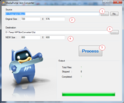
    Copy the two files from the attached zip file in one directory. When the EXE FILE has started, then follow the steps below:

    1) Input the Location of the Source Skin
    2) Input the original size of the skin he is designed for
    => you can find it in references.xml
    3) Define the location where the modified skin files should be copied to
    4) Define a new size for the skin
    5) Hit the "Process" button and wait until it finished
    => do not forget to put your new size in references.xml

    MPSkinConverter.png

    !! Attachment is updated !!
     

    Attachments

    • MPSkinConverter - Update.zip
      30.7 KB

    2BitSculptor

    Super Moderator
  • Team MediaPortal
  • January 23, 2008
    2,007
    1,052
    South Central Wisconsin
    Home Country
    United States of America United States of America
    • Thread starter
    • Moderator
    • #17
    Bavarian,
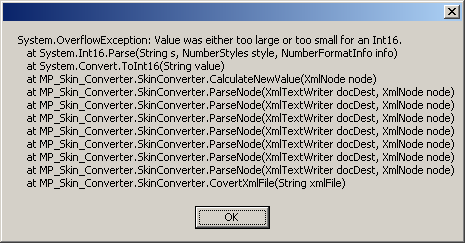
    I ran into a glitch. While converting 'Blue3' to 'Blue3-stretch', 25 of the 177 files were skipped, with an error message (below). Also, when I checked the references.xml, only half of the controls had been copied to the new references.xml (probably one of the errors). I can't tell immediately which other xmls were skipped.

    regards,

    Chuck
     

    Attachments

    • converter-error.png
      converter-error.png
      331.9 KB

    2BitSculptor

    Super Moderator
  • Team MediaPortal
  • January 23, 2008
    2,007
    1,052
    South Central Wisconsin
    Home Country
    United States of America United States of America
    • Thread starter
    • Moderator
    • #19
    Works perfectly now.
    :D:D:D
    Chuck

    This would be good to place in the Download/HTPCcustomization/ repository for others to find easily.

    Thanks again.
     

    2BitSculptor

    Super Moderator
  • Team MediaPortal
  • January 23, 2008
    2,007
    1,052
    South Central Wisconsin
    Home Country
    United States of America United States of America
    • Thread starter
    • Moderator
    • #20
    Again, I want to thank vuego, hkjensen and Bavarian for assisting me.

    After running Bavarian's MPSkinConverter on Blue3 (which worked beautifully), I still had to recenter many dialogs with vuego's script. It took a couple attempts, but I think I got them all. Then copied the rescaled dialogs into my TrueView-Blue folder. I may have to tweek 4 or 5 of the smaller dialogs another 10 pixels or so, but it is looking better.

    I've nearly got confidence enough to publish my skin as a beta. Don't ask too much too soon though, There is a lot I still don't have a grip on, and a bit to tweek, and still too much stuff in the media folder (gotta trim the fat, as it were)

    :D

    Chuck
     

    Users who are viewing this thread

    Top Bottom