
You are using an out of date browser. It may not display this or other websites correctly.
You should upgrade or use an alternative browser.
You should upgrade or use an alternative browser.
QAM record problem with logs -- HELP please (1 Viewer)
- Thread starter cewillis
- Start date
- August 27, 2010
- 327
- 13
- Home Country
-
 United States of America
- Thread starter
- #12
I may be an idiot, because I haven't been able to reproduce the problem as I described it - and I'm positive that is what was happening from several days of trying different things.
Now all I can get to fail is starting a recording of one (haven't tried them all) of the QAM channels that changed frequency, while an analog recording is in progress on the other hybrid tuner. And it fails whether the recordings are set up ahead of time, or started manually.
At least one QAM channel that did not change frequency works fine in both cases.
I'll try all possibilities over the weekend.
Now all I can get to fail is starting a recording of one (haven't tried them all) of the QAM channels that changed frequency, while an analog recording is in progress on the other hybrid tuner. And it fails whether the recordings are set up ahead of time, or started manually.
At least one QAM channel that did not change frequency works fine in both cases.
I'll try all possibilities over the weekend.
- August 27, 2010
- 327
- 13
- Home Country
-
United States of America
- Thread starter
- #14
OK, pass me a plate of crow please. (or is that only a USA idiom?) It means I apologize for apparently misstating the facts originally.
It now appears that the recording problems are only with the 2 QAM channels that have changed frequency, and only when another recording is already in progress. (I've only tested with the other recoding being analog) May indeed be that the changed frequencies are inducing interference. There look to be striking differences in signal level and quality for the troublesome QAM channels, depending on whether another recording is running or not, not that I know exactly what the numbers mean.
I get 4 useful QAM channels, plus 2 others that are intermittent (and NOT tuned by any of my TVs), plus 2 or 3 others that I never look at.
The 4 are named KVOAHD, KGUNHD, KMSBHD, and KOLDHD. The latter two changed frequency recently)
Here is the test sequence that goes with the logs.
1. stop MP and TV
2. delete all logs
3. start MP (and TV)
4. use Scheduled -> New to start a recording on analog channel 3
5. use Scheduled -> New to start a recording on KVOAHD
6. verify recording playback and normal MP operation -- both good
7. stop recordings.
8. repeat 4 - 7 except use KGUNHD -- all good
9. repeat 4 - 7 except use KMSBHD -- recording is heavily pixelated, torn, distorted; audio intermittent and out of sync; MP operating v-e-r-y s-l-o-w
10. stopped MP, TV missing per Task Manager, do not delete logs, restart MP
11. repeat 4-7 except use KOLDHD -- recording is heavily pixelated, torn, distorted; audio intermittent and out of sync; MP operating v-e-r-y s-l-o-w, eventually 'Connection to TVserver lost'
12. stopped MP, TV missing per Task Manager, do not delete logs, restart MP
13. start recording on KMSBHD only -- all good
14. stop recording
15. start recording on KOLDHD only -- all good
16. stop recording
17. compress and send logs
I think the channel frequency detail is in the logs, but I could also post the TVsetup page that shows that.
I probably should have also tried scheduled recordings with zero pre and post record, and will do. If that doesn't work, I guess I'll just have to avoid the problem ---
Major thanks for sticking so long. I probably deserve this one -
It now appears that the recording problems are only with the 2 QAM channels that have changed frequency, and only when another recording is already in progress. (I've only tested with the other recoding being analog) May indeed be that the changed frequencies are inducing interference. There look to be striking differences in signal level and quality for the troublesome QAM channels, depending on whether another recording is running or not, not that I know exactly what the numbers mean.
I get 4 useful QAM channels, plus 2 others that are intermittent (and NOT tuned by any of my TVs), plus 2 or 3 others that I never look at.
The 4 are named KVOAHD, KGUNHD, KMSBHD, and KOLDHD. The latter two changed frequency recently)
Here is the test sequence that goes with the logs.
1. stop MP and TV
2. delete all logs
3. start MP (and TV)
4. use Scheduled -> New to start a recording on analog channel 3
5. use Scheduled -> New to start a recording on KVOAHD
6. verify recording playback and normal MP operation -- both good
7. stop recordings.
8. repeat 4 - 7 except use KGUNHD -- all good
9. repeat 4 - 7 except use KMSBHD -- recording is heavily pixelated, torn, distorted; audio intermittent and out of sync; MP operating v-e-r-y s-l-o-w
10. stopped MP, TV missing per Task Manager, do not delete logs, restart MP
11. repeat 4-7 except use KOLDHD -- recording is heavily pixelated, torn, distorted; audio intermittent and out of sync; MP operating v-e-r-y s-l-o-w, eventually 'Connection to TVserver lost'
12. stopped MP, TV missing per Task Manager, do not delete logs, restart MP
13. start recording on KMSBHD only -- all good
14. stop recording
15. start recording on KOLDHD only -- all good
16. stop recording
17. compress and send logs
I think the channel frequency detail is in the logs, but I could also post the TVsetup page that shows that.
I probably should have also tried scheduled recordings with zero pre and post record, and will do. If that doesn't work, I guess I'll just have to avoid the problem ---
Major thanks for sticking so long. I probably deserve this one -
Attachments
- August 27, 2010
- 327
- 13
- Home Country
-
United States of America
- Thread starter
- #15
Results for a troublesome QAM channel with pre = post = zero; times for example.
analog followed by QAM
analog (1:30 - 2:00) followed by QAM (2:00 - 2:30): works fine. This is what was failing with pre = post = 2 seconds.
2 recordings schedule to start at the 'same' time:
analog (3:00 - 3:30), QAM (3:00 - 3:30) analog first in line to start: QAM fails as before
2 recordings schedule to start at the 'same' time:
QAM ( 4:00 - 4:30), analog (4:00 - 4:30) QAM first in line to start: works fine
What about 2 QAM recordings?
analog followed by QAM
analog (1:30 - 2:00) followed by QAM (2:00 - 2:30): works fine. This is what was failing with pre = post = 2 seconds.
2 recordings schedule to start at the 'same' time:
analog (3:00 - 3:30), QAM (3:00 - 3:30) analog first in line to start: QAM fails as before
2 recordings schedule to start at the 'same' time:
QAM ( 4:00 - 4:30), analog (4:00 - 4:30) QAM first in line to start: works fine
What about 2 QAM recordings?
- September 1, 2008
- 21,544
- 8,236
- Home Country
-
New Zealand
Hi again cewillis
Thank you for the detailed explanation and logs - I could follow your testing process easily.
Well, you're possibly not going to like this but I can confirm that the same characteristics that I saw in your earlier logs are present when you have problems and absent when you don't have problems. My conclusion from those observations would be that you have signal strength/quality issues with KMSBHD and KOLDHD (or some kind of interaction/interference issues when tuning analog at the same time).
Just to fill that out a bit:
Your four QAM channels are on two muxes (frequencies). KVOAHD and KGUNHD are together at 139.25 MHz, and KOLDHD and KMSBHD are together at 103.25 MHz. That explains why you get identical "performance" within the pairs.
The signal strength and quality statistics are interesting. Before I dive into those, some background for you. Firstly the stats are completely meaningless for analog. The tuner driver will arbitrarily decide whether the signal is considered strong enough to be locked - if the signal is locked then strength and quality will be 100%, and if the signal is not locked then strength and quality will be 0% and you don't get to watch the channel. For digital, the stats have *a little* meaning. I say a little because a percentage really means nothing without a measure *and* a baseline to compare against (% = measure * 100 / baseline). The baseline is different for each tuner (depending on the chips used), which means that you can't compare signal stats from one tuner with another. Anyhow, you can infer some basic information. The meaning of "strength" should be relatively self explanatory - it is a measure of the raw signal level. Too high is no good as it leads to distortion; too low is also no good as it results in dropouts. Anywhere in between is generally "much of a muchness". Quality is the most important of the two stats - it indicates how "clean" the signal is. Ideally you'd have a perfectly clean signal. The more errors, the more pixellation, dropouts, stutters etc.
So, for 139.25 MHz (with an analog recording) you're getting strength 0% and quality 100%. Quality is excellent, strength possibly rather borderline. I'd be interested to know how that sort of signal would stand up in bad weather, and what the strength is when there is no analog channel tuned. Anyhow, moving on to the problematic 103.25 MHz. When you're not tuning an analog channel strength is 10 or 20% and quality is 100%. Again, quality is excellent but strength is very low. I can't compare that to 139.25 MHz but I suspect you'd find that strength for 139.25 MHz without analog would be higher. When you have 103.25 MHz tuned on one QAM tuner and analog on the other tuner then you get strength 80% and quality 25%. The high strength is probably an indication that a chunk of interference is artificially boosting the signal. Quality of 25% would be basically unwatchable on most tuners - it means the signal has lots of errors, and that will manifest with pixellation, stutter, macroblocking, dropouts... the works.
So what can be done? There are a range of things. The best option really depends on how you're receiving the signals. A signal amplifier may help - the quality of your signal seems okay, but the strength of your QAM signals seems weak at best. A signal amplifier may fortify the signal and allow your tuners to operate in harmony. My understanding is that QAM channels are received via cable, but I'm not sure how you're receiving your analog channels. If the analog channels are being pulled in with an aerial then it might be a good idea to check your aerial alignment and "combiner". You could also check your cabling system - old or low grade cable with poor shielding, unnecessary lengths, dodgy connectors or unterminated splitter outputs should ideally be dealt with. Remove unnecessary extensions, replace dodgy connectors, terminate all splitter outputs... and if necessary replace the cable entirely (some people say that needs to be done every 10 - 15 years).
Any comments?
Thank you for the detailed explanation and logs - I could follow your testing process easily.
Well, you're possibly not going to like this but I can confirm that the same characteristics that I saw in your earlier logs are present when you have problems and absent when you don't have problems. My conclusion from those observations would be that you have signal strength/quality issues with KMSBHD and KOLDHD (or some kind of interaction/interference issues when tuning analog at the same time).
Just to fill that out a bit:
Your four QAM channels are on two muxes (frequencies). KVOAHD and KGUNHD are together at 139.25 MHz, and KOLDHD and KMSBHD are together at 103.25 MHz. That explains why you get identical "performance" within the pairs.
The signal strength and quality statistics are interesting. Before I dive into those, some background for you. Firstly the stats are completely meaningless for analog. The tuner driver will arbitrarily decide whether the signal is considered strong enough to be locked - if the signal is locked then strength and quality will be 100%, and if the signal is not locked then strength and quality will be 0% and you don't get to watch the channel. For digital, the stats have *a little* meaning. I say a little because a percentage really means nothing without a measure *and* a baseline to compare against (% = measure * 100 / baseline). The baseline is different for each tuner (depending on the chips used), which means that you can't compare signal stats from one tuner with another. Anyhow, you can infer some basic information. The meaning of "strength" should be relatively self explanatory - it is a measure of the raw signal level. Too high is no good as it leads to distortion; too low is also no good as it results in dropouts. Anywhere in between is generally "much of a muchness". Quality is the most important of the two stats - it indicates how "clean" the signal is. Ideally you'd have a perfectly clean signal. The more errors, the more pixellation, dropouts, stutters etc.
So, for 139.25 MHz (with an analog recording) you're getting strength 0% and quality 100%. Quality is excellent, strength possibly rather borderline. I'd be interested to know how that sort of signal would stand up in bad weather, and what the strength is when there is no analog channel tuned. Anyhow, moving on to the problematic 103.25 MHz. When you're not tuning an analog channel strength is 10 or 20% and quality is 100%. Again, quality is excellent but strength is very low. I can't compare that to 139.25 MHz but I suspect you'd find that strength for 139.25 MHz without analog would be higher. When you have 103.25 MHz tuned on one QAM tuner and analog on the other tuner then you get strength 80% and quality 25%. The high strength is probably an indication that a chunk of interference is artificially boosting the signal. Quality of 25% would be basically unwatchable on most tuners - it means the signal has lots of errors, and that will manifest with pixellation, stutter, macroblocking, dropouts... the works.
So what can be done? There are a range of things. The best option really depends on how you're receiving the signals. A signal amplifier may help - the quality of your signal seems okay, but the strength of your QAM signals seems weak at best. A signal amplifier may fortify the signal and allow your tuners to operate in harmony. My understanding is that QAM channels are received via cable, but I'm not sure how you're receiving your analog channels. If the analog channels are being pulled in with an aerial then it might be a good idea to check your aerial alignment and "combiner". You could also check your cabling system - old or low grade cable with poor shielding, unnecessary lengths, dodgy connectors or unterminated splitter outputs should ideally be dealt with. Remove unnecessary extensions, replace dodgy connectors, terminate all splitter outputs... and if necessary replace the cable entirely (some people say that needs to be done every 10 - 15 years).
Any comments?
- August 27, 2010
- 327
- 13
- Home Country
-
United States of America
- Thread starter
- #17
First, many thanks for your patience and analysis.
All my TV channels are on cable - mixed analog and digital obviously.
I'm pretty sure the provider uses fiber to their local distribution 'boxes' throughout the community.
The provider just upgraded the the cable from their nearby local distribution 'box' to my house to RG11/U.
All the cables in the house are RG6/U.
There is a provider supplied 3 way splitter at the providers service entrance.
The -3.5db branch goes to one area where it is further split 2 ways (-3.5db each) to my cable modem, and a small tv.
One of the -7db branches goes to the bedroom wing where it is further split 3 ways to tvs.
The other -7db branch goes to the family room where it is split two ways to my HTPC and my Sony lcd.
As mentioned, the Hauppauge tuner again splits the signal two ways for the dual hybrid tuners.
I have verified all the connections are good, and there are no unterminated splitters.
That may sound like a lot of splitting and signal degradation. As counter, I offer these, if they mean anything:
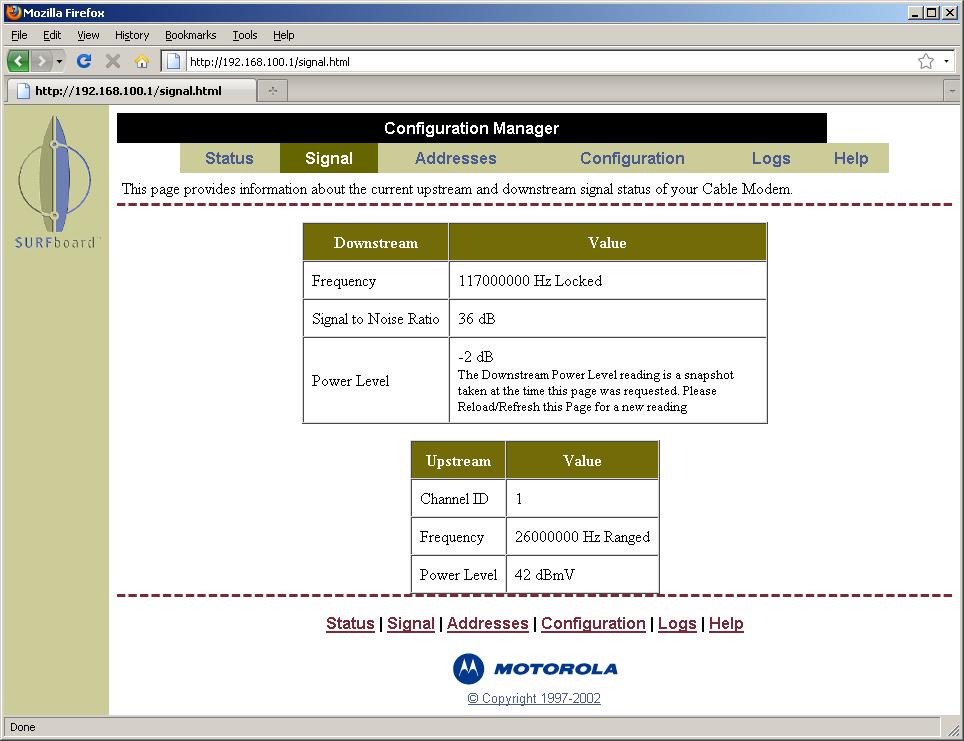
1) signal strength report from cable modem (attached)
2) I almost never see any picture problem on any of the tvs, although only 3 have QAM tuners, one on each cable branch.
3) I almost never saw any HTPC recording problem before the frequency change.
4) The HTPC actually finds a few more QAM channels than any of my TVs.
The attached logs are for this condition: schedule recording on KVOAHD (good channel) and on KOLDHD (bad) to start at 'same' time, KVOAHD first.
KVOAHD gets ***** SIGNAL LEVEL: 0, SIGNAL QUALITY: 100 *****
KOLDHD gets ***** SIGNAL LEVEL: 20, SIGNAL QUALITY: 100 *****
The KOLDHD recording is messed up same as with the analog interference, and TVserver terminates after a while.
So it appears I'm getting the same 'interference' when a QAM recording is already in progress as when an analog recording is already in progress, except the signal quality reported is 100 instead of 25.
Does this demonstrate that it's not a quality issue?
If you'll indulge, it seems to me that this:
Rather another recording already in progress causes a 'mis-tune', or incorrect setup, of the 103.25 MHz channels, but not the 139.25 MHz channels.
Do you agree?
I seriously doubt, and you can verify, that TVserver is not setting up the tuners differently depending on the channel frequency.
So that DOES seem like the Hauppauge card is not 'taking' the setup correctly under the problem circumstances.
Do you agree, and do you think that increased signal strength could help?
As for increasing the signal strength, I could (temporarily?) switch the splitter connections at the service entrance, and get +3.5db. Is that enough to make a difference? I could also (temporarily?) remove the splitter between the Sony and the HTPC and get another +3.5db.
Any recommendations for a low noise signal amplifier?
Thanks again.
All my TV channels are on cable - mixed analog and digital obviously.
I'm pretty sure the provider uses fiber to their local distribution 'boxes' throughout the community.
The provider just upgraded the the cable from their nearby local distribution 'box' to my house to RG11/U.
All the cables in the house are RG6/U.
There is a provider supplied 3 way splitter at the providers service entrance.
The -3.5db branch goes to one area where it is further split 2 ways (-3.5db each) to my cable modem, and a small tv.
One of the -7db branches goes to the bedroom wing where it is further split 3 ways to tvs.
The other -7db branch goes to the family room where it is split two ways to my HTPC and my Sony lcd.
As mentioned, the Hauppauge tuner again splits the signal two ways for the dual hybrid tuners.
I have verified all the connections are good, and there are no unterminated splitters.
That may sound like a lot of splitting and signal degradation. As counter, I offer these, if they mean anything:
1) signal strength report from cable modem (attached)
2) I almost never see any picture problem on any of the tvs, although only 3 have QAM tuners, one on each cable branch.
3) I almost never saw any HTPC recording problem before the frequency change.
4) The HTPC actually finds a few more QAM channels than any of my TVs.
The attached logs are for this condition: schedule recording on KVOAHD (good channel) and on KOLDHD (bad) to start at 'same' time, KVOAHD first.
KVOAHD gets ***** SIGNAL LEVEL: 0, SIGNAL QUALITY: 100 *****
KOLDHD gets ***** SIGNAL LEVEL: 20, SIGNAL QUALITY: 100 *****
The KOLDHD recording is messed up same as with the analog interference, and TVserver terminates after a while.
So it appears I'm getting the same 'interference' when a QAM recording is already in progress as when an analog recording is already in progress, except the signal quality reported is 100 instead of 25.
Does this demonstrate that it's not a quality issue?
If you'll indulge, it seems to me that this:
demonstrates that a simultaneous analog recording (that starts after a QAM recording starts) does cause not the problem.Results for a troublesome QAM channel
2 recordings schedule to start at the 'same' time:
analog (3:00 - 3:30), QAM (3:00 - 3:30) analog first in line to start: QAM fails as before
2 recordings scheduled to start at the 'same' time:
QAM ( 4:00 - 4:30), analog (4:00 - 4:30) QAM first in line to start: works fine
Rather another recording already in progress causes a 'mis-tune', or incorrect setup, of the 103.25 MHz channels, but not the 139.25 MHz channels.
Do you agree?
I seriously doubt, and you can verify, that TVserver is not setting up the tuners differently depending on the channel frequency.
So that DOES seem like the Hauppauge card is not 'taking' the setup correctly under the problem circumstances.
Do you agree, and do you think that increased signal strength could help?
As for increasing the signal strength, I could (temporarily?) switch the splitter connections at the service entrance, and get +3.5db. Is that enough to make a difference? I could also (temporarily?) remove the splitter between the Sony and the HTPC and get another +3.5db.
Any recommendations for a low noise signal amplifier?
Thanks again.
Attachments
- September 1, 2008
- 21,544
- 8,236
- Home Country
-
New Zealand
No problem - thank you for the detailed response. It makes it easier to try to help.First, many thanks for your patience and analysis.
That was certainly my first impression, yes.That may sound like a lot of splitting and signal degradation.
That is interesting - I'm not really familiar with cable, but generally tuners are rated for the signal levels and SNRs that they are able to cope with. I can't find those ratings for the 2250...1) signal strength report from cable modem (attached)
Fair enough, but as I tried to explain earlier in the thread, it is not fair to compare between different kinds of devices as they have different sensitivities (resulting from the differences in chipsets used, circuit designs, electrical environments...).2) I almost never see any picture problem on any of the tvs, although only 3 have QAM tuners, one on each cable branch.
Signal levels and quality will not be uniform (constant) over the entire frequency range. 103.25 MHz is very close to the frequency of the PCIe bus in some computers. That might have an effect. It would be interesting to know what the frequency was before...3) I almost never saw any HTPC recording problem before the frequency change.
That is something that I can't explain...4) The HTPC actually finds a few more QAM channels than any of my TVs.
I'm not sure. When I went looking for the 2250 specs just a moment ago I remembered something that I feel *reeeeaally* stupid for not remembering earlier. Hauppauge have a dedicated signal level/quality checking tool. You can download it from here (accessories tab, first download). What does that report?The attached logs are for this condition: schedule recording on KVOAHD (good channel) and on KOLDHD (bad) to start at 'same' time, KVOAHD first.
KVOAHD gets ***** SIGNAL LEVEL: 0, SIGNAL QUALITY: 100 *****
KOLDHD gets ***** SIGNAL LEVEL: 20, SIGNAL QUALITY: 100 *****
The KOLDHD recording is messed up same as with the analog interference, and TVserver terminates after a while.
So it appears I'm getting the same 'interference' when a QAM recording is already in progress as when an analog recording is already in progress, except the signal quality reported is 100 instead of 25.
Does this demonstrate that it's not a quality issue?
That is the exact nature of interference. Tuner/demodulators are meant to be smart - they usually auto-acquire the best possible signal within a certain "window" of frequency. Interference can sometimes trick the tuner into picking the wrong optimum position within that window...If you'll indulge, it seems to me that this:
demonstrates that a simultaneous analog recording (that starts after a QAM recording starts) does cause not the problem.Results for a troublesome QAM channel
2 recordings schedule to start at the 'same' time:
analog (3:00 - 3:30), QAM (3:00 - 3:30) analog first in line to start: QAM fails as before
2 recordings scheduled to start at the 'same' time:
QAM ( 4:00 - 4:30), analog (4:00 - 4:30) QAM first in line to start: works fine
Rather another recording already in progress causes a 'mis-tune', or incorrect setup, of the 103.25 MHz channels, but not the 139.25 MHz channels.
Do you agree?
Absolutely!I seriously doubt, and you can verify, that TVserver is not setting up the tuners differently depending on the channel frequency.
As explained above: the "smarts" for auto-acquisition can be tricked in a noisy environment. I definitely agree that increased signal strength could help, although it could also serve to boost the interference -> make things no better or worse. You'd have to try it to find out. The other thing would be to know if TV Server is passing the right frequency in the first place (I'm thinking of the QAM standards). Have you heard back from your cable company?So that DOES seem like the Hauppauge card is not 'taking' the setup correctly under the problem circumstances.
Do you agree, and do you think that increased signal strength could help?
Both of those would be good things to try.As for increasing the signal strength, I could (temporarily?) switch the splitter connections at the service entrance, and get +3.5db. Is that enough to make a difference? I could also (temporarily?) remove the splitter between the Sony and the HTPC and get another +3.5db.
I'd recommend that you hold off on that for the moment until you've tried the Hauppauge software and the splitter removal. My direct answer to the question would be this: I have owned a couple of tuners that use the same families of chips (NXP/Philips SAA716x, TDA8275A) and they really need good signal. I have a setup like this:Any recommendations for a low noise signal amplifier?
Aerial --(7.5m)-->Kingray 15dB amplifier-->8 sat input + 1 aerial input EMP-Centauri multiswitch
Dish (3 twin output LNBs)---(7.5m)---------->
From the multiswitch:
1. To main TV STB (~1m flylead).
2. To main TV VCR for recording (I know - old school
).3. To secondary TV via 15m under floor.
4 + 5. To HTPC via 10 m under floor.
6, 7, 8. (Terminated unused.)
The HTPC outs go:
1. To sat tuner. This tuner is not very sensitive.
2. To passive 4 way splitter.
The four way splitter outs go:
1. To DVB-T/analog dual hybrid input on Pinnacle 7010ix number 1.
2. To DVB-T/analog dual hybrid input on Pinnacle 7010ix number 2.
3. To sat tuner - currently chopped and changed as I'm doing some hardware testing.
4. Terminated.
All cabling is RG6. The Pinnacle tuners have internal splits just like your 2250. They also use the same family of chips (SAA7162, TDA8275A). If I take the 15dB amp out then I have problems just like what you describe...
- August 27, 2010
- 327
- 13
- Home Country
-
United States of America
- Thread starter
- #19
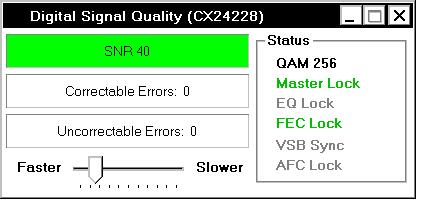
Not sure what you wanted me to do, but the attachment shows the signal monitor output for KVOAHD and KGUNHD (the 139.25MHz channels). For KMSBHD and KOLDHD (the 103.35 MHz channels), the output is exactly the same, except the signal to noise ratio is 36 instead of 40. From amplifier design classes in the far distant past, I would think those are very good SNRs, especially for digital information. Yes or no?I'm not sure. When I went looking for the 2250 specs just a moment ago I remembered something that I feel *reeeeaally* stupid for not remembering earlier. Hauppauge have a dedicated signal level/quality checking tool. You can download it from here (accessories tab, first download). What does that report?
No correctable or uncorrectable errors reported on any of the channels -- once tuned.
(on edit -- maybe there where a few and I didn't look long enough -- it doesn't give an error count)
There is a brief burst of uncorrectable errors when changing from one channel to another. I can't see a clear difference in the number or errors whether the channel change is within or across frequencies.
(on edit -- it's more errors when changing across frequencies)
No, had to leave a message - no return yet.Have you heard back from your cable company?
I'm on it.Both of those would be good things to try.As for increasing the signal strength, I could (temporarily?) switch the splitter connections at the service entrance, and get +3.5db. Is that enough to make a difference? I could also (temporarily?) remove the splitter between the Sony and the HTPC and get another +3.5db.
I still have 3 hooked up - but only for very rare playback.VCR for recording (I know - old school )
Interesting -- maybe. But I suspect my cable signal strength is much higher than from an antenna, even with the splitters --If I take the 15dB amp out then I have problems just like what you describe...
On edit:
Switching service entrance splitter connections to increase the HTPC input by 3.5db increased the SNR of the 103.25 MHz channels to 37 from 36. It also product a few correctable errors, and an occasional uncorrectable error. No improvement in recording the 103.25 MHz channels when some other recording is already in progress.
As expected, this dropped the cable modem up and down stream power levels by ~3db, with a minor decrease in performance.
Eliminating the other splitter I mentioned produced a very unexpected, negative result. Not sure I believe it, so will try it again tomorrow.
Attachments
- August 27, 2010
- 327
- 13
- Home Country
-
United States of America
- Thread starter
- #20
I did talk to the cable companies head technician. The QAM frequency allocation method is Standard, which is what I used to scan for the channels.
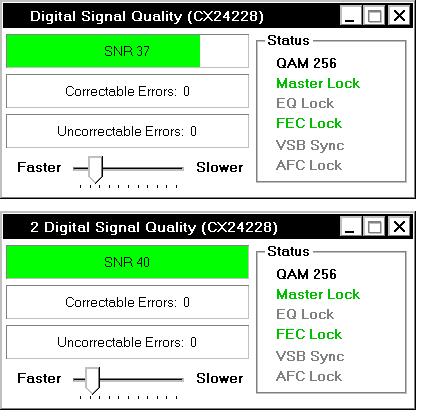
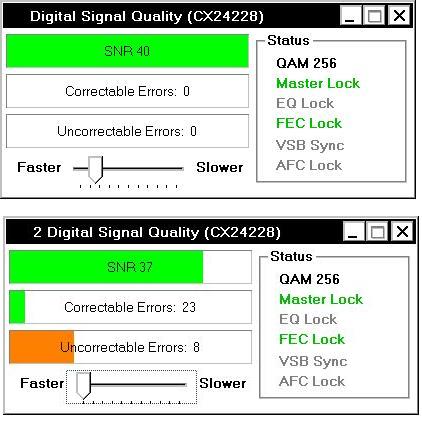
I realized the the Hauppauge monitor provides the capability to monitor both tuners. The two attachments show the results when I manually start (1) KOLD (103.35) then KVOA (139.25), and (2) KVOA then KOLD. The results are consistent with prior experience. If a problem channel is started first, all is fine. If a problem channel is started second, it's recording is very poor.
As noted, switching service entrance splitter connections to increase the HTPC input by 3.5db increased the SNR of the 103.25 MHz channels to 37 from 36. It also seems to produce a few more correctable errors, and an occasional uncorrectable error.
Additionally eliminating the TV / HTPC splitter, by replacing it with a straight-through connection, did not further increase the SNR, and seemingly caused increased numbers of both correctable and uncorrectable errors. (there are no error counts, but that's definitely what it looks like on the signal monitor and the video display) In this last case, the HTPC is connected directly to the service entrance splitter -3.5db branch.
I have no clue why the last case should happen, unless -- a real stretch -- it's because the splitter I removed is also a 5 - 2500 Mhz band-pass filter.
In sum, it doesn't look like amplifying the input signal would help the situation. Do you agree?
I realized the the Hauppauge monitor provides the capability to monitor both tuners. The two attachments show the results when I manually start (1) KOLD (103.35) then KVOA (139.25), and (2) KVOA then KOLD. The results are consistent with prior experience. If a problem channel is started first, all is fine. If a problem channel is started second, it's recording is very poor.
As noted, switching service entrance splitter connections to increase the HTPC input by 3.5db increased the SNR of the 103.25 MHz channels to 37 from 36. It also seems to produce a few more correctable errors, and an occasional uncorrectable error.
Additionally eliminating the TV / HTPC splitter, by replacing it with a straight-through connection, did not further increase the SNR, and seemingly caused increased numbers of both correctable and uncorrectable errors. (there are no error counts, but that's definitely what it looks like on the signal monitor and the video display) In this last case, the HTPC is connected directly to the service entrance splitter -3.5db branch.
I have no clue why the last case should happen, unless -- a real stretch -- it's because the splitter I removed is also a 5 - 2500 Mhz band-pass filter.
In sum, it doesn't look like amplifying the input signal would help the situation. Do you agree?
Attachments
Users who are viewing this thread
Online now: 2 (members: 0, guests: 2)