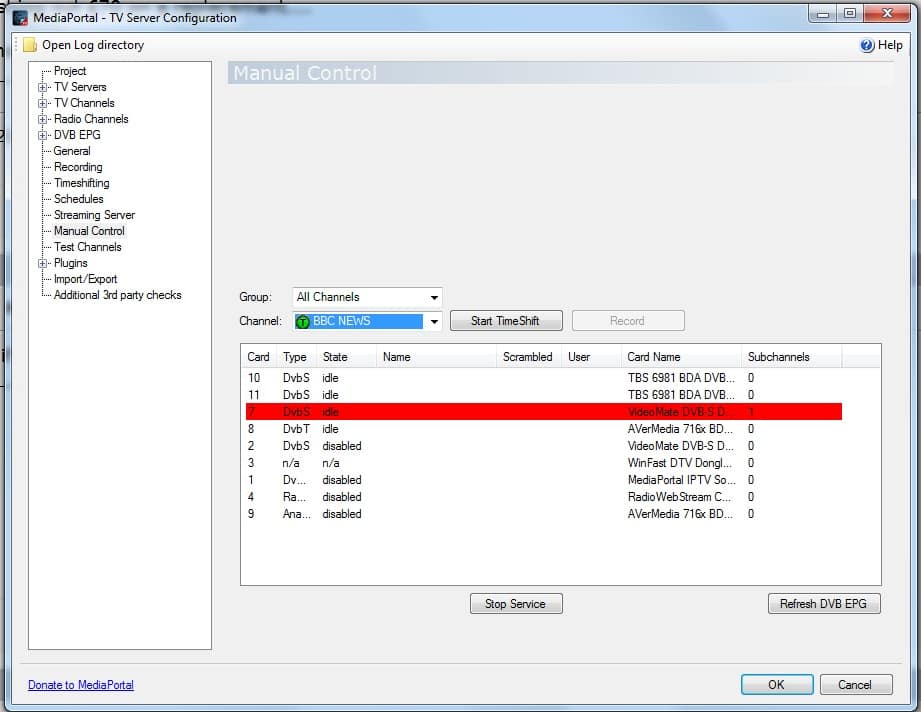
Question on Manual Control screen in TV Server Config (1 Viewer)

Pom

Portal Pro
August 10, 2006
171
0
49
Gloucester
Home Country
United Kingdom United Kingdom
MediaPortal Version: 1.2.1
MediaPortal Skin: StreamedMP
Windows Version: Win7 64-Bit Ultra (all updates applied)
CPU Type: AMD Phenom II X2 5500 Black Edition (3.5 GHz)
HDD: Western Digital WD5000AAKS 500GB SATA II 7200RPM (x2)
Memory: Crucial 4GB DDR2 800/PC2-6400 Ballistix
Motherboard: Asus M4N78 Pro Socket AM3
Video Card: ATI Radeon HD4550
Video Card Driver: CCC 10.11
Sound Card: VIA 1708S 8-Channel HD Audio Codec (integrated)
Sound Card AC3:
Sound Card Driver:
1. TV Card: Hauppauge NOVA-T USB Stick
1. TV Card Type: DVB-T
1. TV Card Driver: 3.11.27187.0
2. TV Card: Technotrend TT-Budget S2-1600
2. TV Card Type: DVB-S
2. TV Card Driver: 5.0.2.1
3. TV Card:
3. TV Card Type:
3. TV Card Driver:
4. TV Card:
4. TV Card Type:
4. TV Card Driver:
MPEG2 Video Codec: Cyberlink PDVD10
MPEG2 Audio Codec: Cyberlink PDVD10
h.264 Video Codec: Cyberlink PDVD10
Satelite/CableTV Provider: 28.2deg E EuroBird 1/Astra
HTPC Case: Coolermaster Media 281
Cooling: Arctic Cooling AC-FR2-64P
Power Supply: NorthQ NQ-4350GP-FL Pacific II 500W Fanless
Remote: Hauppage MCE
TV: Sony Bravia 40" KDL40W5500U
TV - HTPC Connection: DVI

This might be one for the developers... but what does it mean in the Manual Control screen of TV Server Configuration when one of the installed TV cards is flashing red?!

Thanks,
Lee
 

mm1352000

Retired Team Member
  • Premium Supporter
  • September 1, 2008
    21,544
    8,236
    Home Country
    New Zealand New Zealand
    Hi Lee

    It is a bit unclear even to me, but I think it means that the tuner is being tuned.

    mm
     

    Pom

    Portal Pro
    August 10, 2006
    171
    0
    49
    Gloucester
    Home Country
    United Kingdom United Kingdom
    I think my TT-Budget S2-1600 satellite tuner is faulty, lots of 'discontinuities' when i start timeshifting inside Manual Control and when in fulscreen TV the channels play as bad as you'd expect. I happened to see it flashing red inside manual control screen - it didn't look like normal behaviour because i'd never seen it before and my DVB-T card wasn't flashing red. Guess i'm just looking for some kind of confirmation that my tuner card is defunct before splashing out £70 on a replacement....

    PS. I've ruled out the graphics card so i'm fairly convinced.
     

    Pom

    Portal Pro
    August 10, 2006
    171
    0
    49
    Gloucester
    Home Country
    United Kingdom United Kingdom
    Here's a question - if the driver is updated for a tuner card should a full channel rescan for that card be performed?
     

    mm1352000

    Retired Team Member
  • Premium Supporter
  • September 1, 2008
    21,544
    8,236
    Home Country
    New Zealand New Zealand
    Hi again Lee

    I think my TT-Budget S2-1600 satellite tuner is faulty, lots of 'discontinuities' when i start timeshifting inside Manual Control and when in fulscreen TV the channels play as bad as you'd expect.
    Discontinuities could simply mean bad signal quality. What makes you so certain that the tuner is faulty?

    Guess i'm just looking for some kind of confirmation that my tuner card is defunct before splashing out £70 on a replacement....
    I wouldn't confirm that without a few more tests.
    1. Ensure that the timeshifting and recording folder(s) are excluded from any virus scanner.
    2. Try using a 7200rpm HDD (separate from the OS drive if possible) for timeshifting and recording.
    3. Check your dish alignment, cables and connectors. Don't make the mistake of assuming that your signal and cabling is okay just because another STB or tuner works fine. Tuners are all different - they have different sensitivity and signal level requirements.

    Did the tuner work well in the past and then stop working at some point?

    PS. I've ruled out the graphics card so i'm fairly convinced.
    Discontinuities in TsWriter logs rule out everything except:
    - the tuning parameters
    - the tuner hardware
    - the tuner driver
    - the HDD
    - dish alignment
    - cabling
    - connectors
    - splitters/switches
    - LNB
    - interference

    The tuner hardware is only one possibility in that list. If I were you I'd keep my mind open and try some more options if you haven't done so already.

    Here's a question - if the driver is updated for a tuner card should a full channel rescan for that card be performed?
    It isn't required. You should restart the PC after installing the drivers. If TV Server thinks it is a completely new tuner then you *could* rescan... or you could simply link the channels to the "new" tuner and remove the old one. If I were you, I would export my complete channel list and groups using the built in import/export function, then I'd delete all channels, update the satellite transponder lists (click "update satellite list" in the scanning section for that tuner in TV Server configuration), and then do a full rescan. That should eliminate the tuning parameters option I mentioned above.

    mm
     

    Pom

    Portal Pro
    August 10, 2006
    171
    0
    49
    Gloucester
    Home Country
    United Kingdom United Kingdom
    mm - thanks for your informative reply. The reason i am so sure it is the tuner is because my dual tuner system (1 xDVB-S2 + 1 xDVB-T) has been perfectly stable now for well a year, now all of a sudden the satellite channels are playing up (HD channels at first, now the SD channels are breaking up). Since i have made no changes to the system and all DVB-T channels are as good as ever, this points me to the satellite tuner.

    I don't think it is the satellite dish/cable because (1) i've just tested the signal using my SatFinder Kit (ok it's basic, but it tells me that there is a strong signal there which is constant and not dropping out) and (2) just the way i see the signal strength and quality meters jumping between zero and maximum in the Manual COntrol screen - just looks like dodgy PC hardware!
     

    ninja 12

    MP Donator
  • Premium Supporter
  • April 22, 2009
    126
    42
    Home Country
    Ireland Ireland
    I've only noticed the red flashing recently as well .

    If you look at my screenshot , card number 7 (Compro Videomate) is highlighted in red and it says "subchannels 1"

    attachment.php


    A couple of seconds later , the red bar was gone and it said "subchannels 0"

    A few seconds later "subchannels 0" changed to "subchannels 1" and the card started EPG grabbing .

    I take it that this mean that the red bar is just a sign that TV Server is preparing the card for use ?
     

    Attachments

    • manualcontrol.jpg
      manualcontrol.jpg
      124.3 KB

    Pom

    Portal Pro
    August 10, 2006
    171
    0
    49
    Gloucester
    Home Country
    United Kingdom United Kingdom
    Yeah, it seems to be something along those lines.

    My problem is fixed now - woop woop!

    I reseated the tuner card and then made the coax plug fit better. It's one of those cheap ones where the inner contact is actually the inner conductor of the wire itself - where the trick is to put a kink in it to get a good friction fit. Last time i took the coax plug off and put it back on again was only a couple of weeks ago, so my guess is that it was making poor contact which got worse over the coming days.
     

    Da_JoJo

    MP Donator
  • Premium Supporter
  • August 6, 2008
    64
    3
    Home Country
    Netherlands Netherlands
    the red bar indicates that the tuner is being accessed. if it stays red it means some other program uses the tuner or there is a fault in the decoding from the smartcard. reboot of the machine most of the times work. you could also try older stable drivers.

    if you happen to use k-light codec pack then update it to 7.9 as the former version has bugs in transportstreaming of HD content.
     

    Users who are viewing this thread

    Top Bottom