Reliable way to stop tv service. (1 Viewer)

404

Portal Pro
January 11, 2005
281
71
After resuming from a sleep state I use a batch file to stop the tv service (NET STOP) then reset my pair of skystar2 cards and restart the tv service, Lately on random occasions the tv service refuses to stop with 'the service could not be stopped' error, Not so bad if I'm at home to restart the system but any unattended recording fails, Is there a more reliable command or method I could use ??.
The only way I could think of was to wake the system and then reboot from a batch file...Not very elegant but I guess it would work.
 

HomeY

Test Group
  • Team MediaPortal
  • February 23, 2008
    6,418
    4,717
    51
    ::1
    Home Country
    Netherlands Netherlands
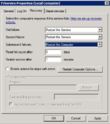
    Did you try using the Service Recovery settings?

    For example like this:

    TVService_Recovery.JPG
     

    Zoidberg77

    MP Donator
  • Premium Supporter
  • July 12, 2011
    392
    206
    Home Country
    Germany Germany
    Not so bad if I'm at home to restart the system but any unattended recording fails, Is there a more reliable command or method I could use
    This happens, if the TVService.exe gets somehow stuck; a forced kill will help: taskkill /F /IM TVservice.exe

    I execute the following script after every resume via task planer. It works fine for me in my multiseat environment, although the timeouts could be optimized, but I'm lazy and it does it's job since several months :)
    Code:
    @echo off
    start "" net stop tvservice
    timeout /T 3 /nobreak
    sc query TvService | find "STOPPED"
    if errorlevel 1 goto :waitlonger
    goto :starttvs
     
    :waitlonger
    timeout /T 5 /nobreak
    sc query TvService | find "STOPPED"
    if errorlevel 1 goto :1stkill
    goto :starttvs
     
    :1stkill
    echo %date% %time% TVService reagiert nicht, neustart>>e:\TVService.log
    set KILLCOUNT=1
    goto :killtvs
     
    :2ndkill
    echo %date% %time% TVService reagiert immmer noch nicht, neustart>>e:\TVService.log
    set /a KILLCOUNT=%KILLCOUNT%+1
    if %KILLCOUNT% == 3 GOTO :crit
     
    :killtvs
    start "" net stop tvservice
    timeout /T 5 /nobreak
    taskkill /F /IM TVservice.exe
    timeout /T 3 /nobreak
     
    :starttvs
    start "" net start TVService
    timeout /T 5 /nobreak
    sc query TvService | find "RUNNING"
    if errorlevel 1 goto :restart
    goto :end
     
    :restart
    timeout /T 10 /nobreak
    sc query TvService | find "RUNNING"
    if errorlevel 1 goto :restart2
    goto :end
     
    :restart2
    start "" net start TVService
    timeout /T 10 /nobreak
    sc query TvService | find "RUNNING"
    if errorlevel 1 goto :2ndkill
    goto :end
     
    :crit
    echo %date% %time% TVService reagiert immmer noch nicht, SYSTEM NEUSTART>>e:\TVService.log
    start "" shutdown /r /t 0 /f
     
    :end
    exit
     

    404

    Portal Pro
    January 11, 2005
    281
    71
    I'll try both ways and see which way works best on my setup...Many thanks to both of you for the help
     
    Last edited:

    Users who are viewing this thread

    Top Bottom