Remote problems. Antec Fusion Micro 350 (2 Viewers)

SN33K

Portal Member
February 28, 2007
13
0
Home Country
Netherlands Netherlands
OK i got a problems with my mediacenter. I had a asus pundit P4 2.6ghz before this build but it was not fast enough to play HD content so i decided to upgrade. But it seems the old system was way more easy to configure then this system. I'm already playing like 2 days with the configurations etc... but i cant seem to get things working.
maybe you guys can help me out? i even reinstalled VISTA 64 bit to see if a reinstall could solve the problem.

My remote ain't working with mediaportal.
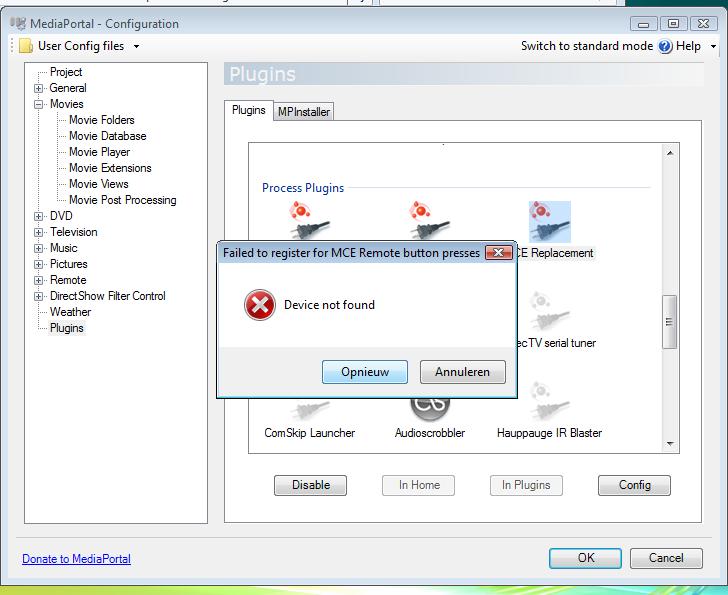
OK i got Imon software running on my Antec Fusion Micro 350 to let the display and remote work. Then i installed the plugin MCE replacement tool because on my old configuration it worked like a charm. but now it gives me an error. See the image.
attachment.php

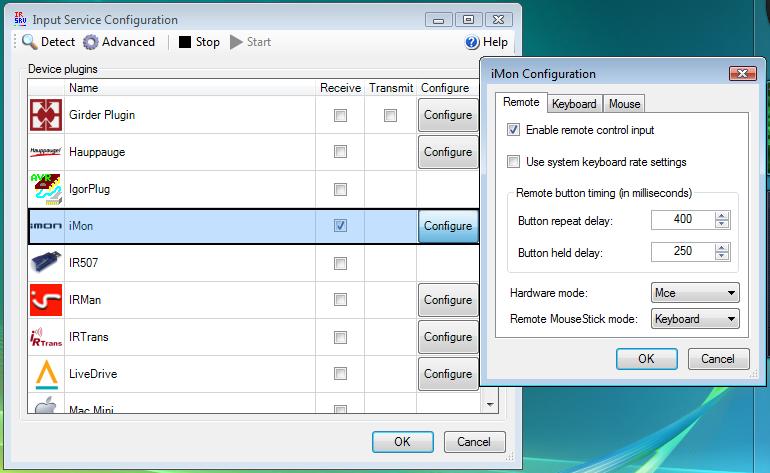
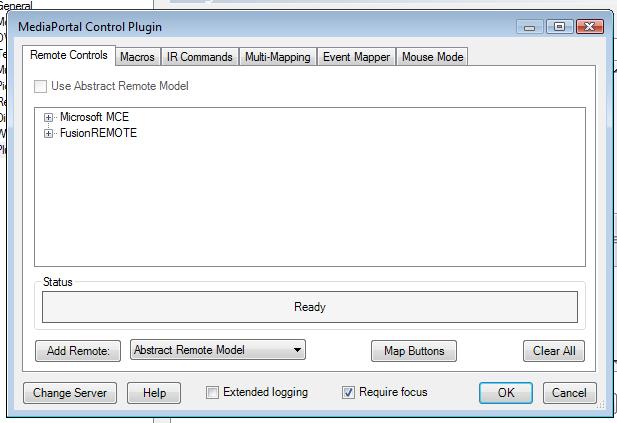
So i gave up on the MCE replacement tool and took a try on the IR Server suite

I used these settings but still no luck
attachment.php

attachment.php

The remote ain't working with Mediaportal

Some1 that has a solution for me?

MediaPortal Version: 1.0.0 RC2
Windows Version: Vista 64 bit Ultimate
CPU Type: AMD socket AM2 4850e @ 2.5 Ghz
HDD: 750GB
Memory: 4GB DDR2 800hz
Motherboard: Gigabyte GA-MA78GM-SH2
Video Card: AMD HD 3200
Video Card Driver: newest
1. TV Card: None yet
MPEG2 Video Codec: Cyberlink Vdeo SP decoder
MPEG2 Audio Codec: AC3filter
h.264 Video Codec: Cybelink H.264 decoder
HTPC Case: Antec Micro Fusion 350
Cooling: standard
Power Supply: 250W
Remote: MS Mediacenter remote
TV: Panasonic
TV - HTPC Connection: DVI -> HDMI
 

Attachments

  • MCEreplacement1.jpg
    MCEreplacement1.jpg
    58.6 KB
  • input service conf.jpg
    input service conf.jpg
    61.5 KB
  • input service conf2.jpg
    input service conf2.jpg
    38.6 KB

Crew

Portal Pro
April 24, 2007
61
0
Hi,

Have you loaded translator and under the programs tab tried to launch a program with a remote press WITH version 1.4.2.

Granted this isnt ideal but it should get you going.

Andy
 

kjachimowski

Portal Member
October 23, 2008
9
0
Home Country
United Kingdom United Kingdom
check out my post here: https://forum.team-mediaportal.com/297385-post5.html

maybe this helps. I could set everything I wanted for my Antec Fusion 430. Even Display infos, equalizer from Mediaportal.

No need for IR-Suite or anything else strange.

Hi Kszabo,

i tried your settings on my Fusion remote 450 silver with LCD ad it did not work, I have the keys options gredyed out on system control key mapping in iMon ? any idea?

thanks,
Karol
 

crazyfool

Portal Pro
October 8, 2008
237
4
i have a 350 and i got it working using the imon software... basically set it to whatever remote you use... go to program setting or commands or summin and create a new profile for mp and then jus set up the buttons corresponding to the shortcut keys in mp... i did this using my mce remote and worked like a charm... but this wasn't on vista so i dunno but its worth a shot
 

kjachimowski

Portal Member
October 23, 2008
9
0
Home Country
United Kingdom United Kingdom
i have a 350 and i got it working using the imon software... basically set it to whatever remote you use... go to program setting or commands or summin and create a new profile for mp and then jus set up the buttons corresponding to the shortcut keys in mp... i did this using my mce remote and worked like a charm... but this wasn't on vista so i dunno but its worth a shot


I tried to do this but some keys are greyed out? Do you use IR built into the case? i dont have mce IR connected? is this is the case?What version of IMon do you run?what about the settings in media portal rc3? do you sleect MCE remote there? Only four arrows keys work by default and the back key is mapped to back and NOT to escape...

i tried this but stil no luck


1. do not install Antec software. Get iMon 7.020.0502 from their website ::eek:undGraph::: Innovation of Human on Digital Network and install it (without imedianHD)
2. Install iMon and CybrDisplay v.782 Plugin for Mediaportal, configure it as described in its thread (choose display type and connection, and iMon Driver; see 2nd screenshot)

in iMon Manager you have to do the followings:
- set MCE as remote device
- map the left, right, up, down and OK keys of the RC in Settings/Windows commands/ (or like that, i have it in german). Deactivate the rest (to avoid conflicts with other apps)
- add PowerDVD and Mediaportal under Settings/Application commands to create a profile, you can delete rest if you want (I had Internet Explorer, Powerpoint etc there; see screenshot in german)
- map your RC-Keys to the functions you need (just check out the keyboard shortcut lists of MP and PDVD) or load mediaportal.imo and pdvd.imo file (.imo config files attached as zip!, import them and modify them to your liking!!!!)
- choose your default sound device to get controlled through the volume knob of the Antec case (this does not work with Vistas normal driver, you have to install the dedicated driver of the manufacturer like Realtek etc; my setting is "realtek hd audio HDMI")

Imon switches between the profiles according to the application in the foregroung ("in focus"). If you load PDVD from MP, it switches to PDVD mode, on return to MP it switches back to MP mode. It works great!!

needed files:
- iMon 7.020.0502 from their website
- CybrDisplay v.782 (latest from MP), configure it for the iMon Driver 7.20.0520
 

kszabo

MP Donator
  • Premium Supporter
  • December 6, 2007
    796
    86
    Germany, Bayern
    Home Country
    Hungary Hungary
    i tried your settings on my Fusion remote 450 silver with LCD ad it did not work, I have the keys options gredyed out on system control key mapping in iMon ? any idea?

    this happens to me also with different versions of iMon. Sometimes is the "back" and "menü" buttons are greyed out (the up, down, left, right and OK are always). If I am at home I will post a config file where they are not locked. btw which buttons are greyed out?
     

    kjachimowski

    Portal Member
    October 23, 2008
    9
    0
    Home Country
    United Kingdom United Kingdom
    i tried your settings on my Fusion remote 450 silver with LCD ad it did not work, I have the keys options gredyed out on system control key mapping in iMon ? any idea?

    this happens to me also with different versions of iMon. Sometimes is the "back" and "menü" buttons are greyed out (the up, down, left, right and OK are always). If I am at home I will post a config file where they are not locked. btw which buttons are greyed out?

    i have left, right, up , down, back greyed out.I gave up on this and connected mce receiver and i use MCE with this ...
     

    kszabo

    MP Donator
  • Premium Supporter
  • December 6, 2007
    796
    86
    Germany, Bayern
    Home Country
    Hungary Hungary
    i have left, right, up , down, back greyed out.I gave up on this and connected mce receiver and i use MCE with this ...


    good decision, this works always.

    but the fact that the up-down-left-right keys are greyed out is normal. This means they work only are not configurable. This is not a problem because you would configure this like that anyway!

    greetings
     

    Users who are viewing this thread

    Top Bottom