- August 3, 2010
- 14
- 0
MediaPortal Version: 1.1.3
MediaPortal Skin: standard
Windows Version: Win7
Remote: Terratec USB Infrared Receiver
Hi,
I use my Terratec cemote-control unit to remote control MP. (in the end its a harmony but that doesnt matter )
)
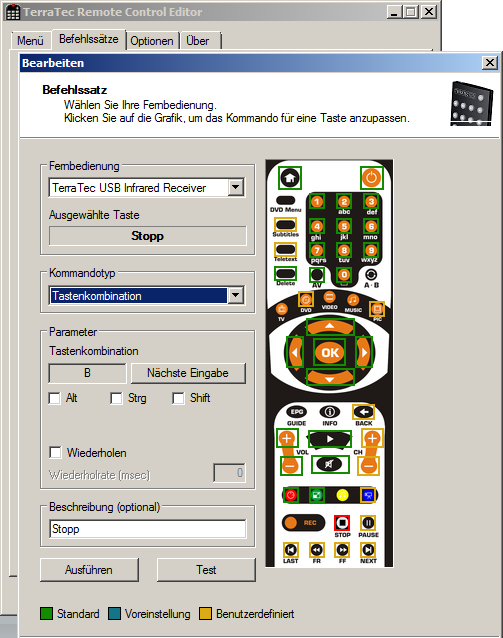
Works quite well, mostly I assign Keyboard Hotkeys to the remote-control Buttons.
E.g. in RemoteControlEditor "Pause Button" = Keyboard "SPACE".
Works perfekt!
Except for some Keys, for example "b" (= Stop within MP)
Stop Button assigned to Keyboard "b" in the same way as pause.
For example playing a music song.
Pushing Keyboard directly works!
When I push stop on remote-control, it seems to send some "b" but it's different, sound does not stop
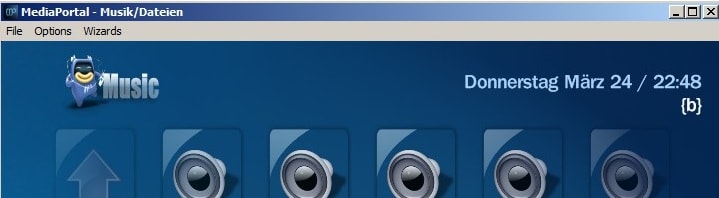
Instead it replaces the title String in the top tight corner by "{b}". (see screenshot)
Pressing a second time results in "{bb}" ... and so on.
To understand the problem I now need to know:
What is the exact signal, MP receives here that explains its behaviour?
big THX in advance!
MediaPortal Skin: standard
Windows Version: Win7
Remote: Terratec USB Infrared Receiver
Hi,
I use my Terratec cemote-control unit to remote control MP. (in the end its a harmony but that doesnt matter
)Works quite well, mostly I assign Keyboard Hotkeys to the remote-control Buttons.
E.g. in RemoteControlEditor "Pause Button" = Keyboard "SPACE".
Works perfekt!
Except for some Keys, for example "b" (= Stop within MP)
Stop Button assigned to Keyboard "b" in the same way as pause.
For example playing a music song.
Pushing Keyboard directly works!
When I push stop on remote-control, it seems to send some "b" but it's different, sound does not stop
Instead it replaces the title String in the top tight corner by "{b}". (see screenshot)
Pressing a second time results in "{bb}" ... and so on.
To understand the problem I now need to know:
What is the exact signal, MP receives here that explains its behaviour?
big THX in advance!

 New Zealand