Codecs SAF v6 (based on LAVF) (15 Viewers)

alltheway

Portal Pro
February 2, 2009
67
4
Re: AW: Re: SAF v6.00 (based on LAVF)

Hi Hoborg,

after changing from SAF 5 to 6 (unlocked) i´have some trouble with several MKV. When starting them in Mediaportal it crashes completely and I am back on Desktop. I figuered out, that the problem is the ffdshow(DXVA) codec, with PDVD11 it works. System is an 785 AMD-onboardchip. In the annex there´s a mediainfo.txt from one file.
I hope that you´ve got the sollution.

Thanks a lot.
Sparky

Can you try to play it in graphstudio?

No Problem there: LAV -> ffdshow(DXVA) -> EVR.

So there is something strange while playing in MePo.....

Sparky


Hello Sparky,

I have the same problem, and I see your MKV has embedded subtitles, exactly as mine, I also found out that if I play in MePo a movie without subs for a second or two, then playing movies with subs causes no problems. In my case I found that even playing a movie in windows, any movie, then loading MePo and playing MKV with subs is OK.

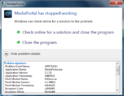
When booting to windows, then loading MePo, then playing the first file, an MKV with subtitles I get the following:

Untitled.png

and then MePo CTD. Even disabling subs with DXVA doesn't help.

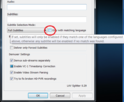
I found the problem in my case, maybe it will help you, the problem is with LAV splitter. if I untick the selection box, view next picture:

Untitled2.png

and delete the language codes from sound and sub, everything works fine. Maybe deselecting the box is enough but I was so tired from the problem that I left it that way.

BTW Sparky, how do you change subtitles when using DXVA for subtitles, the S key on the keyboard is for something else, and I also have a remote, but didn't find the way.
 

alltheway

Portal Pro
February 2, 2009
67
4
Re: SAF v6.00 (based on LAVF)

@alltheway:
What GPU and OS do you have?

GPU: Sapphire HD 6770

OS: Windows 7 x64

Hmm, there should not be any issue on that hardware.
Can you post small video samples?

@alltheway:
Does the issue happend in Graphstudio too?


About a small video sample, how do I do it? and how small?

The first MP4 movie not playing with DXVA is a blue ray rip.
The second movie with heavy artifacts on DXVA and playing fine on FFDSHOE without DXVA is an MKV, HD-DVD rip made ten years ago, maybe bad encoders, but plays very well with FFDSHOW.

The MP4 video plays well with GraphStudio, and showing - FFDSHOW filter
The MKV with the artifacts plays son Graphstudio with the heavy artifacts, showing - FFDSHOW DXVA filter.

Was your question regarding GraphStudio referring to my reply to Sparky? If so, then all the MKV with embedded subtitles play very well with Graphstudio, they also play very well with WMP, and after playing them with Graphstudio, loading MePo and playing them with MePo is fine too. The problem described in my reply to Sparky is playing them in MePo without playing anything in windows prior to launching MePo.
 

alltheway

Portal Pro
February 2, 2009
67
4
Re: SAF v6.00 (based on LAVF)

Hi hoborg,

Here are he samples of the two files:

Artifacts_with_DXVA-004.mkv:
Artifacts_with_DXVA-004.mkv - download now for free. File sharing. Software file sharing. Free file hosting. File upload. FileFactory.com

This file shows heavy artifacts only when playing with DXVA, playin with FFDSHOW and DXVA disabled is fine.


Not_playing_with_dxva.mp4:

Not_playing_with_dxva.mp4 - download now for free. File sharing. Software file sharing. Free file hosting. File upload. FileFactory.com


This is a sample of an MP4 file type, doesn't play with DXVA.
In Graphstudio it loads FFDSHOW, I see the icon in the tray, and I get subtitles. Playing in WMP, no FFDSHOW is used, I can't see the icon in the tray and no subtitles.

However, the sample plays with FFDSHOW in Graphstudio and in WMP, still no DXVA. I didn't made the sample with MKVmerge because MKVmerge makes the samples MKV files, and the MKV samples play fine with DXVA, as I've mentioned before, using MKVMerge to remux MP4 files solved the problem, all the MP4 videos, remuxed to MKV play fine with DXVA, maybe I should remux them all over night instead of troubling you.
 

hoborg

Portal Pro
June 13, 2008
4,413
1,644
Nový Jičín
Home Country
Czech Republic Czech Republic
Re: SAF v6.00 (based on LAVF)

@alltheway:

I will look on your samples, but not until 10.07.

There is a filter in FFDshow DXVA decoder - this preset should disable DXVA for MP4 with 50FPS, becouse there is a bug in FFDshow DXVA decoder - stutterring. Maybe the your sample is afected too.
BTW, if you just rename *.MP4 to *.MKV - does DXVA start to work?
 

polarie

Retired Team Member
  • Premium Supporter
  • November 20, 2006
    1,250
    153
    53
    Hasloh (near Hamburg)
    Home Country
    Germany Germany
    AW: Re: SAF v6.00 (based on LAVF)

    @alltheway:
    You can use MKVMerge to create samples from videos. And how big? Just to reproduce your issue.

    all stuttering ...

    Did you tryed to play your BluRays directly in Gaphstudio?

    no - öhm did not know that directly is possible -

    just start MePo in window mode -
    start the BluRays in MePo and start the remote graph ...

    will try to play BR direct and report

    Thx
     

    hoborg

    Portal Pro
    June 13, 2008
    4,413
    1,644
    Nový Jičín
    Home Country
    Czech Republic Czech Republic
    Re: AW: Re: SAF v6.00 (based on LAVF)

    @alltheway:
    You can use MKVMerge to create samples from videos. And how big? Just to reproduce your issue.

    all stuttering ...

    Did you tryed to play your BluRays directly in Gaphstudio?

    no - öhm did not know that directly is possible -

    just start MePo in window mode -
    start the BluRays in MePo and start the remote graph ...

    will try to play BR direct and report

    Thx

    Just open Graphstudio, look for index.bdmv in BluRay, drag and drop index.bdmv to Graphstudio and hit play. It should start to play.
     

    D3ltoroxp

    MP Donator
  • Premium Supporter
  • June 1, 2008
    3,272
    212
    Home Country
    Germany Germany
    AW: SAF v6.00 (based on LAVF)

    hey hoborg now i have the same card as you.the hd 6750 from gigabyte.you have post a long time ago your optimal settings for the card.can you tell me the settings again plz.
     

    Users who are viewing this thread

    Top Bottom