Codecs SAF v6 (based on LAVF) (8 Viewers)

BrownGhost

MP Donator
  • Premium Supporter
  • October 15, 2008
    435
    30
    Home Country
    Denmark Denmark
    I had stutters when I made a fresh reinstall of Windows some days ago: I have a Nvidia card and checked the available screen resolutions/frequency combinations in the Nvidia Control Panel. Turned out that Windows did not recognize my TV and did not read out the EDID information the TV sends over HDMI. In device manager the TV was shown as PnP Monitor. This is an old Windows bug. My solution was to use Monitor Asset Manager to create a correct Monitor.inf file for my TV and repalce the standard one with this. Voila the missing screen resolutions/frequency combinations are available now and the stutter is gone. I had the same problem with an ATI Setup and it was also Windows 7 causing the troubles.

    Hope this helps.

    okay so i try it, the first thing i see is, its reporting my screen 46" it 60" so im already pretty sure this thing is not going to solve my isue

    here is what the program reports my screen in..


    Monitor
    Model name............... SAMSUNG
    Manufacturer............. Samsung
    Plug and Play ID......... SAM07C5
    Serial number............ 1
    Manufacture date......... 2010, ISO week 46
    Filter driver............ None
    -------------------------
    EDID revision............ 1.3
    Input signal type........ Digital
    Color bit depth.......... Undefined
    Display type............. RGB color
    Screen size.............. 1020 x 570 mm (46,0 in)
    Power management......... Not supported
    Extension blocs.......... 1 (CEA-EXT)
    -------------------------
    DDC/CI................... Not supported

    Color characteristics
    Default color space...... Non-sRGB
    Display gamma............ 2,20
    Red chromaticity......... Rx 0,640 - Ry 0,330
    Green chromaticity....... Gx 0,300 - Gy 0,600
    Blue chromaticity........ Bx 0,150 - By 0,060
    White point (default).... Wx 0,313 - Wy 0,329
    Additional descriptors... None

    Timing characteristics
    Horizontal scan range.... 26-81kHz
    Vertical scan range...... 24-75Hz
    Video bandwidth.......... 230MHz
    CVT standard............. Not supported
    GTF standard............. Not supported
    Additional descriptors... None
    Preferred timing......... Yes
    Native/preferred timing.. 1920x1080p at 60Hz (16:9)
    Modeline............... "1920x1080" 148,500 1920 2008 2052 2200 1080 1084 1089 1125 +hsync +vsync
    Detailed timing #1....... 1360x768p at 60Hz (16:9)
    Modeline............... "1360x768" 85,500 1360 1424 1536 1792 768 771 777 795 +hsync +vsync

    Standard timings supported
    720 x 400p at 70Hz - IBM VGA
    640 x 480p at 60Hz - IBM VGA
    640 x 480p at 67Hz - Apple Mac II
    640 x 480p at 72Hz - VESA
    640 x 480p at 75Hz - VESA
    800 x 600p at 60Hz - VESA
    800 x 600p at 72Hz - VESA
    800 x 600p at 75Hz - VESA
    832 x 624p at 75Hz - Apple Mac II
    1024 x 768p at 60Hz - VESA
    1024 x 768p at 70Hz - VESA
    1024 x 768p at 75Hz - VESA
    1280 x 1024p at 75Hz - VESA
    1152 x 870p at 75Hz - Apple Mac II
    1152 x 864p at 75Hz - VESA STD
    1280 x 800p at 60Hz - VESA STD
    1280 x 960p at 60Hz - VESA STD
    1280 x 1024p at 60Hz - VESA STD
    1440 x 900p at 60Hz - VESA STD
    1440 x 900p at 75Hz - VESA STD
    1680 x 1050p at 60Hz - VESA STD
    1600 x 1200p at 60Hz - VESA STD

    EIA/CEA-861 Information
    Revision number.......... 3
    IT underscan............. Supported
    Basic audio.............. Supported
    YCbCr 4:4:4.............. Supported
    YCbCr 4:2:2.............. Supported
    Native formats........... 1
    Detailed timing #1....... 1920x1080p at 50Hz (16:9)
    Modeline............... "1920x1080" 148,500 1920 2448 2492 2640 1080 1084 1089 1125 +hsync +vsync
    Detailed timing #2....... 1280x720p at 50Hz (16:9)
    Modeline............... "1280x720" 74,250 1280 1720 1760 1980 720 725 730 750 +hsync +vsync
    Detailed timing #3....... 1920x1080i at 50Hz (16:9)
    Modeline............... "1920x1080" 74,250 1920 2448 2492 2640 1080 1084 1094 1124 interlace +hsync +vsync

    CE video identifiers (VICs) - timing/formats supported
    1920 x 1080p at 60Hz - HDTV (16:9, 1:1) [Native]
    1920 x 1080p at 50Hz - HDTV (16:9, 1:1)
    1280 x 720p at 60Hz - HDTV (16:9, 1:1)
    1280 x 720p at 50Hz - HDTV (16:9, 1:1)
    1920 x 1080i at 60Hz - HDTV (16:9, 1:1)
    1920 x 1080i at 50Hz - HDTV (16:9, 1:1)
    720 x 480p at 60Hz - EDTV (16:9, 32:27)
    720 x 576p at 50Hz - EDTV (16:9, 64:45)
    1920 x 1080p at 24Hz - HDTV (16:9, 1:1)
    1920 x 1080p at 25Hz - HDTV (16:9, 1:1)
    1920 x 1080p at 30Hz - HDTV (16:9, 1:1)
    NB: NTSC refresh rate = (Hz*1000)/1001

    CE audio data (formats supported)
    LPCM 2-channel, 16/20/24 bit depths at 32/44/48 kHz

    CE speaker allocation data
    Channel configuration.... 2.0
    Front left/right......... Yes
    Front LFE................ No
    Front center............. No
    Rear left/right.......... No
    Rear center.............. No
    Front left/right center.. No
    Rear left/right center... No
    Rear LFE................. No

    CE video capability data
    CE scan behavior......... Supports overscan and underscan
    IT scan behavior......... Supports overscan and underscan
    PT scan behavior......... Not supported
    RGB quantization range... Not supported
    YCC quantization range... Not supported

    CE colorimetry data
    xvYCC709 support......... Yes
    xvYCC601 support......... Yes
    sYCC601 support.......... No
    AdobeYCC601 support...... No
    AdobeRGB support......... No
    Metadata profile flags... 0x01

    CE vendor specific data (VSDB)
    IEEE registration number. 0x000C03
    CEC physical address..... 4.0.0.0
    Supports AI (ACP, ISRC).. Yes
    Supports 48bpp........... No
    Supports 36bpp........... Yes
    Supports 30bpp........... Yes
    Supports YCbCr 4:4:4..... Yes
    Supports dual-link DVI... No
    Maximum TMDS clock....... 225MHz
    Audio/video latency (p).. n/a
    Audio/video latency (i).. n/a
    HDMI video capabilities.. Yes
    EDID screen size......... Rounded to nearest cm
    3D structures supported.. Top-and-bottom, Side-by-side w. horizontal sub-sampling
    3D formats supported..... Mandatory formats plus some primary VICs
    1920 x 1080p at 60Hz - HDTV (16:9, 1:1) [Native]
    1920 x 1080p at 50Hz - HDTV (16:9, 1:1)
    1280 x 720p at 60Hz - HDTV (16:9, 1:1)
    1280 x 720p at 50Hz - HDTV (16:9, 1:1)
    1920 x 1080i at 60Hz - HDTV (16:9, 1:1)
    1920 x 1080i at 50Hz - HDTV (16:9, 1:1)
    1920 x 1080p at 24Hz - HDTV (16:9, 1:1)
    1920 x 1080p at 25Hz - HDTV (16:9, 1:1)
    1920 x 1080p at 30Hz - HDTV (16:9, 1:1)
    NB: NTSC refresh rate = (Hz*1000)/1001
    Data payload............. 030C004000B82D20D0080140073F405090A0

    Report information
    Date generated........... 04-04-2012
    Software revision........ 2.60.0.972
    Data source.............. Real-time 0x0031
    Operating system......... 6.1.7601.2.Service Pack 1
     

    psykix

    MP Donator
  • Premium Supporter
  • July 10, 2009
    785
    46
    Wirral
    Home Country
    United Kingdom United Kingdom
    Well.. I switched to the Tesla driver and still have the same problem..

    I don't really understand what the issue could be - had to switch back to PDVD12 for now.

    Surely if it is a graphics card issue, then it would affect the main single seat rather than live TV on the client it is streaming to?

    Even disabled IPV6 in case that was related.
     

    BlueMax1916

    Super User
  • Team MediaPortal
  • Super User
  • January 29, 2007
    706
    125
    Home Country
    Germany Germany
    okay so i try it, the first thing i see is, its reporting my screen 46" it 60" so im already pretty sure this thing is not going to solve my isue

    here is what the program reports my screen in..


    -- SNIP --


    The utility reads the information that is coming from the screen. Not more and not less. It is not important what your screen size (diameter) actually is as long as the other information is right. Maybe Samsung just copies these data from one model to another and does not adapt some data. Screen resolutions and refresh rates is what you are looking for. You could save this information now into an .inf file and use this in Windows. For me it worked. I had some vital screen resolutions and refresh rates not showing up in Nvidia Control Panel. For example 1080i 25Hz was not listed and I had stutter exactly at that resolution and refresh rate. Other combinations had the same problem. After applying the .inf file those problems went away. No stutter. My TV was listed as PnP Monitor in device manager. Windows simply did not read out all the EDID (Wikipedia link) information that came over the HDMI cable.

    By the way ATI graphics cards have problems reading and interpreting EDID data coming from Philips TV. That is a long-lasting driver bug resulting in weird colours. I experienced that with an E350 mainboard and finally had to change to Intel/Nvidia combo to cure the problem.
     

    BrownGhost

    MP Donator
  • Premium Supporter
  • October 15, 2008
    435
    30
    Home Country
    Denmark Denmark
    ... My solution was to use Monitor Asset Manager to create a correct Monitor.inf file for my TV and repalce the standard one with this. Voila the missing screen resolutions/frequency combinations are available now and the stutter is gone. I had the same problem with an ATI Setup and it was also Windows 7 causing the troubles.

    Hope this helps.

    Do you have an HDMI AV Receiver between your TV and the HTPC?

    I have this kind of configuration (TV->AVR->HTPC all connected through HDMI) and experience stutters and all the videos don't play smooth with SAF 6.0.9 (or older). I have an ATI card with 12.2 drivers in my HTPC.

    i have same stup HTPC
    from htpc Optical to AV Reciver
    from htpc HDMI to TV
     

    BrownGhost

    MP Donator
  • Premium Supporter
  • October 15, 2008
    435
    30
    Home Country
    Denmark Denmark
    First I would try the refresh rate changer! Works fine on my Samsung 50" top model state of the art plasma TV ;)

    is it the Dynamic refresh rate changer, in settings in MePo you are talking about?
    if i use = mepo crash ffmpeg is crashing.

    i disabled it again, when to the ATI graphics card settings.
    disabled ALL enhancements in there, every single ting i could find.
    plays better looks better now..

    From in there i set demo mode, split screen.. the screen showing me no enhancements look even better, the color are way better.
    i have try every setting, but cant get color on enhanced side of demo to look the same.. no matter what i do.. what a shame..
    the skin in dessert game of thrones 2x2 15 minutes in, looks way to red on enhanced demo side..
     
    C

    CypherMK

    Guest
    is it the Dynamic refresh rate changer, in settings in MePo you are talking about?
    if i use = mepo crash ffmpeg is crashing.

    i disabled it again, when to the ATI graphics card settings.
    disabled ALL enhancements in there, every single ting i could find.
    plays better looks better now..

    From in there i set demo mode, split screen.. the screen showing me no enhancements look even better, the color are way better.
    i have try every setting, but cant get color on enhanced side of demo to look the same.. no matter what i do.. what a shame..
    the skin in dessert game of thrones 2x2 15 minutes in, looks way to red on enhanced demo side..

    Yes. I mean the one in mediaportal configuration. Just enable it and try it without changing any options. Normally it should work.

    But you say it crashes? What does exactly happen?
     

    BrownGhost

    MP Donator
  • Premium Supporter
  • October 15, 2008
    435
    30
    Home Country
    Denmark Denmark
    i enable it, and i dont make changes. save setting, start mepo, play a movie = mepo crash, crash report show ffmpeg is crashing.
     
    C

    CypherMK

    Guest
    i enable it, and i dont make changes. save setting, start mepo, play a movie = mepo crash, crash report show ffmpeg is crashing.

    Strange. What is your hardware? Do you use saf? Or other codec packs?

    P.s. It is wise to provide your system specs under your profile!
     

    BrownGhost

    MP Donator
  • Premium Supporter
  • October 15, 2008
    435
    30
    Home Country
    Denmark Denmark
    i enable it, and i dont make changes. save setting, start mepo, play a movie = mepo crash, crash report show ffmpeg is crashing.

    Strange. What is your hardware? Do you use saf? Or other codec packs?

    P.s. It is wise to provide your system specs under your profile!

    the first post i made had all info, here it is again..
    + i will update my profile

    SAF 6.0.9
    MePo 1.2.2

    Computer win 7 64 bit
    6 giga ram
    ATI 5xxx mobility radion (is this getting to weak to handle HD movies??) Newst drivers 12.3 from AMD

    My tv is brand new 60" Samsung Top model 800mhz LED tv

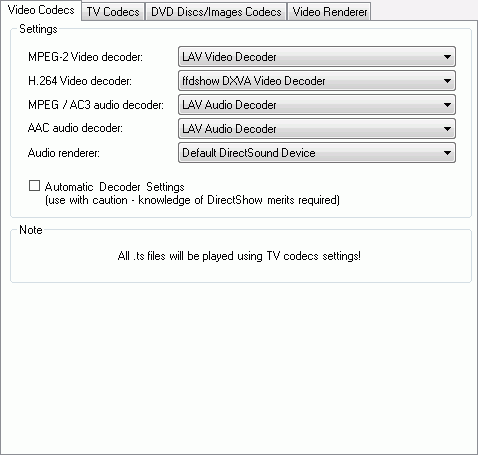
    and my settings are

    saf6_video.png


    graphstudio.jpg
     
    C

    CypherMK

    Guest
    I think the hardware shouldn't be a problem. It is strange that mepo crashes.

    If you manually set the refresh rate to 23hz in the ati control center. And then you play a hd movie. Does it stutter then?
     

    Users who are viewing this thread

    Top Bottom