- December 15, 2009
- 11
- 0
- Home Country
-
 France
MediaPortal Version: RC1
MediaPortal Skin: PurevisionHD
Windows Version: XP sp3
CPU Type: AMD x2 2.3
HDD: 1To
Memory: 2G
Motherboard: LanParty
Video Card: Nvidea
Video Card Driver:
Sound Card:
Sound Card AC3:
Sound Card Driver:
1. TV Card: KNC
1. TV Card Type: DVB-S
1. TV Card Driver:
2. TV Card: Technotrend
2. TV Card Type: DVB-S, analog
2. TV Card Driver:
3. TV Card:
3. TV Card Type:
3. TV Card Driver:
4. TV Card:
4. TV Card Type:
4. TV Card Driver:
MPEG2 Video Codec:
MPEG2 Audio Codec:
h.264 Video Codec:
Satelite/CableTV Provider: Astra, Hotbird, Eutelsat
HTPC Case:
Cooling:
Power Supply:
Remote: Imon
TV:
TV - HTPC Connection: Component
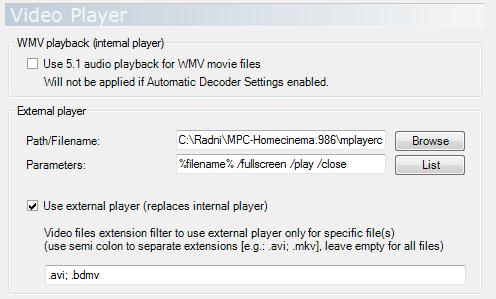
I'm trying to configure MP1.2 to use an external video player (powerdvd10) ONLY for certain file types. Why ? because I want to use the internal player for most files & Power DVD for 3D (stereoscopic) files. I could give the files a special name or place them in a special folder. has anyone any suggestions on how to achieve this ?
MediaPortal Skin: PurevisionHD
Windows Version: XP sp3
CPU Type: AMD x2 2.3
HDD: 1To
Memory: 2G
Motherboard: LanParty
Video Card: Nvidea
Video Card Driver:
Sound Card:
Sound Card AC3:
Sound Card Driver:
1. TV Card: KNC
1. TV Card Type: DVB-S
1. TV Card Driver:
2. TV Card: Technotrend
2. TV Card Type: DVB-S, analog
2. TV Card Driver:
3. TV Card:
3. TV Card Type:
3. TV Card Driver:
4. TV Card:
4. TV Card Type:
4. TV Card Driver:
MPEG2 Video Codec:
MPEG2 Audio Codec:
h.264 Video Codec:
Satelite/CableTV Provider: Astra, Hotbird, Eutelsat
HTPC Case:
Cooling:
Power Supply:
Remote: Imon
TV:
TV - HTPC Connection: Component
I'm trying to configure MP1.2 to use an external video player (powerdvd10) ONLY for certain file types. Why ? because I want to use the internal player for most files & Power DVD for 3D (stereoscopic) files. I could give the files a special name or place them in a special folder. has anyone any suggestions on how to achieve this ?