Set true directx fullscreen in mediaportal (1 Viewer)

oshri

Portal Member
November 29, 2010
48
0
Home Country
Israel Israel
Hi,
In the past few days I tried to make my videos played smootly with dynamic refresh rate.
I was unsuccesful until today.
I installed XBMC and unchecked the option "Use a fullscreen window rather than true fullscreen ".
From that time, XBMC played smooth video with dynamic refresh rate.
I like MediaPortal MUCH better than XBMC and i want to be able to watch videos smoothly.
Where can i tell the codec to use the DirectX full screen and not the windowed full screen?
I use Win7, SAF 6 and my graphics card is AMD HD6450.

Thanks for all your help.
Oshri
 

oshri

Portal Member
November 29, 2010
48
0
Home Country
Israel Israel
Anyone? about 3% of the frames are dropped on mediaportal.
please help me i really don't know what to do.
 
Last edited:

HomeY

Test Group
  • Team MediaPortal
  • February 23, 2008
    6,418
    4,717
    51
    ::1
    Home Country
    Netherlands Netherlands
    I installed XBMC and unchecked the option "Use a fullscreen window rather than true fullscreen ".
    From that time, XBMC played smooth video with dynamic refresh rate.

    Quote XBMC FAQ:
    The "Adjust display refresh rate" function of XBMC sometimes has bad interactions with Aero on Windows Vista and 7.

    So that doesn't mean you need that option for MediaPortal also. ;)

    You might wanna check out the Wiki about Stuttering Playback.
    If that doesn't work, then help us to help you, and post logs. See the link in my signature on how to do that.
     
    Last edited:

    HomeY

    Test Group
  • Team MediaPortal
  • February 23, 2008
    6,418
    4,717
    51
    ::1
    Home Country
    Netherlands Netherlands
    Hmm..... Those logs look pretty normal to me. Graph also looks good.

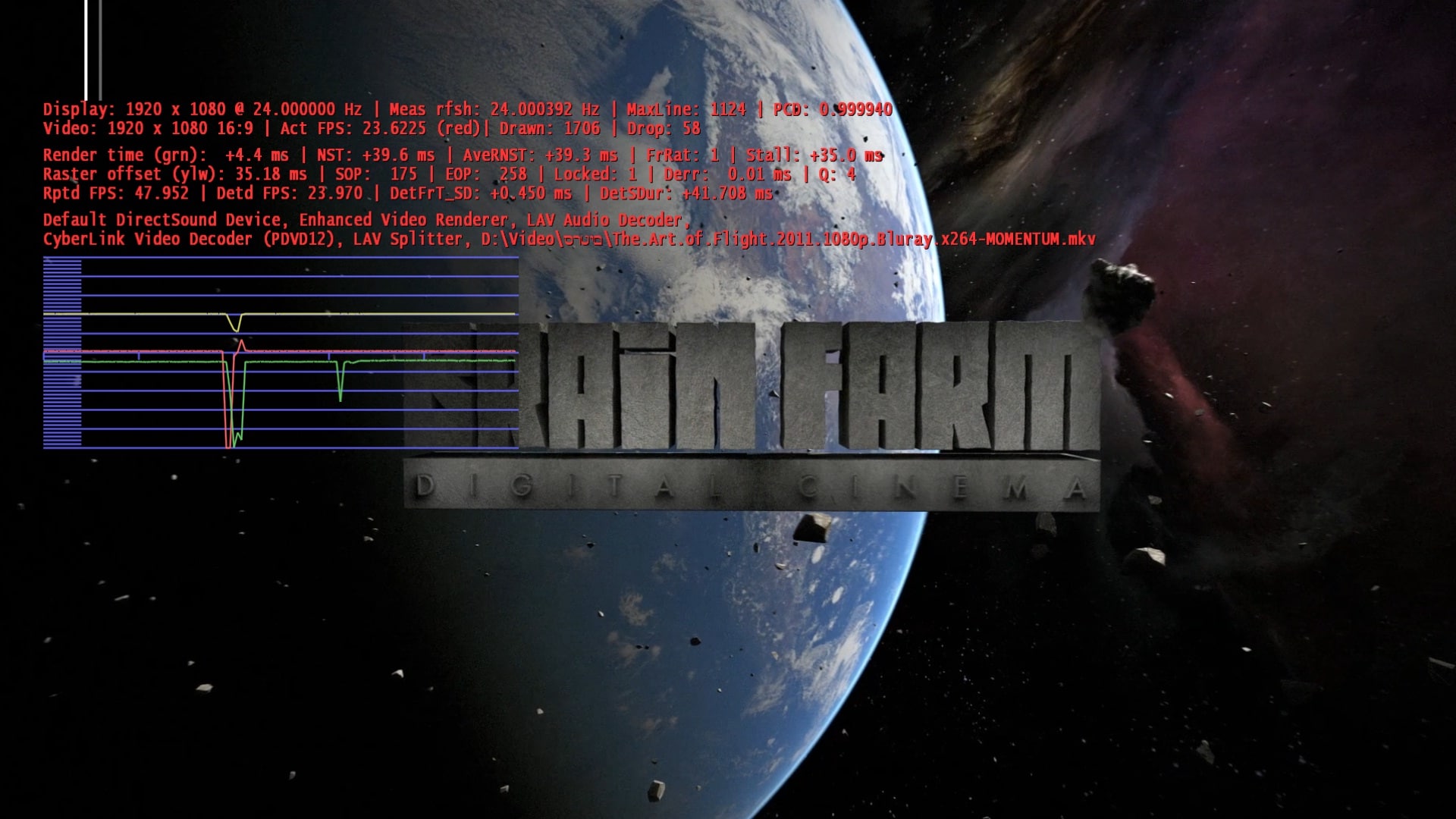
    Can you post a screenshot with the stats on screen while you watch a movie?
    1. Start a movie
    2. Press Shift + 1 (stats will be displayed now)
    3. Wait about 20 seconds and create a screenshot.

    If that doesn't clear things up, hopefully someone else has an idea :unsure:
     

    oshri

    Portal Member
    November 29, 2010
    48
    0
    Home Country
    Israel Israel
    Here is a screenshot.
    I get 2-5 dropped frames every few seconds. About 3% dropped frames.
    I don't think it is driver or hardware related because everything is super smooth on XBMC.
    As i said XBMC was exactly the same until i turned off fake full screen.

    Thanks again for all the help.
     

    Attachments

    • framedrop.jpg
      framedrop.jpg
      456 KB

    seco

    Retired Team Member
  • Premium Supporter
  • August 7, 2007
    1,575
    1,239
    Home Country
    Finland Finland
    I would try some different codec just to be sure. Also the Movie Thumbnailer process is crashing on your setup which I believe can take a lot of CPU time and this way cause bad user experience in Mediaportal.

    Based on the logs the Refresh Rate Changer is working as expected.
     

    oshri

    Portal Member
    November 29, 2010
    48
    0
    Home Country
    Israel Israel
    I would try some different codec just to be sure. Also the Movie Thumbnailer process is crashing on your setup which I believe can take a lot of CPU time and this way cause bad user experience in Mediaportal.

    Based on the logs the Refresh Rate Changer is working as expected.

    I tried all the options on SAF . I uninstalled SAF and installed SHARK007 . Tried all the options on shark007.
    Everything is exactly the same.
    Can the Thumbnailer process cause 3% dropped frames?

    Is MediaPortal using true or fake full screen?
    Because turning off fake full screen fixed the problem on XBMC.

    Thanks again
    Oshri[DOUBLEPOST=1342372241][/DOUBLEPOST]I found this thread:
    https://github.com/xbmc/xbmc/pull/598
    I think this is the cause of the problem.
     

    seco

    Retired Team Member
  • Premium Supporter
  • August 7, 2007
    1,575
    1,239
    Home Country
    Finland Finland
    I know nothing about true/fake full screen. I would throw away all codec packs and try only LAV Filters or manually register MPC-HC codec. Do you have Aero mode enabled in Windows? (you should)
     

    oshri

    Portal Member
    November 29, 2010
    48
    0
    Home Country
    Israel Israel
    I know nothing about true/fake full screen. I would throw away all codec packs and try only LAV Filters or manually register MPC-HC codec. Do you have Aero mode enabled in Windows? (you should)
    Thanks for all your help.
    I did try MPC-HC and LAV filters before i installed saf 6 and shark007.
    I installed these packages becuase i got the dropped frames issue.

    Aero is enabled on my HTPC.

    Thanks again for all your help.
     

    SiLenTYL

    Retired Team Member
  • Premium Supporter
  • April 23, 2004
    1,144
    159
    Melbourne
    Home Country
    Australia Australia
    so did it work?
    if you are trying to get 23.967 hz refreshrate, you will need to add a custom resolution (with that refreshrate) in the ATI control panel
     

    Users who are viewing this thread

    Top Bottom