
Set-up help please? (1 Viewer)

jameson_uk

Retired Team Member
  • Premium Supporter
  • January 27, 2005
    7,257
    2,533
    Birmingham
    Home Country
    United Kingdom United Kingdom
    VIDEO_TS.BUP
    VIDEO_TS.IFO
    VTS_01_0.BUP
    VTS_01_0.IFO
    All the files in that window were for VTS_01_0.IFO files. Has it correctly picked up and added the VIDEO_TS.IFO files (can you check what videos have actually been added?)

    Failing that try renaming the VTS_01_0.IFO file to VTS_01_0.XXX or something on one folder and then see if that gets picked up.

    As Deda said though, he has basically rewritten the video section from scratch because there were numerous issues with it.
     

    Deda

    Lead Dev MP1 Videos
  • Premium Supporter
  • March 18, 2009
    2,423
    2,385
    Zagreb
    Home Country
    Croatia Croatia
    Yes, one of the thing is missing subfolder \VIDEO_TS\ (I didn't saw that on first look :sorry:) so MP thought that all files inside title folder are video files (that's why you have so many entries with the same title).
    Don't delete VTS_01_0.IFO (VIDEO_TS.IFO, VTS_01_0.IFO - are configuration files with information about how to play exactly all video and audio content of DVD (including menus, subtitles, aspect ratio, languages etc.).

    Just delete your video database, create VIDEO_TS subfolder for all rips and try to rescan, sure maybe there still will be some conflicts but you will end up with clean database and results, conflicts can be re-searched again and you can choose right title from the list.
     

    Eezer

    Portal Member
    December 31, 2010
    19
    0
    that's what i've just been doing. i just rescanned the folder and my conflicts have gone from 103 to 6! i don't understand why so many didn't rip with VIDEO_TS folders. the ones that did seem to be random ones; it's not even a few that were ripped at the same time. weird.

    the conflicts i'm left with seem to be mainly dvds which are split over more than one disc (Live Aid, Pink Floyd's P.U.L.S.E) and a couple that i can't find on IMDB at all (Ricky Gervais Live 4 - Science, Katie Melua - Live In Rotterdam). what's the best way to do multi-disc rips?

    and thanks to both of you for all your help :)
     

    Deda

    Lead Dev MP1 Videos
  • Premium Supporter
  • March 18, 2009
    2,423
    2,385
    Zagreb
    Home Country
    Croatia Croatia
    what's the best way to do multi-disc rips?

    Hah, now you got me :). To be honest, I never think of that in case of DVD rips. Currently this is not possible for them, but I found first aid workaround.

    Just name you DVD folders something like:
    Title (year) DVD1
    Title (year) DVD2

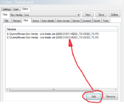
    After scan you will found only one entry in the database but it's only for DVD1. What you need to do is to add VIDEO_TS.IFO file from DVD2 in the file list (just go to VDb Editor-Files , select corresponding DVD title and add that file - don't delete first IFO file from DVD1)
     

    Attachments

    • MultiDVD.png
      MultiDVD.png
      16.3 KB

    Eezer

    Portal Member
    December 31, 2010
    19
    0
    you say it's not really possible with dvd rips, but there's only a few so i can re-rip them as mkv files if that makes it easier? if i do this how should i name them and which folder structure should i use?
     

    Deda

    Lead Dev MP1 Videos
  • Premium Supporter
  • March 18, 2009
    2,423
    2,385
    Zagreb
    Home Country
    Croatia Croatia
    In case like that just end file name before extension with CDx ie:

    My Film (Year) CD1.mkv
    My Film (Year) CD2.mkv

    Put both file in one folder but beware that folder name will not be taken into account for movie name search, MP will take "My Film (Year)" for search string from CD1, CD2 file will be added to found movie.

    Possible stack extensions are also:

    DiscX, DiskX, PartX, DVDx, [x-y], X or Y are the numbers from 0 to 99
     

    Users who are viewing this thread

    Top Bottom