
Single Seat or TV Server (1 Viewer)

eetaylog

Portal Pro
March 6, 2007
874
41
45
South London
Home Country
England England
A quick question... if im running a PC which will act as a TV server but also is used to run MP (i have a seperate client that will use the PC's tv server) should i install it as a single seat or as a TV server + client (seperate client install after installing TV server)?
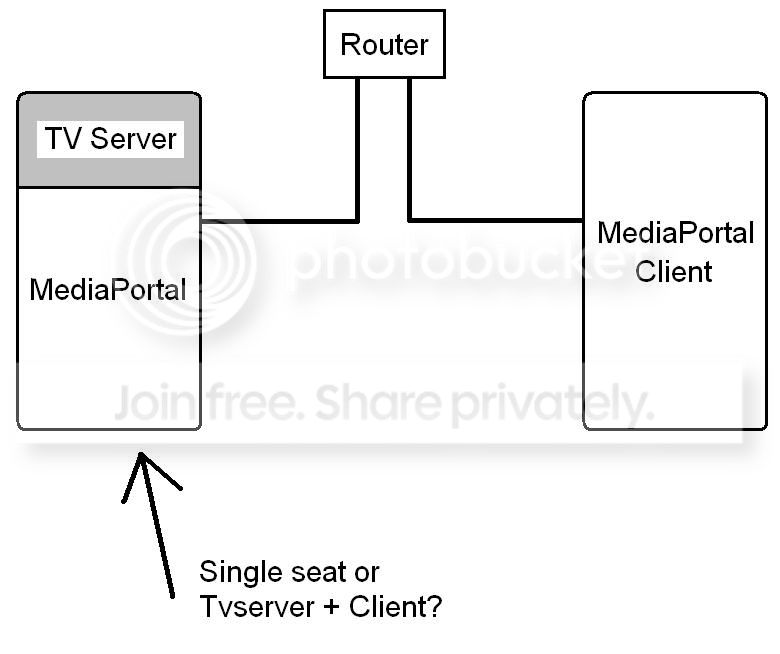
MP.jpg


TIA

MediaPortal Version: MP1.2 RC
MediaPortal Skin: Avalon
Windows Version: Win7 + SP1
CPU Type: AMD AM2 X2 4600+
HDD: 2 x Samsung F1 2Tb
Memory: Corsair 4Gb
Motherboard: Gigabyte nForce 430 Micro ATX
Video Card: ATI Radeon HD 4670
Video Card Driver:
Sound Card: On board 7.1
Sound Card AC3:
Sound Card Driver:
1. TV Card: Hauppauge Nova-T500
1. TV Card Type: DVB-T
1. TV Card Driver:
2. TV Card:
2. TV Card Type:
2. TV Card Driver:
3. TV Card:
3. TV Card Type:
3. TV Card Driver:
4. TV Card:
4. TV Card Type:
4. TV Card Driver:
MPEG2 Video Codec:
MPEG2 Audio Codec:
h.264 Video Codec: DivX7
Satelite/CableTV Provider:
HTPC Case: Antec Fusion
Cooling: Scythe Mini Ninja
Power Supply: Antec 430W
Remote: Hauppauge
TV: Samsung 42" Plasma
TV - HTPC Connection: DVI -> HDMI
 

hafblade

Portal Pro
January 19, 2011
675
290
Trier, Germany
Home Country
Germany Germany
Hi

depens on what you want to do with your server.

If you link a TV monitor to your Server and want to watch TV / Videos / ... on your server than you should install it as single seat installation.

If you only want to use it as server and don't want to watch videos on this specific computer you should install it as dedicated server


I'm not sure if you understood the difference.

Single-seat means that this is a pc where a server AND a client are running together on the same machine.
TV-server-only means that this pc is dedicated to send around the TV signal to watch it on other PCs.

I hope I could help
 

eetaylog

Portal Pro
March 6, 2007
874
41
45
South London
Home Country
England England
Hi

depens on what you want to do with your server.

If you link a TV monitor to your Server and want to watch TV / Videos / ... on your server than you should install it as single seat installation.

If you only want to use it as server and don't want to watch videos on this specific computer you should install it as dedicated server


I'm not sure if you understood the difference.

Single-seat means that this is a pc where a server AND a client are running together on the same machine.
TV-server-only means that this pc is dedicated to send around the TV signal to watch it on other PCs.

I hope I could help


Thanks. Is single seat not the same thing as installing TV server and then installing a client MP on top? I use my server PC to host my TV cards and network shared drives for my home network/client PC's, but i also use it to run MP on as well (so i can watch TV and videos on).

If i install it as a single seat, how can my client PC (in my bedroom upstairs) connect to the TV service? Isnt this only a feature of having it installed as Tvserver?
 

hafblade

Portal Pro
January 19, 2011
675
290
Trier, Germany
Home Country
Germany Germany
Single seat is like installing a server and a client on the same pc and linking from the client to the server by localhost.


Steps to do:
1) On your server install single-seat
2) On your client install client-only
3) Go to the configuration of the server -> TV -> TV client and type in "localhost" , "127.0.0.1" or its on IP as tv-server (so it links to itself
4) Go to the configuration of the client -> TV -> TV client and type in the IP of the single-seat-tv-server-pc.

Thats all.

Single seat is like both on the same PC and you only have to configure the this PCs IP at every clients configuration window.

:)

Example 1:
You have one PC in your living room where your tv cabel can also be found. There you use a single-seat system. You are able to watch TV on it and its your server because the tv cabel is there. Than you also have PCs in your children-room, bath-room ( :D ), room where you sleep, in your garden, in your swiming pool ( :D ). On these you install only the client with the ip to your server.

Example 2:
You have a PC in a small room in your basement where all your tv cabel is situated. On this PC you only install your TV-Server without single-seat or client. And all other PCs are installed as clients.
 

eetaylog

Portal Pro
March 6, 2007
874
41
45
South London
Home Country
England England
I think i may have been confused about the setup types. Ive been running Tvserver + client on my main server PC for years now, but ive always had problems with hibernation/sleep and think this may be the reason why :D

Ill reinstall tonight, many thanks.
 

hafblade

Portal Pro
January 19, 2011
675
290
Trier, Germany
Home Country
Germany Germany
:)

In a normal single-seat environment you activate your powerscheduler in your server AND your client configuration.

Than you configure your idle timeout in your server configuration and let him do the whole "go-to-hibernate-and-wake-up-when-its-needed" thing.

A single seat should never be sent to hibernate with your remote or by switching it of because it may be possible that your server is recording at the same time. You should always let the server do this for you.
 

eetaylog

Portal Pro
March 6, 2007
874
41
45
South London
Home Country
England England
:)

In a normal single-seat environment you activate your powerscheduler in your server AND your client configuration.

Than you configure your idle timeout in your server configuration and let him do the whole "go-to-hibernate-and-wake-up-when-its-needed" thing.

Thats the same in the Tvserver + client setup that i had though? There was a seperate Powerscheduler for MPconfig and for Tvserver config.

:)

A single seat should never be sent to hibernate with your remote or by switching it of because it may be possible that your server is recording at the same time. You should always let the server do this for you.

So if i use single seat youre saying i should never use the standby function with the remote to put MP into sleep mode? When using standby doesnt the PC write to memory when to wake up for recording TV/epg grabbing though?
 

Users who are viewing this thread

Top Bottom