Australia
Hi,
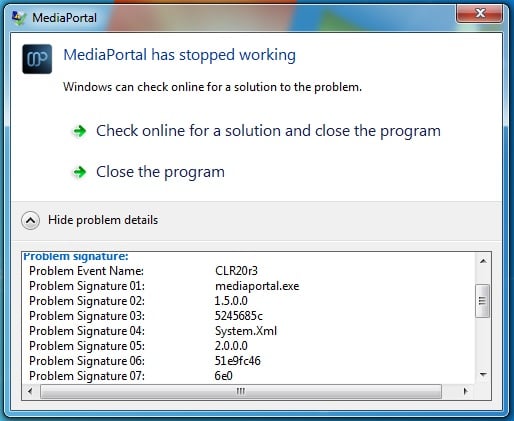
I get this error every time I start Mediaportal - without fail. The full error can be seen in the screenshot attached. If I close the error window (using the red cross in the corner, not the 'OK' button) then MP continues to work just fine, but every time I restart it comes back - annoying. This behaviour started with all versions of MP 1.4, and has continued all the way through all versions since (including the v1.5 final release).
I have attached logs. Method of collecting logs was to (i) close MP, (ii) delete all files in the MP Logs folder, (iii) start MP (error occurs), (iv) close MP, (v) collect newly generated logs.
Hope someone can help.
Cheers, Rich
I get this error every time I start Mediaportal - without fail. The full error can be seen in the screenshot attached. If I close the error window (using the red cross in the corner, not the 'OK' button) then MP continues to work just fine, but every time I restart it comes back - annoying. This behaviour started with all versions of MP 1.4, and has continued all the way through all versions since (including the v1.5 final release).
I have attached logs. Method of collecting logs was to (i) close MP, (ii) delete all files in the MP Logs folder, (iii) start MP (error occurs), (iv) close MP, (v) collect newly generated logs.
Hope someone can help.
Cheers, Rich