- August 13, 2008
- 10
- 0
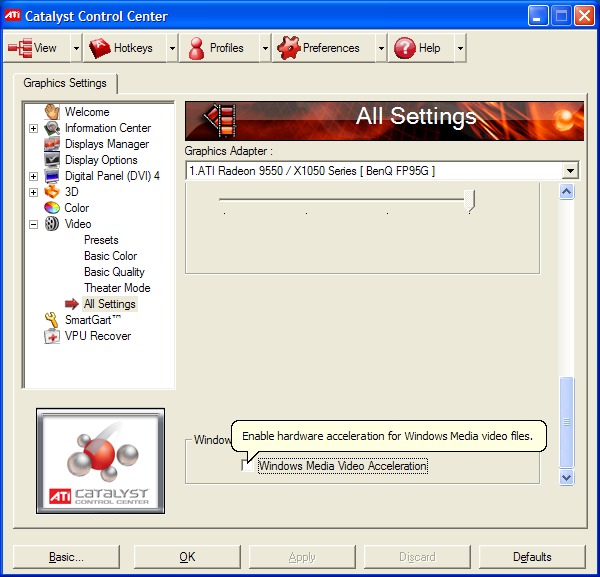
short version: i disabled "windows media video acceleration" on ati's catalyst control center.
longer version: i formatted my hdd and installed winxpsp3 shortly after it became available, then ati drivers, later cccp, and finally wmf11.
wmv files played on mportal.
i didnt play wmv files often because they looked like crap, i didnt know that vlc didnt use the same powerfull postprocessing directshow players used on wmv files.
recently i downloaded an obscene amount of wmv files and i noticed the difference it made wether i used vlc or a directshow wmv decoder; strangely enough pp was disabled in mpclassic and enabled on mplayer2 6.4. ;mportal played only audio on those wmv.
i blocked wmv dmo on mpclassic and then it used the other wmv video decoder with pp enabled.
then i lowered the merit of the wmv dmo directshow filters, but mportal didnt play the wmv.
the mportal test tool showed that mportal still used the dmo filters, giving me a black screen.
then i remembered that wmv otion on catalist drivers, i unchecked it and wmv played again on mportal.
i bashed my head against the table and i felt asleep.
i cant tell if wmv worked with that option enabled back in the day, so i dont know if something borked that option or if it never worked and i enabled it without testing mportal aferwards.
well, now it works, even skippin 15 seconds without distortion, like with avi files.
longer version: i formatted my hdd and installed winxpsp3 shortly after it became available, then ati drivers, later cccp, and finally wmf11.
wmv files played on mportal.
i didnt play wmv files often because they looked like crap, i didnt know that vlc didnt use the same powerfull postprocessing directshow players used on wmv files.
recently i downloaded an obscene amount of wmv files and i noticed the difference it made wether i used vlc or a directshow wmv decoder; strangely enough pp was disabled in mpclassic and enabled on mplayer2 6.4. ;mportal played only audio on those wmv.
i blocked wmv dmo on mpclassic and then it used the other wmv video decoder with pp enabled.
then i lowered the merit of the wmv dmo directshow filters, but mportal didnt play the wmv.
the mportal test tool showed that mportal still used the dmo filters, giving me a black screen.
then i remembered that wmv otion on catalist drivers, i unchecked it and wmv played again on mportal.
i bashed my head against the table and i felt asleep.
i cant tell if wmv worked with that option enabled back in the day, so i dont know if something borked that option or if it never worked and i enabled it without testing mportal aferwards.
well, now it works, even skippin 15 seconds without distortion, like with avi files.