United States of America
MediaPortal Version: 1.2.2
MediaPortal Skin: Black Glass HD
Windows Version: Windows 7 32-Bit Home Premium SP1
CPU Type: Intel Core 2 Duo E6750
HDD: Intel 320 SSD 80GB System, WD 1TB Caviar Black Storage
Memory: 4GB DDR3
Motherboard: MSI G41M-P23
Video Card: EVGA Geforce GT 430
Video Card Driver: 8.17.12.8562
1. TV Card: Haupauge Win-TV HVR 2250
2. TV Card: DVICO FusionHDTV7 RT Gold
MPEG2 Video Codec: LAV 0.44
MPEG2 Audio Codec: LAV 0.44
h.264 Video Codec: LAV 0.44 with CUDA
HTPC Case: Foxconn DH-153C
Cooling: A very cold apartment
Power Supply: 300W
Remote: Hauppauge MCE Remote
TV - HTPC Connection: HDMI 1.4
I'm having a problem playing videos. I can play any kind of video file on my hard drive but I sometimes get a strange bug when playing videos on the internet.
I've been using the Online Videos plugin to play videos from the internet. Most videos will play fine but once in a while I try to play a video which will give me this bug: The sound plays but there is no picture. But here's where it gets strange: Any video I try to play after that, online or from my hard drive, even if I could play it well before, will give me the same bug. I have to exit and restart MP to fix the problem.
I have identified a handful of these internet videos which cause the problem every time I try to play them, but here's where it gets even stranger: If I download those videos to my hard drive then they will play fine.
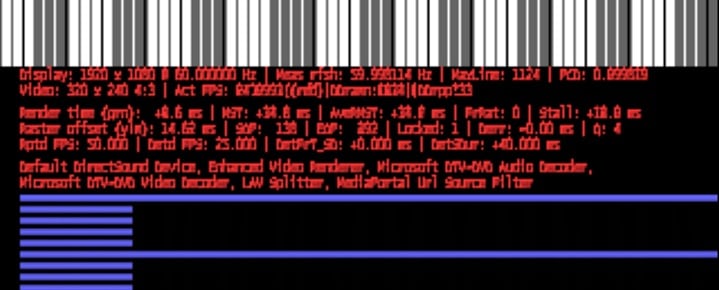
I did some troubleshooting, checked my logs, etc. I think I found something of note: When I played one of the internet videos which gave me the bug, I pressed Shift+1 and read the information. It said that it's using the Microsoft DTV-DVD Audio and Video Decoders to play the file. These same decoders are also mentioned in the log files. Now, I'm no expert on codecs, but even I know that this is the wrong codec to be using for an internet .flv video.
And this is where it gets even stranger: I have MP Config set up to use the LAV codecs for absolutely everything. There is no reason MP should be using the Microsoft DTV-DVD decoders for anything at all.
I reproduced the bug so that I could get the right logs, posted below. Here are the exact steps I took:
- Started MP, went to OnlineVideos.
- Played one of the videos which gives me the bug (Sound but no picture). During playback I pressed Shift+1 and took the screenshot.
- Exited OnlineVideos and went to Videos.
- Tried to play a video from my collection (Doom MP4.mp4) and still had no picture.
- Exited MP.
While "Doom MP4.mp4" was playing I pressed Shift+1 and it said the LAV codecs were in use, not the Microsoft DTV-DVD codecs.
By the way, I can't get Watchdog to work so I can't gather logs that way. I included the logs which I thought were relevant but if I'm missing something then please let me know and I will do what I can to find and post it.
MediaPortal Skin: Black Glass HD
Windows Version: Windows 7 32-Bit Home Premium SP1
CPU Type: Intel Core 2 Duo E6750
HDD: Intel 320 SSD 80GB System, WD 1TB Caviar Black Storage
Memory: 4GB DDR3
Motherboard: MSI G41M-P23
Video Card: EVGA Geforce GT 430
Video Card Driver: 8.17.12.8562
1. TV Card: Haupauge Win-TV HVR 2250
2. TV Card: DVICO FusionHDTV7 RT Gold
MPEG2 Video Codec: LAV 0.44
MPEG2 Audio Codec: LAV 0.44
h.264 Video Codec: LAV 0.44 with CUDA
HTPC Case: Foxconn DH-153C
Cooling: A very cold apartment
Power Supply: 300W
Remote: Hauppauge MCE Remote
TV - HTPC Connection: HDMI 1.4
I'm having a problem playing videos. I can play any kind of video file on my hard drive but I sometimes get a strange bug when playing videos on the internet.
I've been using the Online Videos plugin to play videos from the internet. Most videos will play fine but once in a while I try to play a video which will give me this bug: The sound plays but there is no picture. But here's where it gets strange: Any video I try to play after that, online or from my hard drive, even if I could play it well before, will give me the same bug. I have to exit and restart MP to fix the problem.
I have identified a handful of these internet videos which cause the problem every time I try to play them, but here's where it gets even stranger: If I download those videos to my hard drive then they will play fine.
I did some troubleshooting, checked my logs, etc. I think I found something of note: When I played one of the internet videos which gave me the bug, I pressed Shift+1 and read the information. It said that it's using the Microsoft DTV-DVD Audio and Video Decoders to play the file. These same decoders are also mentioned in the log files. Now, I'm no expert on codecs, but even I know that this is the wrong codec to be using for an internet .flv video.
And this is where it gets even stranger: I have MP Config set up to use the LAV codecs for absolutely everything. There is no reason MP should be using the Microsoft DTV-DVD decoders for anything at all.
I reproduced the bug so that I could get the right logs, posted below. Here are the exact steps I took:
- Started MP, went to OnlineVideos.
- Played one of the videos which gives me the bug (Sound but no picture). During playback I pressed Shift+1 and took the screenshot.
- Exited OnlineVideos and went to Videos.
- Tried to play a video from my collection (Doom MP4.mp4) and still had no picture.
- Exited MP.
While "Doom MP4.mp4" was playing I pressed Shift+1 and it said the LAV codecs were in use, not the Microsoft DTV-DVD codecs.
By the way, I can't get Watchdog to work so I can't gather logs that way. I included the logs which I thought were relevant but if I'm missing something then please let me know and I will do what I can to find and post it.