
starting up tv on single seat (1 Viewer)

M

Mr-MarQuez

Guest
TV-Server Version: MP 1.0
MediaPortal Version: MP 1.0
MediaPortal Skin: Aeon Wide
Windows Version: Vista sp1
CPU Type: MD Athlon X2 4850e (2x2,5 GHz)
HDD: Samsung Spinpoint F1 HD103UJ 1TB
Memory: 2GB
Motherboard: Gigabyte GA-MA78GPM-DS2H
Video Card: ATi HD 3200 onboard
Video Card Driver: ccc 8.9
1. TV Card: FloppyDTV
1. TV Card Type: DVB-C
MPEG2 Video Codec: microsoft MPEG 2
MPEG2 Audio Codec: AC3 FILTER
h.264 Video Codec: Cyberlink PDVD 8.0.1
Satelite/CableTV Provider: Ziggo
Remote: MCE
TV: SONY 26 inch
TV - HTPC Connection: HDMI


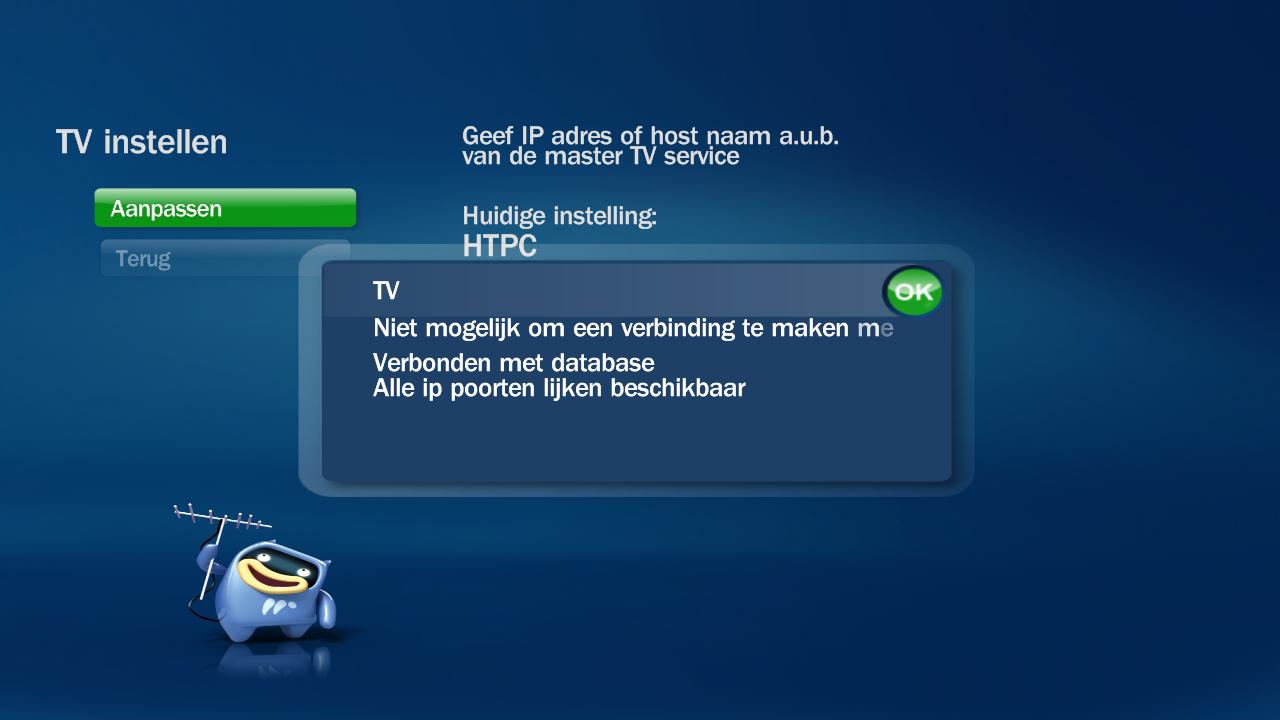
when i startup my pc i can watch tv, but when i want exit mp to change something in config of mp and than startup mp again everything works fine but i can't watch tv and get the following message (see img). i need to restart the pc to get it working again. before mp 1.0 i had installed rc 2 and 3 and they have functioned perfect and never got this message. so after installing mp 1.0 i got this problem.
does somebody know whats going wrong?
 

Attachments

  • server.jpg
    server.jpg
    51.9 KB

Paranoid Delusion

Moderation Manager
  • Premium Supporter
  • June 13, 2005
    13,052
    2,978
    Cheshire
    Home Country
    United Kingdom United Kingdom
    Check a few things first, ie sqlbrowser\tvservice are both running and can you preview tv with server config\channels.

    If all above seems fine then go to MP config\Television\client and change name to localhost or 127.0.0.1 (same thing), does that now fix things.

    Regards
     
    M

    Mr-MarQuez

    Guest
    thanks for the quick reply, but when i set it to localhost or 127.0.0.1 it give me the message that the connection with the tv server is lost. when i restart pc it gives me the same message so that doesn't work for me.

    sqlbrowser and tvservice are both running, but when i select a channel i get no preview and get the message: preview failed: NoVideoAudioDetected.
     

    Paranoid Delusion

    Moderation Manager
  • Premium Supporter
  • June 13, 2005
    13,052
    2,978
    Cheshire
    Home Country
    United Kingdom United Kingdom
    https://forum.team-mediaportal.com/...ack-device-singleseat-users-51028/#post348973

    Maybe just the network disconnects, if so try above and see if TV continuously works, mine started doing this over Xmas, suspect a M$ update may be at fault for mssql, because it seemed to appear after about 10 security updates were installed in one night, and the problem arose the very next day, using the M$ loopback Device myself and since had no problems.

    One setting that i had not put in above post, is open device manager, select M$ Loopback Device, properties\advanced, set connection ethernet and address to the same one you have chosen ie 192.168.2.1

    Regards
     
    M

    Mr-MarQuez

    Guest
    oke, but you don't need a network connection because it's a single seat? the server and client are on the same pc so they don't have to contact the network to make a connection. or am i wrong at this point?

    i will try the fix you said later on this evening.
     

    Paranoid Delusion

    Moderation Manager
  • Premium Supporter
  • June 13, 2005
    13,052
    2,978
    Cheshire
    Home Country
    United Kingdom United Kingdom
    oke, but you don't need a network connection because it's a single seat? the server and client are on the same pc so they don't have to contact the network to make a connection. or am i wrong at this point?

    MSSQL is all about networking, whether 1 pc or 100, that's the only downside, especially if like me your wireless, or have a router\modem that may get switched off, or even Windows device manager allows a network device to go to sleep when idle (check it does not, especially with Vista as its more power conscious than xp).
     
    M

    Mr-MarQuez

    Guest
    oke i didn't know that, i have no experience with mssql.

    i did the steps you mentioned in the other post but now i always get the message that the connection with te tv server is lost. when i restart my pc everything is fine again but when i close mp en than restart it it give me again that message.

    edit: now i also get after i restart the message that the connection is lost. so tv isn't working any more.

    when i'm in SQL Server management studio express i see also a database MpTvDbRC2 could this maby be al problem?

    edit2: i now changed the settings back to how it was before, and still get the message of the first post.
    but when i go to my second pc and startup the tv it works just fine.:confused:
     

    Paranoid Delusion

    Moderation Manager
  • Premium Supporter
  • June 13, 2005
    13,052
    2,978
    Cheshire
    Home Country
    United Kingdom United Kingdom
    when i'm in SQL Server management studio express i see also a database MpTvDbRC2 could this maby be al problem?

    Can you access the above database when you lose your TV connection with SQL Server Management studio express, if you can then it shows that part is fine.

    This is only happening with MP after it has shutdown, wondering if it has anything to do with the powerscheduler client plugin, please check it is enabled and setup as per here TV-Server/Configuration/Plugins/PowerScheduler - MediaPortal Manual Documentation
    Lower part of page.

    Just for information, if inaccessible from one pc, can you access TV from the other pc without rebooting or restarting TVServer.
    Are you on a wired or wireless network, all my problems have been down to my wireless network dropping out, approx 1 time a day or more.
     
    M

    Mr-MarQuez

    Guest
    when i shutdown mp and restart it the tv is not working i can acces the database with SQL Server Management studio express. also when i go to my other pc i can connect and watch tv without a problem, no restart of tv server or pc is needed. i have a wired gigabit network.

    i will check the settings of powerschedule but in the past this gave me no problem and the settings are the same as on previous installs

    thnx

    edit: the powerschedule plugin wasn't enabled yet.
     

    Users who are viewing this thread

    Top Bottom