TBS 6985 No Singal (1 Viewer)

mm1352000

Retired Team Member
  • Premium Supporter
  • September 1, 2008
    21,544
    8,236
    Home Country
    New Zealand New Zealand
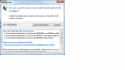
    Attached are the progress made, I am not sure of what to do next to view the Live TV
    Seems like all you may need to do is open MediaPortal, go to the TV section, and select the channel you want to view.
     

    e123enitan

    New Member
    December 16, 2014
    16
    0
    47
    Home Country
    Canada Canada
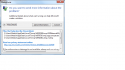
    Attached are the progress made, I am not sure of what to do next to view the Live TV
    Seems like all you may need to do is open MediaPortal, go to the TV section, and select the channel you want to view.
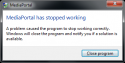
    MP crashed each time I lunched it
    It went through these stages
    • Loading windows plugins,
    • Initial windows manager
    • Loading plugins
    • then crashed
    • upload_2014-12-18_19-35-31.png
    upload_2014-12-18_19-33-53.png
     

    Attachments

    • upload_2014-12-18_19-22-38.png
      upload_2014-12-18_19-22-38.png
      39 KB

    e123enitan

    New Member
    December 16, 2014
    16
    0
    47
    Home Country
    Canada Canada

    mm1352000

    Retired Team Member
  • Premium Supporter
  • September 1, 2008
    21,544
    8,236
    Home Country
    New Zealand New Zealand
    Thanks.
    From the dxdiag info included with the log files I think the video card (GPU) connected to your PC is not compatible with MediaPortal. To run MediaPortal a PC must have a GPU that supports at least DirectX 9c. Your PC's GPU - an NVidia Quadro NVS 285 - is very old now. I wasn't able to confirm 100%, but a quick google suggests that it was released in 2006 and only supports DirectX 8... or only certain DirectX 9 features.

    Additionally, it looks like the PC doesn't have a sound card. You're not going to be able to hear live TV sound without that... and I doubt the live TV picture would even display smoothly without a sound card.

    So, in short you need a better GPU and a sound card if you want to run MediaPortal.
     

    mm1352000

    Retired Team Member
  • Premium Supporter
  • September 1, 2008
    21,544
    8,236
    Home Country
    New Zealand New Zealand
    In regards to the crash, the Windows application event log is clear:
    [collapse]
    "12/18/2014 10:59:33 PM";".NET Runtime";"(0)";"Error";"Application: MediaPortal.exe
    Framework Version: v4.0.30319
    Description: The process was terminated due to an unhandled exception.
    Exception Info: System.AccessViolationException
    Stack:
    at Microsoft.DirectX.Direct3D.Device.PresentInternal(Microsoft.DirectX.PrivateImplementationDetails.tagRECT*, Microsoft.DirectX.PrivateImplementationDetails.tagRECT*, IntPtr)
    at Microsoft.DirectX.Direct3D.Device.Present()
    at MediaPortalApp.Render(Single)
    at MediaPortal.D3D.FullRender()
    at MediaPortal.D3D.OnIdle(System.Object, System.EventArgs)
    at System.Windows.Forms.Application+ThreadContext.System.Windows.Forms.UnsafeNativeMethods.IMsoComponent.FDoIdle(Int32)
    at System.Windows.Forms.Application+ComponentManager.System.Windows.Forms.UnsafeNativeMethods.IMsoComponentManager.FPushMessageLoop(IntPtr, Int32, Int32)
    at System.Windows.Forms.Application+ThreadContext.RunMessageLoopInner(Int32, System.Windows.Forms.ApplicationContext)
    at System.Windows.Forms.Application+ThreadContext.RunMessageLoop(Int32, System.Windows.Forms.ApplicationContext)
    at System.Windows.Forms.Application.Run(System.Windows.Forms.Form)
    at MediaPortalApp.Main(System.String[])
    ";"1026"
    "12/18/2014 10:59:35 PM";"Application Error";"Application Crashing Events";"Error";"Faulting application name: MediaPortal.exe, version: 1.8.0.0, time stamp: 0x53a6f5af Faulting module name: nvd3dum.dll, version: 8.15.11.8593, time stamp: 0x4a5be115 Exception code: 0xc0000005 Fault offset: 0x0029db98 Faulting process id: 0xbec Faulting application start time: 0x01d01b5950ce0400 Faulting application path: C:\Program Files (x86)\Team MediaPortal\MediaPortal\MediaPortal.exe Faulting module path: C:\Windows\system32\nvd3dum.dll Report Id: 969d8a01-874c-11e4-99c0-14feb5e2e47b";"1000"
    "12/18/2014 11:00:00 PM";"Windows Error Reporting";"(0)";"Information";"Fault bucket 505973342, type 17 Event Name: APPCRASH Response: Not available Cab Id: 0 Problem signature: P1: MediaPortal.exe P2: 1.8.0.0 P3: 53a6f5af P4: nvd3dum.dll P5: 8.15.11.8593 P6: 4a5be115 P7: c0000005 P8: 0029db98 P9: P10: Attached files: C:\Users\Media\AppData\Local\Temp\WERC748.tmp.WERInternalMetadata.xml These files may be available here: C:\Users\Media\AppData\Local\Microsoft\Windows\WER\ReportArchive\AppCrash_MediaPortal.exe_c7cdc31ad7b101e15197318b368aa9916375c4c_13e82907 Analysis symbol: Rechecking for solution: 0 Report Id: 969d8a01-874c-11e4-99c0-14feb5e2e47b Report Status: 0";"1001"
    [/collapse]

    The faulting module is nvd3dum.dll, which is part of the NVidia driver for your GPU.
    You could try to upgrade the GPU driver if a newer version is available... but ultimately I doubt it will help.
     

    mm1352000

    Retired Team Member
  • Premium Supporter
  • September 1, 2008
    21,544
    8,236
    Home Country
    New Zealand New Zealand

    Users who are viewing this thread

    Top Bottom