- January 3, 2008
- 683
- 54
- Home Country
-
 Germany
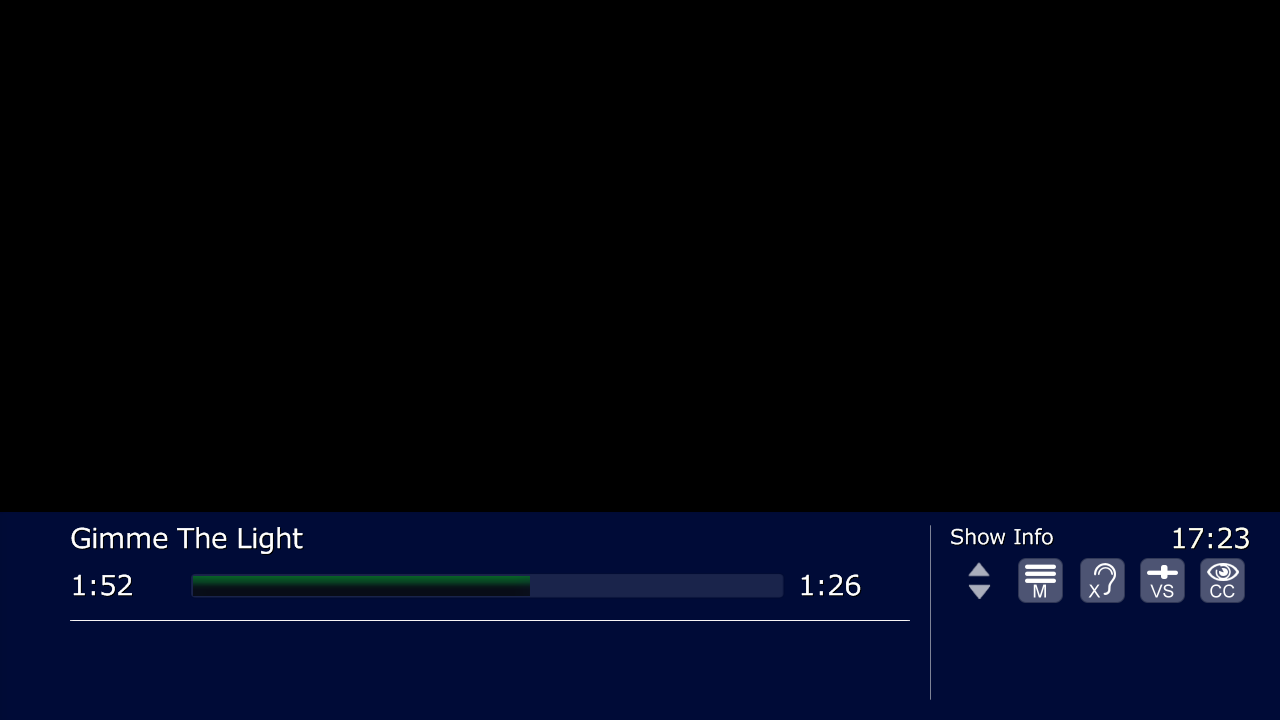
When you select the internal dshow Player in the Music Section, the Red Button jump to the wrong NowPlaying Screen. It Jumps to the Videio Screen.
1. Select the internal dshow Engine
2. Play a Song in Mediaportal
3. Put the red Button on the Remote
>>You see black Screen and when you put the Info button, you see that it is the Video-Screen.
I can't use the bass engine, because it stopped Playing when I switch of the TV and will listen to the song over the AVR without the TV. I have connected the TV with the AVR and the PC over HDMI. When I use the internal dshow Engine it works fine.
MediaPortal Version: 1.2.0 RC
MediaPortal Skin: StreamedMP
Windows Version: Windows 7 Home
CPU Type: Intel® Atom™ 330 1.6GHz (Dual core)
HDD: 2.5” HDD 320GB
Memory: 2GB DDR2 800 MHz memory
Motherboard:
Video Card: NVIDIA® ION™ graphics
Video Card Driver: 260.99
Sound Card: onboard
Sound Card AC3: HDMI
Sound Card Driver:
1. TV Card: Digital Everywhere, FireDTV
1. TV Card Type: DVB-S
1. TV Card Driver: 5.7
2. TV Card:
2. TV Card Type:
2. TV Card Driver:
3. TV Card:
3. TV Card Type:
3. TV Card Driver:
4. TV Card:
4. TV Card Type:
4. TV Card Driver:
MPEG2 Video Codec: Microsoft DTV
MPEG2 Audio Codec: Microsoft DTV
h.264 Video Codec: Microsoft DTV
Satelite/CableTV Provider: Astra 19,2°E
HTPC Case:
Cooling:
Power Supply:
Remote:
TV: Lg 42SL9500
TV - HTPC Connection: HDMI
1. Select the internal dshow Engine
2. Play a Song in Mediaportal
3. Put the red Button on the Remote
>>You see black Screen and when you put the Info button, you see that it is the Video-Screen.
I can't use the bass engine, because it stopped Playing when I switch of the TV and will listen to the song over the AVR without the TV. I have connected the TV with the AVR and the PC over HDMI. When I use the internal dshow Engine it works fine.
MediaPortal Version: 1.2.0 RC
MediaPortal Skin: StreamedMP
Windows Version: Windows 7 Home
CPU Type: Intel® Atom™ 330 1.6GHz (Dual core)
HDD: 2.5” HDD 320GB
Memory: 2GB DDR2 800 MHz memory
Motherboard:
Video Card: NVIDIA® ION™ graphics
Video Card Driver: 260.99
Sound Card: onboard
Sound Card AC3: HDMI
Sound Card Driver:
1. TV Card: Digital Everywhere, FireDTV
1. TV Card Type: DVB-S
1. TV Card Driver: 5.7
2. TV Card:
2. TV Card Type:
2. TV Card Driver:
3. TV Card:
3. TV Card Type:
3. TV Card Driver:
4. TV Card:
4. TV Card Type:
4. TV Card Driver:
MPEG2 Video Codec: Microsoft DTV
MPEG2 Audio Codec: Microsoft DTV
h.264 Video Codec: Microsoft DTV
Satelite/CableTV Provider: Astra 19,2°E
HTPC Case:
Cooling:
Power Supply:
Remote:
TV: Lg 42SL9500
TV - HTPC Connection: HDMI