
The Weird Menu Action in MP (1 Viewer)

TE5LA

Portal Pro
September 16, 2009
82
0
Home Country
United States of America United States of America
I have tried about every media center app I can get my hands on and I still like MP the most. However, there is one issue that really bugs me. When you first start it, the menu isn't selected. You have to move the mouse over the menu and it starts scrolling out of control until you click, then you can use the keyboard to scroll. I find the mouse is a really poor device to control apps like this. The keyboard or remote is much better. In Boxee, you can disable the mouse so this isn't an issue.

Is there a way to disable the mouse in MP? Is this behavior just inherit in MP or are there skins that don't have this problem?
 

mm1352000

Retired Team Member
  • Premium Supporter
  • September 1, 2008
    21,544
    8,236
    Home Country
    New Zealand New Zealand
    Hi TE5LA

    I don't know of any way to disable the mouse. The speed of the menu rotation is in proportion with the distance of the mouse from the center of the menu. If you really don't like this then you could try using "basic home":

    1. Open MP configuration.
    2. Go to the "GUI" section.
    3. In the "home screen" selection field at the very bottom of those options select "only basic home".

    mm
     

    TE5LA

    Portal Pro
    September 16, 2009
    82
    0
    Home Country
    United States of America United States of America
    Hi TE5LA

    I don't know of any way to disable the mouse. The speed of the menu rotation is in proportion with the distance of the mouse from the center of the menu. If you really don't like this then you could try using "basic home":

    1. Open MP configuration.
    2. Go to the "GUI" section.
    3. In the "home screen" selection field at the very bottom of those options select "only basic home".

    mm
    Yeah, but I really hate the Basic Home menu of most skins. I like vertical text menus. They are the best for every listing IMO. I don't even understand why the other layout views in plugins like Moving Pictures are there. Maybe some people use them but I find a text list much easier to navigate. I can see more than one title at a time rather than having to scroll covers.

    Unless the menu thing is fixed, I'm afraid I'll never view MP as truly polished.
     

    mm1352000

    Retired Team Member
  • Premium Supporter
  • September 1, 2008
    21,544
    8,236
    Home Country
    New Zealand New Zealand
    Hi again

    Unless the menu thing is fixed, I'm afraid I'll never view MP as truly polished.
    Which skin are you actually using? I've just tested, and in the default skin you don't have to select or activate the list with the mouse to start scrolling in it. I just use the keyboard arrow keys and the menu moves up/down by one item at a time no matter where the mouse is. Even if the menu is scrolling at max speed, if I hit the up or down key it stops scrolling immediately and the keyboard takes control of navigation. Even if the mouse is positioned over the menu.

    So in short: this might be skin specific, because I can't reproduce the problem.

    mm
     

    TE5LA

    Portal Pro
    September 16, 2009
    82
    0
    Home Country
    United States of America United States of America
    Perhaps. I have used StreamedMP, aMPed, Avalon, PureVisionHD Horizon, and Reflex. All the skins I can recall exhibited this behavior. I'll try the default ones.

    {EDIT}

    I just tried it with Default Wide and it does the same thing. There is no way for me to use the keyboard until I click the mouse. Could there be another setting causing this or perhaps it's system dependent?

    Another oddity I've noticed: In Default Wide and StreamedMP, the main menu has a highlight bar over the selected item, but this is always on the bottom of the list. There are five menu items viewable at a time in Default Wide. Shouldn't the selected item be in the center? Seems odd that it would be designed to be on the bottom.
     
    Last edited:

    TE5LA

    Portal Pro
    September 16, 2009
    82
    0
    Home Country
    United States of America United States of America
    I have found that checking the option "Keep MediaPortal always on top" seems to fix this most of the time. The problem with this is I can't tab out of MP and use Windows.
     

    mm1352000

    Retired Team Member
  • Premium Supporter
  • September 1, 2008
    21,544
    8,236
    Home Country
    New Zealand New Zealand
    I don't have that option enabled - all I have there is "Turn monitor / tv on when resuming from standby" and "Allow S3 standby although wake up devices are present".

    I use MP in windowed mode by default and I just don't have this problem...

    [Edit: ...unless you are talking about when the MP window is not focussed? In that case I have to activate the window and then the previously described behaviour applies. Is that what you mean?]
     
    Last edited:

    TE5LA

    Portal Pro
    September 16, 2009
    82
    0
    Home Country
    United States of America United States of America
    [Edit: ...unless you are talking about when the MP window is not focussed? In that case I have to activate the window and then the previously described behaviour applies. Is that what you mean?]

    Yes, that must be what it is because I have to click the mouse on the screen, but I am running in full screen mode so it should be the focus anyway.
     

    mm1352000

    Retired Team Member
  • Premium Supporter
  • September 1, 2008
    21,544
    8,236
    Home Country
    New Zealand New Zealand
    I just tried it with Default Wide and it does the same thing. There is no way for me to use the keyboard until I click the mouse. Could there be another setting causing this or perhaps it's system dependent?
    The focussed window receives the keyboard input. This is standard behaviour on Windows.

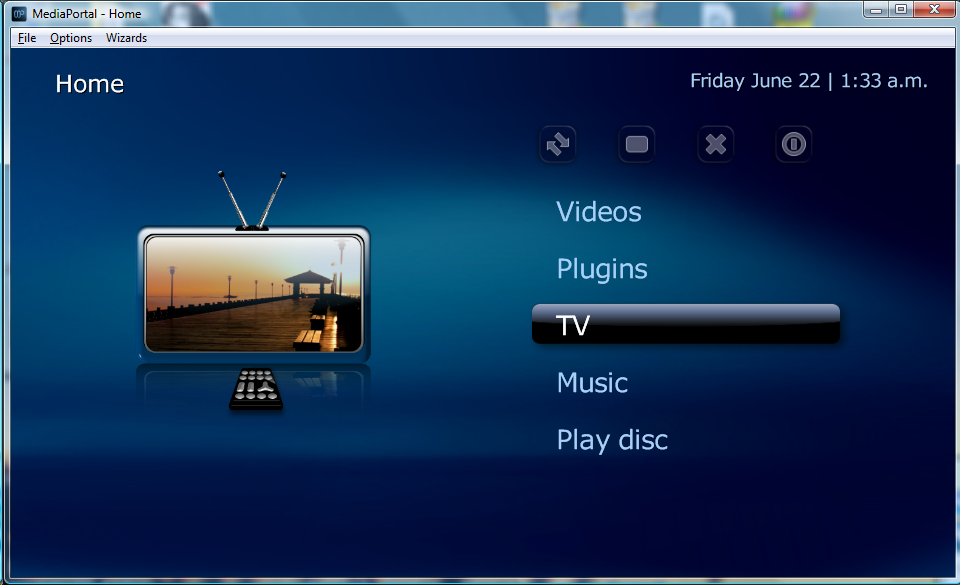
    Another oddity I've noticed: In Default Wide and StreamedMP, the main menu has a highlight bar over the selected item, but this is always on the bottom of the list. There are five menu items viewable at a time in Default Wide. Shouldn't the selected item be in the center? Seems odd that it would be designed to be on the bottom.
    Something is wrong there - the focussed item *should* be the center item as per the attached screenshot.

    [Edit: ...unless you are talking about when the MP window is not focussed? In that case I have to activate the window and then the previously described behaviour applies. Is that what you mean?]

    Yes, that must be what it is because I have to click the mouse on the screen, but I am running in full screen mode so it should be the focus anyway.
    As above - the focussed window gets the keyboard input. How are you tabbing in and out of Windows? Is it possible that something running in your taskbar is stealing focus?

    mm
     

    Attachments

    • 1.png
      1.png
      276.3 KB

    TE5LA

    Portal Pro
    September 16, 2009
    82
    0
    Home Country
    United States of America United States of America
    The focussed window receives the keyboard input. This is standard behaviour on Windows.

    Well, I'm running MP full screen, even the task bar is hidden, but it isn't focused.

    mm1352000 said:
    Something is wrong there - the focussed item *should* be the center item as per the attached screenshot.

    This is a brand-new installation of the latest MP and skins. I completely removed all the old MP files and settings. On mine, the menu would be focused on "Play disc" in your pic.

    mm1352000 said:
    As above - the focussed window gets the keyboard input. How are you tabbing in and out of Windows? Is it possible that something running in your taskbar is stealing focus?

    No, this is how it is when MP first starts. I can actually tab out later with no problems. It is only when starting. I have run MediaPortal since 1.0.x.x and on several computers and it has always done this.

    The highlighting menu issue I recall having in some media control software and it would be corrected by running a calibration, but I'm not sure if this was in MP. I don't see anything in the settings that would affect this.
     
    Last edited:

    Users who are viewing this thread

    Top Bottom