

- October 30, 2006
- 20
- 3
- Home Country
-
 United Kingdom
Area: Media Portal Program
MediaPortal Version: 0.2.0.0 (2006-07-03)
MediaPortal Skin: BlueTwo
Windows Version: Windows XP (SP2) MCE
.NET CLR Version: 2.0.50727
DirectX Version: 4.09.00.0904 (9.0c)
Audio Codec: MPA Decoder Filter
Video Codec: MPV Decoder Filter
CPU Type: XPM2500+ (2GHz)
Memory: 1 GB
Motherboard: NF7-S (nVidia-nForce2)
TV Card Model: Blackgold
TV Card Type: DVB-T
TV Card Driver: 5.17.107.43
Video Card Model: All-in-wonder 9800 Series (omega 3.8.291) (128 MB)
Video Card Resolution: 1024x768
Audio Card Model: NVIDIA(R) nForce(TM) Audio
Synopsis::
Hi all,
MediaPortal seems great for my needs in every respect expect the aspect ratio of the TV function.
My digital TV comes via Freeview in the UK and it seems they broadcast using anamorphic widescreen. That is, broadcast the 16:9 image in a 4:3 frame and then rely on the TV to stretch it out 33% horizontally to fill a widescreen screen.
I'm using a 4:3 TV and for this process to work and give me a 16:9 picture on the 4:3 screen I would normally use 4:3 letterbox option on DVD players, Sky+ etc to ensure I see all the image, but at the correct aspect ratio.
In selecting this on MP, rather than just stretch the image horizontally it also shrinks it vertically resulting in short, wide people! (It's not far out, but it's out)
Please see the attached screenshots for a visual demonstration.
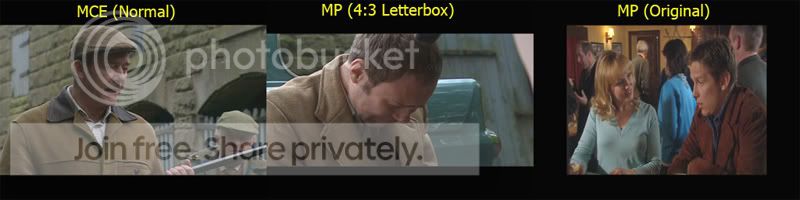
In the above shot, Windows:MCE shows the TV picture as it should, while MP clearly makes the image too small vertically. When set to 'Original' aspect ratio, MP displays the anamorphic image as received by the TV Card. This is the correct height and shows it only needs to be stretched out horizontally into the black area either side to fill the frame, and restore the correct aspect ratio.
MP shows My Videos and My DVDs fine as in the attached screenshots. This is using the 'Normal' setting aspect ratio.
'Normal' aspect ratio in My TV simply makes the 4:3 image from the TV Card full screen and therefore gives a horizontally compressed 16:9 image.
Can anyone suggest a way to fix this please? (other than get a widescreen TV!)
I hope I made my problem clear, if only by the screenshots! If not, please ask for more info. I hope someone can help as this is the only real problem I have with MP.
Cheers!
MediaPortal Version: 0.2.0.0 (2006-07-03)
MediaPortal Skin: BlueTwo
Windows Version: Windows XP (SP2) MCE
.NET CLR Version: 2.0.50727
DirectX Version: 4.09.00.0904 (9.0c)
Audio Codec: MPA Decoder Filter
Video Codec: MPV Decoder Filter
CPU Type: XPM2500+ (2GHz)
Memory: 1 GB
Motherboard: NF7-S (nVidia-nForce2)
TV Card Model: Blackgold
TV Card Type: DVB-T
TV Card Driver: 5.17.107.43
Video Card Model: All-in-wonder 9800 Series (omega 3.8.291) (128 MB)
Video Card Resolution: 1024x768
Audio Card Model: NVIDIA(R) nForce(TM) Audio
Synopsis::
Hi all,
MediaPortal seems great for my needs in every respect expect the aspect ratio of the TV function.
My digital TV comes via Freeview in the UK and it seems they broadcast using anamorphic widescreen. That is, broadcast the 16:9 image in a 4:3 frame and then rely on the TV to stretch it out 33% horizontally to fill a widescreen screen.
I'm using a 4:3 TV and for this process to work and give me a 16:9 picture on the 4:3 screen I would normally use 4:3 letterbox option on DVD players, Sky+ etc to ensure I see all the image, but at the correct aspect ratio.
In selecting this on MP, rather than just stretch the image horizontally it also shrinks it vertically resulting in short, wide people! (It's not far out, but it's out)
Please see the attached screenshots for a visual demonstration.
In the above shot, Windows:MCE shows the TV picture as it should, while MP clearly makes the image too small vertically. When set to 'Original' aspect ratio, MP displays the anamorphic image as received by the TV Card. This is the correct height and shows it only needs to be stretched out horizontally into the black area either side to fill the frame, and restore the correct aspect ratio.
MP shows My Videos and My DVDs fine as in the attached screenshots. This is using the 'Normal' setting aspect ratio.
'Normal' aspect ratio in My TV simply makes the 4:3 image from the TV Card full screen and therefore gives a horizontally compressed 16:9 image.
Can anyone suggest a way to fix this please? (other than get a widescreen TV!)
I hope I made my problem clear, if only by the screenshots! If not, please ask for more info. I hope someone can help as this is the only real problem I have with MP.
Cheers!
