Tv control problems (new to mp) (1 Viewer)

Peter Mee

Portal Member
August 28, 2013
48
12
53
Home Country
Ireland Ireland
Migrating to mp and currently running a test system.

This evening I observed the following problematic behaviour;

A programme commenced at 9.35 but I paused at that time to delay the start
5 mins later I hit play and started watching the programme
5 mins later, I decided I wanted to record and so set up to 'record now'
An ad break arrived. With 5 mins in buffer, I hit ff x4 to skip the ads
The image froze. After about 10 seconds, I hit play. I could hear the ad break playing but the picture remained frozen.
I was forced to stop playback (and lose buffer). I restarted watching the programme live ( having missed the ad break plus a few mins at the start of the second part).
It remains to be seen if the recording has worked fully.

Would this be expected behaviour?

With my current sky system, I have no problem pausing a show to time shift, subsequently recording the show mid way through (it records programme start from buffer) and fast forwarding up to current live broadcast.

Will mp do this?

Thanks

Peter
 
Last edited:

mm1352000

Retired Team Member
  • Premium Supporter
  • September 1, 2008
    21,544
    8,236
    Home Country
    New Zealand New Zealand
    5 mins later, I decided I wanted to record and so set up to 'record now'
    With MP this will record from the live point at the time you hit record. It won't capture the buffer. In other words, your recording has missed the start of the program.


    An ad break arrived. With 5 mins in buffer, I hit ff x4 to skip the ads

    The image froze. After about 10 seconds, I hit play. I could hear the ad break playing but the picture remained frozen.
    Sounds like a codec issue... but without log files we're not really able to make educated comments.
    I note that using skip steps would be a more reliable way to skip the ad break.

    It remains to be seen if the recording has worked fully.
    The recording will have worked in the sense that it will have recorded from the time you select "record now" until the time you stop the recording or the program ends (depending on which "record now" option you selected).


    Would this be expected behaviour?
    As per my comments above.
     

    Peter Mee

    Portal Member
    August 28, 2013
    48
    12
    53
    Home Country
    Ireland Ireland
    Many thanks for the rapid response.

    The programme did indeed commence recording from that point. Is full programme recording (including from programme start to record point, providing content is buffered) on the roadmap or at least an active feature request?

    I'll look into skip steps and see what that's all about. Many thanks.

    Peter
     
    Last edited:

    mm1352000

    Retired Team Member
  • Premium Supporter
  • September 1, 2008
    21,544
    8,236
    Home Country
    New Zealand New Zealand
    Many thank for the rapid respon.
    You're welcome. :)


    The programme did indeed commence recording from that point. Is full programme recording (including from programme start to record point, providing content is buffered) on the roadmap or at least an active feature request?
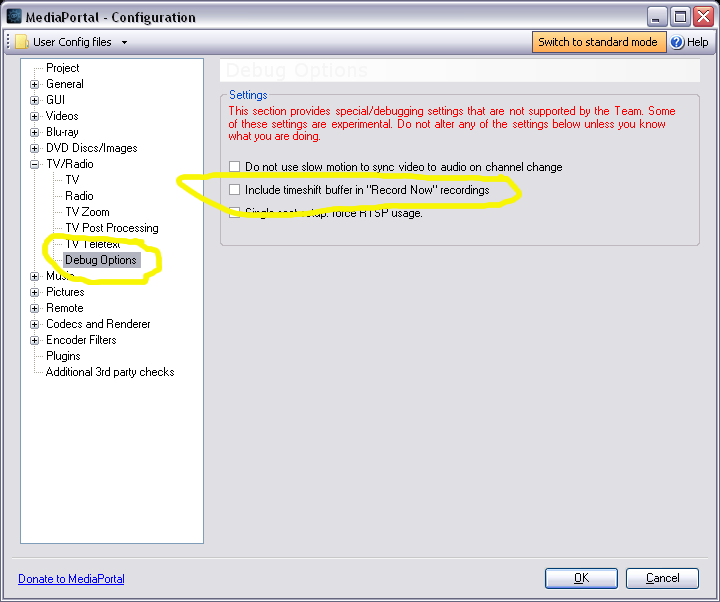
    It has certainly been requested many times, but it's quite complex to implement. There is actually a debug option but I have no idea if it still or ever did work nicely. See the attached screenshot. To get access to those options, start MediaPortal configuration with the /DebugOptions switch:
    http://wiki.team-mediaportal.com/1_MEDIAPORTAL_1/15_Customization/003_Startup/1_Command_Line_Options

    For background:
    https://forum.team-mediaportal.com/...already-watched-ts-buffer-to-recording.71001/
    https://forum.team-mediaportal.com/threads/step-2-add-already-watched-ts-buffer-to-recording.81937/
     

    Attachments

    • 1.png
      1.png
      1.7 MB

    Peter Mee

    Portal Member
    August 28, 2013
    48
    12
    53
    Home Country
    Ireland Ireland
    Excellent

    And I changed my video codecs from lav to ms and repeated the above steps. FF worked perfectly while time shifting and recording so it seems that the image freeze problem was indeed codec related.

    Thanks again. Loving mp so far!
     

    mm1352000

    Retired Team Member
  • Premium Supporter
  • September 1, 2008
    21,544
    8,236
    Home Country
    New Zealand New Zealand
    And I changed my video codecs from lav to ms and repeated the above steps. FF worked perfectly while time shifting and recording so it seems that the image freeze problem was indeed codec related.
    @Owlsroost I think there are known issues with certain combinations of container, splitter, codec, and renderers. Do you know what the limitations are with LAV?
     

    Owlsroost

    Retired Team Member
  • Premium Supporter
  • October 28, 2008
    5,539
    5,038
    Cambridge
    Home Country
    United Kingdom United Kingdom
    And I changed my video codecs from lav to ms and repeated the above steps. FF worked perfectly while time shifting and recording so it seems that the image freeze problem was indeed codec related.
    @Owlsroost I think there are known issues with certain combinations of container, splitter, codec, and renderers. Do you know what the limitations are with LAV?

    You could also add GPU type and driver versions to the list (if using DXVA).....

    If using LAV video decoder the normally the fastest (lowest CPU load) decode mode is "DXVA2(Native)", otherwise with software decoding ("None") it just tends to run out of performance at x4 and higher - see http://wiki.team-mediaportal.com/1_...rer/LAV_Configuration/LAV_Video_Configuration
     

    Users who are viewing this thread

    Top Bottom