TV Fullscreen (1 Viewer)

josch.hh

MP Donator
  • Premium Supporter
  • March 29, 2008
    476
    77
    Hamburg
    Home Country
    Germany Germany
    TV-Server Version:
    MediaPortal Version: 0.2.3
    MediaPortal Skin: Standard
    Windows Version: Win XP SP2
    CPU Type: Athlon XP 1600 MHz
    HDD: 40 GB WD
    Memory: 1GB
    Motherboard: Asus A7n8x
    Motherboard Chipset: Nvidia
    Motherboard Bios:
    Video Card: Nvidia Geforce 7600
    Video Card Driver: lastest for 7600
    Sound Card: Onboard
    Sound Card AC3: Onboard
    Sound Card Driver: lastest for Nvidia nForce
    1. TV Card: Technisat
    1. TV Card Type: Skystar2
    1. TV Card Driver: lastest from Webpage
    2. TV Card:
    2. TV Card Type:
    2. TV Card Driver:
    3. TV Card:
    3. TV Card Type:
    3. TV Card Driver:
    4. TV Card:
    4. TV Card Type:
    4. TV Card Driver:
    MPEG2 Video Codec: PowerDVD 6
    MPEG2 Audio Codec: PowerDVD 6
    Satelite/CableTV Provider:
    HTPC Case:
    Cooling: Normal
    Power Supply: 400W
    Remote:
    TV:
    TV - HTPC Connection:


    Hello,

    i am new here and i think i have a simple question (but until now i could not find it out by myself).
    I would like to start TV in fullscreen when i enter the TV module. I already set TV to autostart, but what about fullscreen from the beginning?
    Thanks for your answers.

    Josch
     

    MoPhat

    Retired Team Member
  • Premium Supporter
  • June 17, 2007
    816
    226
    Berg
    Home Country
    Switzerland Switzerland
    1. Hi its possilbe with the TVServer client/plugin - you need the TVServer, without i dont think its possible...Check the screenshot

    2. Or you youse the Autostart plugin whitch has the ability to start in the fullscreen mode.

    3. Or you use the ShortCuter plugin to go directly to the tv fullscreen section. :D


    greetz
    MoPhat
     

    Attachments

    • TV.jpg
      TV.jpg
      61.1 KB

    gibman

    Retired Team Member
  • Premium Supporter
  • October 4, 2006
    2,998
    1,372
    Usa
    Home Country
    Ethiopia Ethiopia
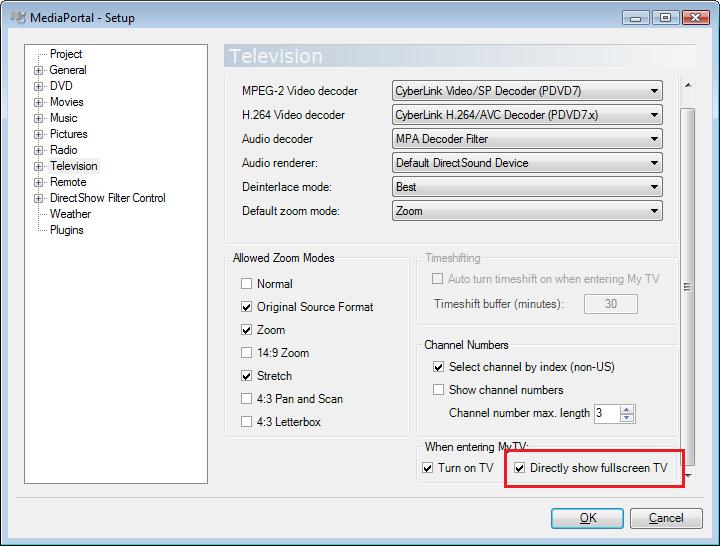
    Look in mp configuration under the tv section ;)

    when entering my TV; directly show fullscreen TV.

    /gibman
     

    josch.hh

    MP Donator
  • Premium Supporter
  • March 29, 2008
    476
    77
    Hamburg
    Home Country
    Germany Germany
    Hi,

    thanks, but i think the problem is that i don't have this option. Do i have the wrong version of MP ?
     

    josch.hh

    MP Donator
  • Premium Supporter
  • March 29, 2008
    476
    77
    Hamburg
    Home Country
    Germany Germany
    Thank you all, but TV Server does not really run on my system. Allways crashes during channel scan and if the MP client tries to start TV viewing (Yes, i have read the requirements). So that application is still to buggy for me.
    I will stick with build in TV from old MP and try to find a work-around to get fullscreen TV.
     

    josch.hh

    MP Donator
  • Premium Supporter
  • March 29, 2008
    476
    77
    Hamburg
    Home Country
    Germany Germany
    OK, but the download link you provided results in MP without buildin TV module.
    I understood that with the lastest SVN the TV Server is the responsible for TV hardware and that MP is only in streaming client for TV, or am i wrong. In my config menu after upgrading to lastest SVN are no more capture card settings. What went wrong? I can the capture card setting in your screen shot... maybe i should reinstall erverything.
     

    Spragleknas

    Moderator
  • Team MediaPortal
  • December 21, 2005
    9,471
    1,822
    Located
    Home Country
    Norway Norway
    SVN builds (found here) are patches to MP that contains TVE2 (TV engine 2), but not TVE3 (TV engine 3 aka TV server).

    If you don't otherwise need/want TVE3, a new SVN build SHOULD give you this option.

    The tab you see on the screenshot appears when selecting [Television] (highlighted in blue) - not selecting any of the sub menus (Capure card, TV channels etc.)
     

    josch.hh

    MP Donator
  • Premium Supporter
  • March 29, 2008
    476
    77
    Hamburg
    Home Country
    Germany Germany
    Thanks for all the help.
    Now it works. I did reinstall it with your lastest SVN update.
    Greate :D
     

    Users who are viewing this thread

    Top Bottom